3
7. PLC2Way 3-39
Serial Communications
Temperature Control Network/PLC2Way Table
1. Starting
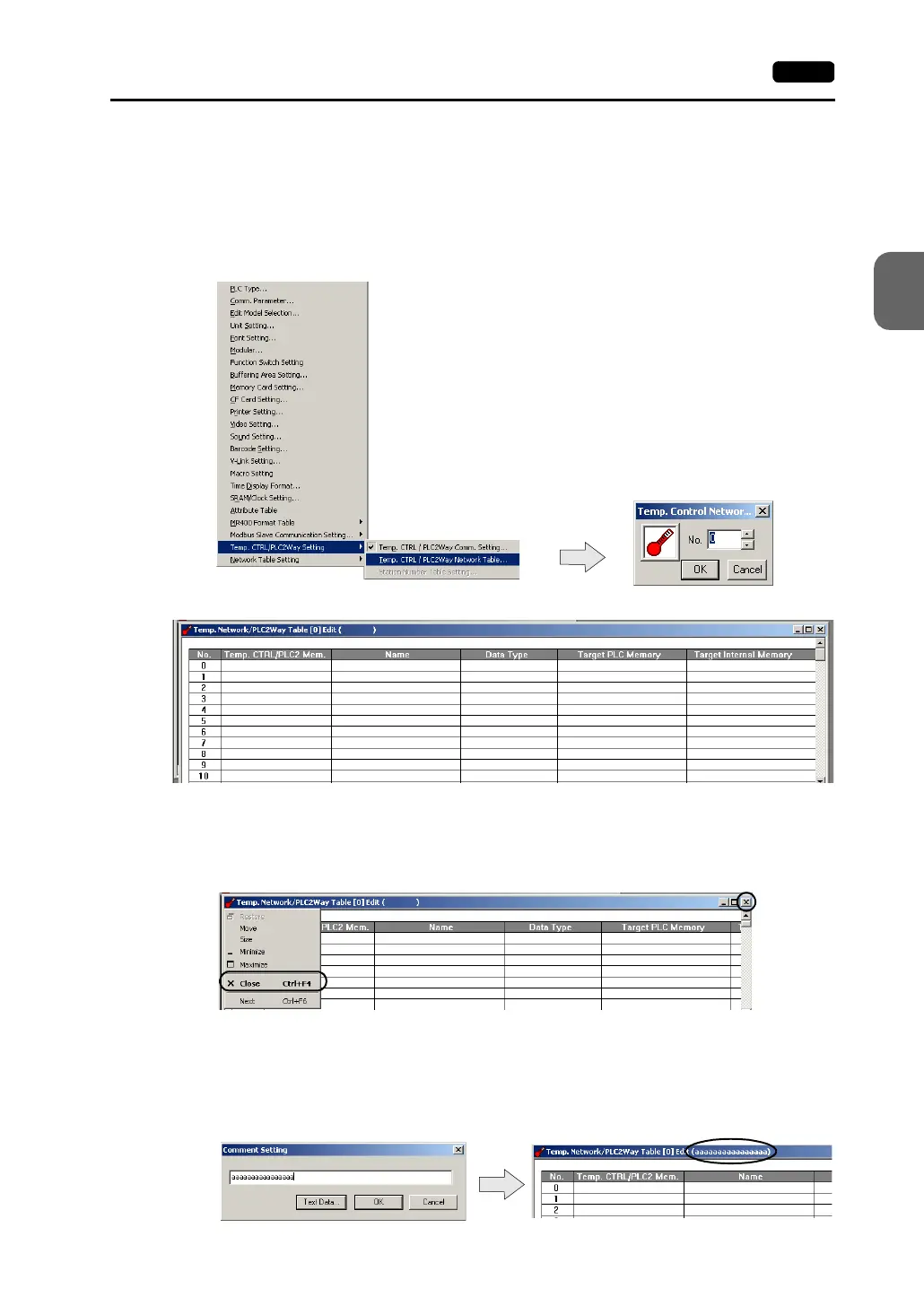
Click [System Setting] → [Temp. CTRL/PLC2Way Setting] → [Temp. CTRL/PLC2Way
Network Table]. ([Temp. CTRL/PLC2Way Network Table] becomes active only when
the setting in the [Temp. Control/PLC2way Comm. Setting] dialog has been completed
as described in the previous section.)
The [Temp. Network/PLC2Way Table Edit] window is opened.
There are 32 tables of temperature control network/PLC2Way table No. 0 to 31. A
maximum of 128 addresses of the PLC2 memory can be set for each table.
2. Closing
Click [Close] in the drop-down menu, or click the [Close] button at the top right corner.
3. Comment setting
There are 32 temperature control network/PLC2Way tables and a comment can be set
for each table.
Click [Edit] → [Comment]. The [Comment Setting] dialog is displayed.
Set the temperature control network/PLC2Way
table number (0 to 31) and click [OK].



 To Next Page