2-30 2. Function Switches
2. Function Switches
Types
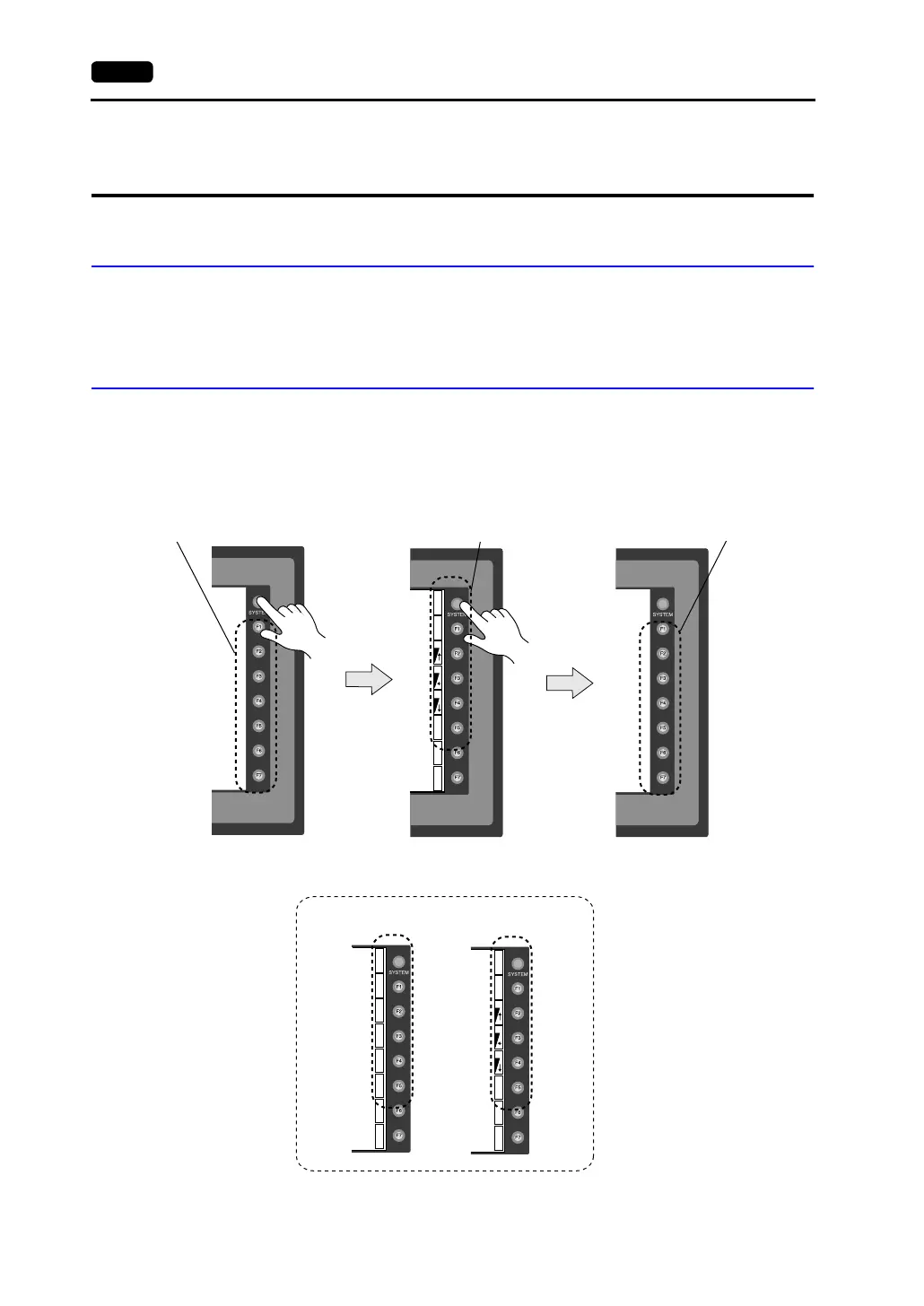
• There are eight function switches provided.
[SYSTEM], [F1], [F2], [F3], [F4], [F5], [F6], [F7]
[SYSTEM] Switch
The [SYSTEM] switch works in “alternate” operations. When this switch is pressed once,
the switch menu is displayed at the side of the function switches [F1] to [F5], and each
function switch corresponds to the menu item displayed in the switch menu. When the
[SYSTEM] switch is pressed again, the switch menu disappears, and the function switches
[F1] to [F7] work as defined by the user.
BR
BR
BR
S
Y
S
T
E
M
M
O
D
E
B
A
C
K
L
T
CT
CT
CT
S
Y
S
T
E
M
M
O
D
E
B
A
C
K
L
T
S
Y
S
T
E
M
M
O
D
E
B
A
C
K
L
T
For V710T, V710iT, V710S, V710iS, V710iS, V712S and V712T
Function switches for switch menu selection
User-defined function switches
User-defined function switches
For V708S/V708iS: For V708C:



 To Next Page