5-58 9. FUJI PLC
9. FUJI PLC
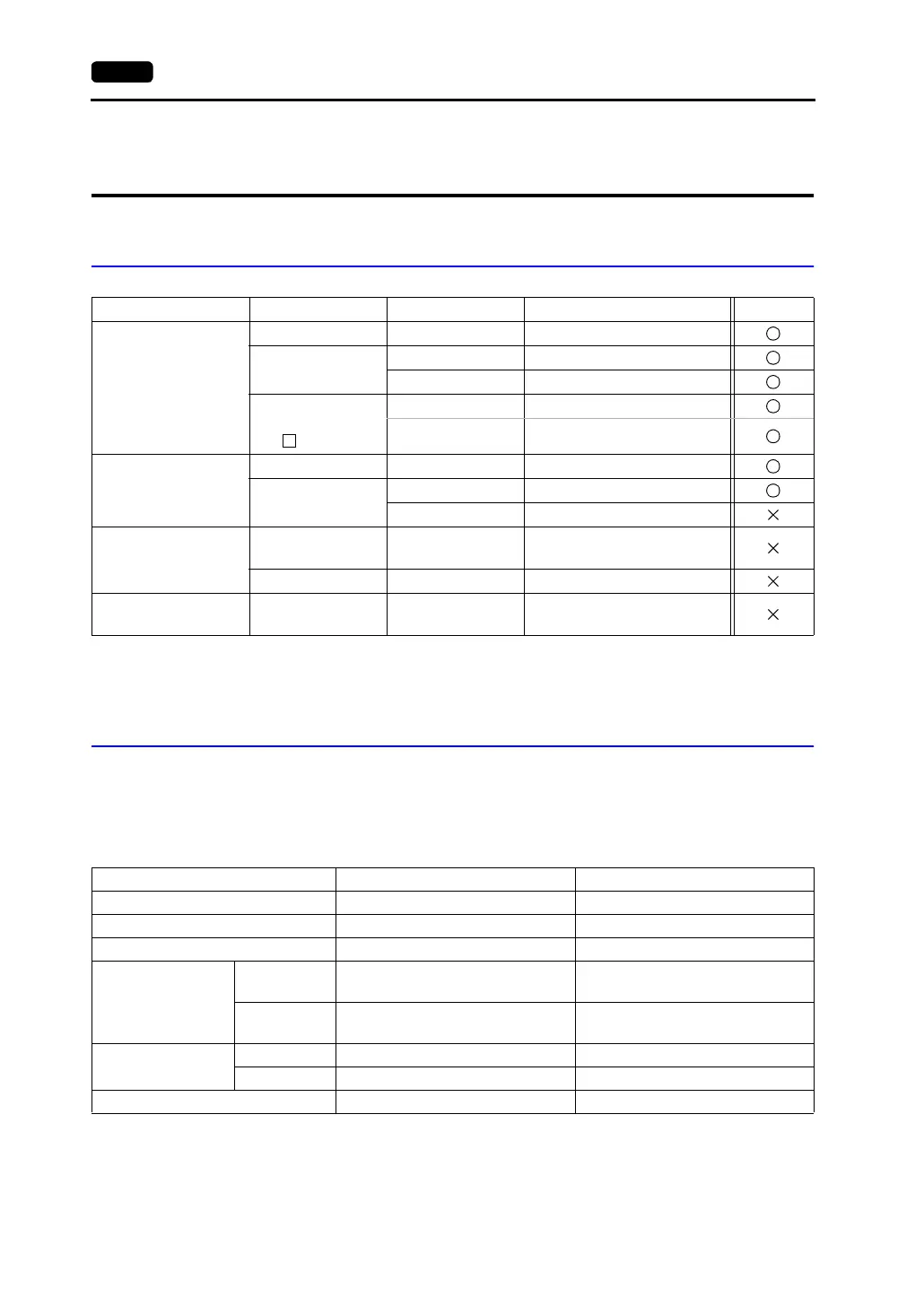
Available PLCs
*1 To use FLEX-PC of Toyota version, select [FLEX-PC (T)].
*2 To use FLEX-PC CPU of Toyota version, select [FLEX-PC CPU (T)].
Communication Setting
The recommended communication parameter settings of the PLC and the V7 series is as follows:
MICREX-F Series, FLEX-PC Series
Select PLC Type PLC Unit/Port Connection PLC2Way
MICREX-F series
(MICREX-F series V4)
F55 NV1L-RS2 RS-232C [Wiring Diagram 1]
F70, F70S
NC1L-RS2 RS-232C [Wiring Diagram 1]
NC1L-RS4 RS-485 [Wiring Diagram 3]
F80H, F120H,
F120S F140S,
F15 S
FFU120B RS-232C [Wiring Diagram 1]
FFK120A RS-485 [Wiring Diagram 3]
FLEX-PC series
*1
NS-T NJRS-1 RS-232C [Wiring Diagram 1]
NJ-T
NJRS-2 RS-232C [Wiring Diagram 1]
NJRS-4 RS-485 [Wiring Diagram 3]
FLEX-PC CPU
*2
FLEX-PC CPU port
RS-485 Hakko Electronics’
cable “FU-CPUNS”
NJ-B16 RS-232C port RS-232C [Wiring Diagram 2]
FLEX-PC COM (T) FLEX-PC NJ-JM
Computer link
terminal block
RS-422 [Wiring Diagram 4]
Item Setting on PLC V7 Comm. Parameter Setting
Baud rate 19200 bps 19200 bps
Port 0 0
Parity Even Even
Transmission mode
RS-232C
1 (asynchronous non-protocol by
command) (fixed)
−
RS-422
3 (asynchronous non-protocol by
command) (fixed)
−
Transmission code
Data length 7 (ASCII) 7
Stop bit 1 1
Terminating resistance at receiver Provided for RS-485 −



 To Next Page