3
7. PLC2Way 3-43
Serial Communications
• Calculating the buffering area capacity
When [Internal Buffer] is selected for [Store Target] in the [Buffering Area Setting],
the maximum available capacity is 32K words. When [Temp Control Net/PLC2] is
selected for [Sampling Method], the required capacity can be calculated as shown
below.
1 sample = [Words*] + 2 words
Buffer size = [Sampling Times] × 1 sample
* [Words] here means the number of words in the memory addresses used in the
temperature control network/PLC2Way table that is set for [No. of Table].
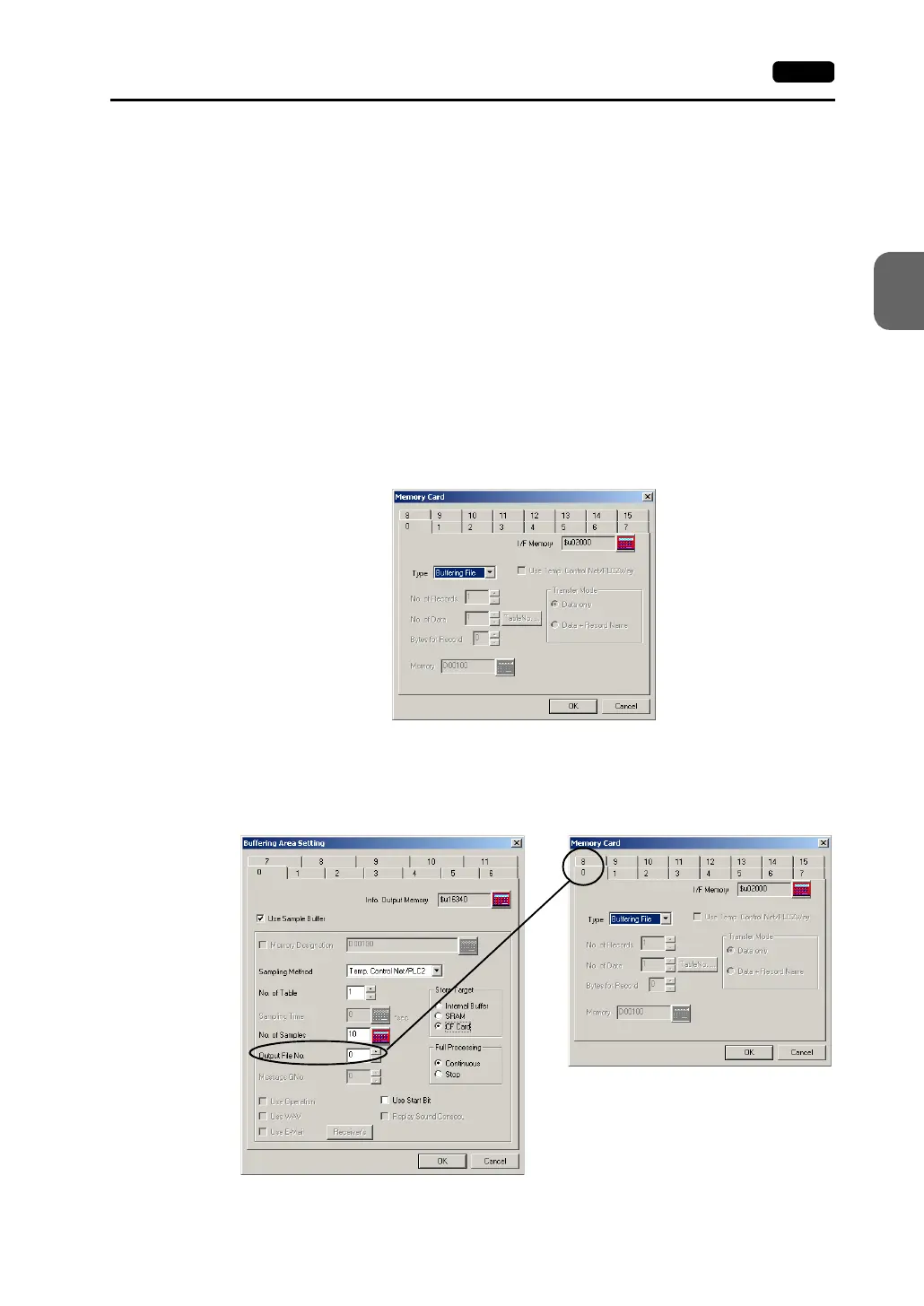
2. Memory card setting
When [SRAM] or [CF Card] is selected for [Store Target] in the [Buffering Area Setting]
dialog, the memory card setting is required.
* The used memory capacity of SRAM and CF card can be calculated in the same way as
the buffering area.
1) Click [System Setting] → [Memory Card Setting]. The [Memory Card] dialog is
opened.
2) Select [Buffering File] for [Type].
3) Match the file number (tab) in the [Memory Card] dialog with [Output File No.] in the
[Buffering Area Setting] dialog.
Select the tab of the same number.



 To Next Page