2-18 1. Operation of V7 Main Menu
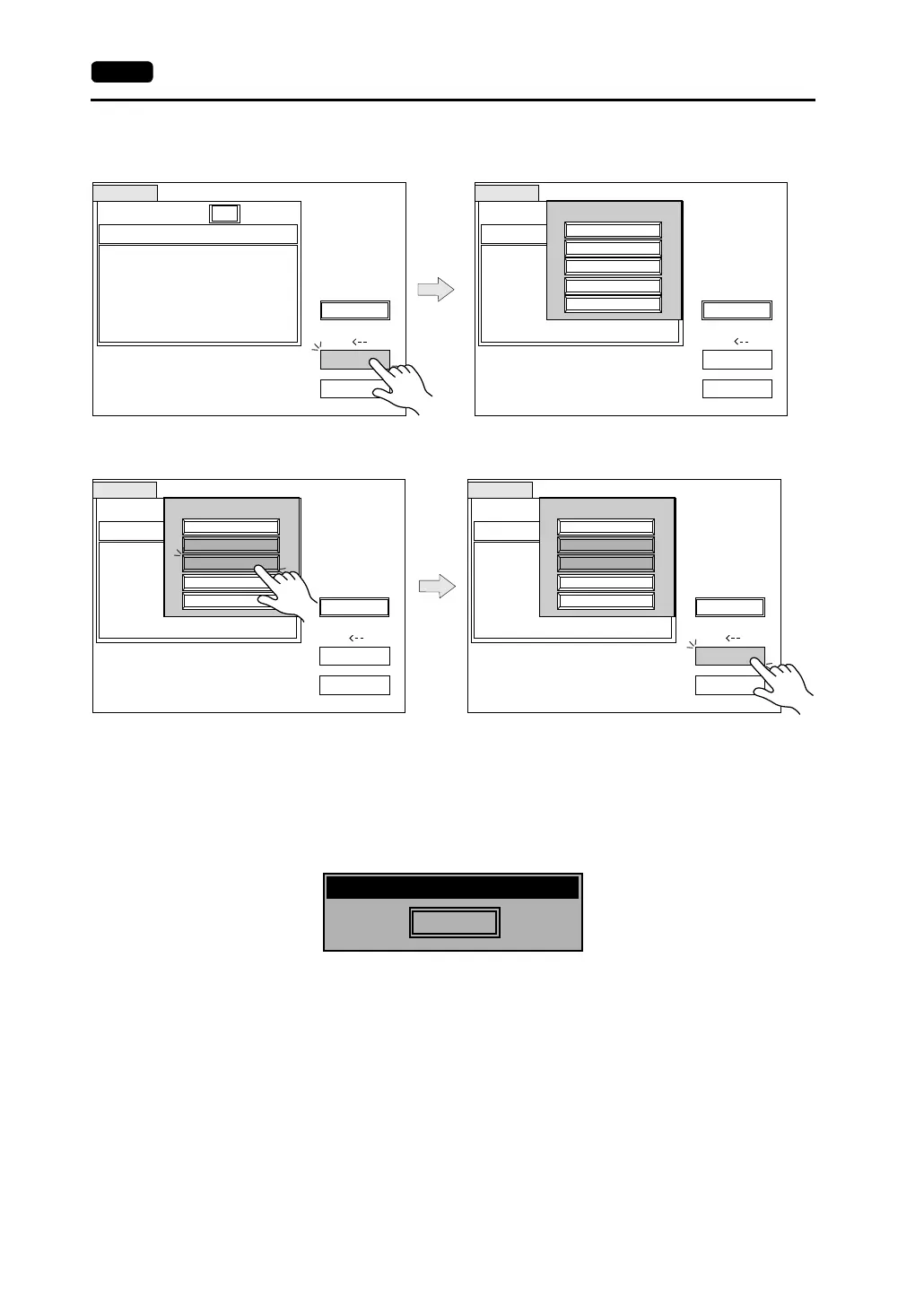
4. Press the [Select Data] switch. The [Data Selection] window is displayed and the
[Select Data] switch changes to [Start].
Select the desired data, and press the [Select Data] switch.
To cancel the [Data Selection] window, press the [Return] switch.
5. During data transfer, the [Start] switch changes into [Busy] and flashes. When data has
been transferred successfully, the following window is displayed. However, when [Sys.
Program] or [Select All] is selected, the “Main Menu” screen is displayed without this
message window on completion of data transfer.
Press the [OK] switch. The “Card Menu” screen is displayed. If any other message is
displayed, refer to page 2-23.
Card Transfer
CF Card File Infomation
Access
Folder Name: AAAAAAAA
Rest Size: 29437KB
Return
Select Data
Select Folder
2002-03-20 10:58:56
Display
Card
DSP0000.BIN
Sys. Program
Version
Font Date
Version
I/F Driver
Version
Screen PLC Type
Screen Comment
: V710/V712
: 1.010
: ENGLISH
: 1.300 / 1.010 / 1.000
: GENERAL
: 1.240
: GENERAL
:
Access
Data Selection
Select All
Screen Data
I/F Driver
Font Data
Sys. Program
Card Transfer
CF Card File Infomation
Access
Folder Name: AAAAAAAA
Rest Size: 29437KB
Return
Select Data
Select Folder
Display
Card
Sys. Program
Version
Font Date
Version
I/F Driver
Version
Screen PLC Type
Screen Comment
DSP0000.BIN
2002-03-20
10:58:56
: V710/V712
: 1.010
: ENGLISH
: 1.300 / 1.010 / 1.000
: GENERAL
: 1.240
: GENERAL
:
Access
CF Card File Infomation
Access
Folder Name: AAAAAAAA
Rest Size: 29437KB
Return
Select Folder
2002-03-20 10:58:56
Display
Card
DSP0000.BIN
CF Card File Infomation
Folder Name: AAAAAAAA
Rest Size: 29437KB
Return
Select Folder
Display
Card
Sys. Program
Version
Font Date
Version
I/F Driver
Version
Screen PLC Type
Screen Comment
: V710/V712
: 1.010
: ENGLISH
: 1.300 / 1.010 / 1.000
: GENERAL
: 1.240
: GENERAL
:
Sys. Program
Version
Font Date
Version
I/F Driver
Version
Screen PLC Type
Screen Comment
: V710/V712
: 1.010
: ENGLISH
: 1.300 / 1.010 / 1.000
: GENERAL
: 1.240
: GENERAL
:
DSP0000.BIN 2002-03-20 10:58:56
Select DataSelect Data
Data Selection
Select All
Screen Data
I/F Driver
Font Data
Sys. Program
Data Selection
Select All
Screen Data
I/F Driver
Font Data
Sys. Program
Card Transfer
Card Transfer
OK
Work normally finished.



 To Next Page