Chapter 4 Transport Stream Configuration
© 2013 Harmonic Inc. Harmonic All rights reserved. 110 Ellipse 3000 Release 3.0, Rev. B
Tables Sub-Menu/Tab
4.4.4 ISOG Carrier ID Sub-Menu/Box
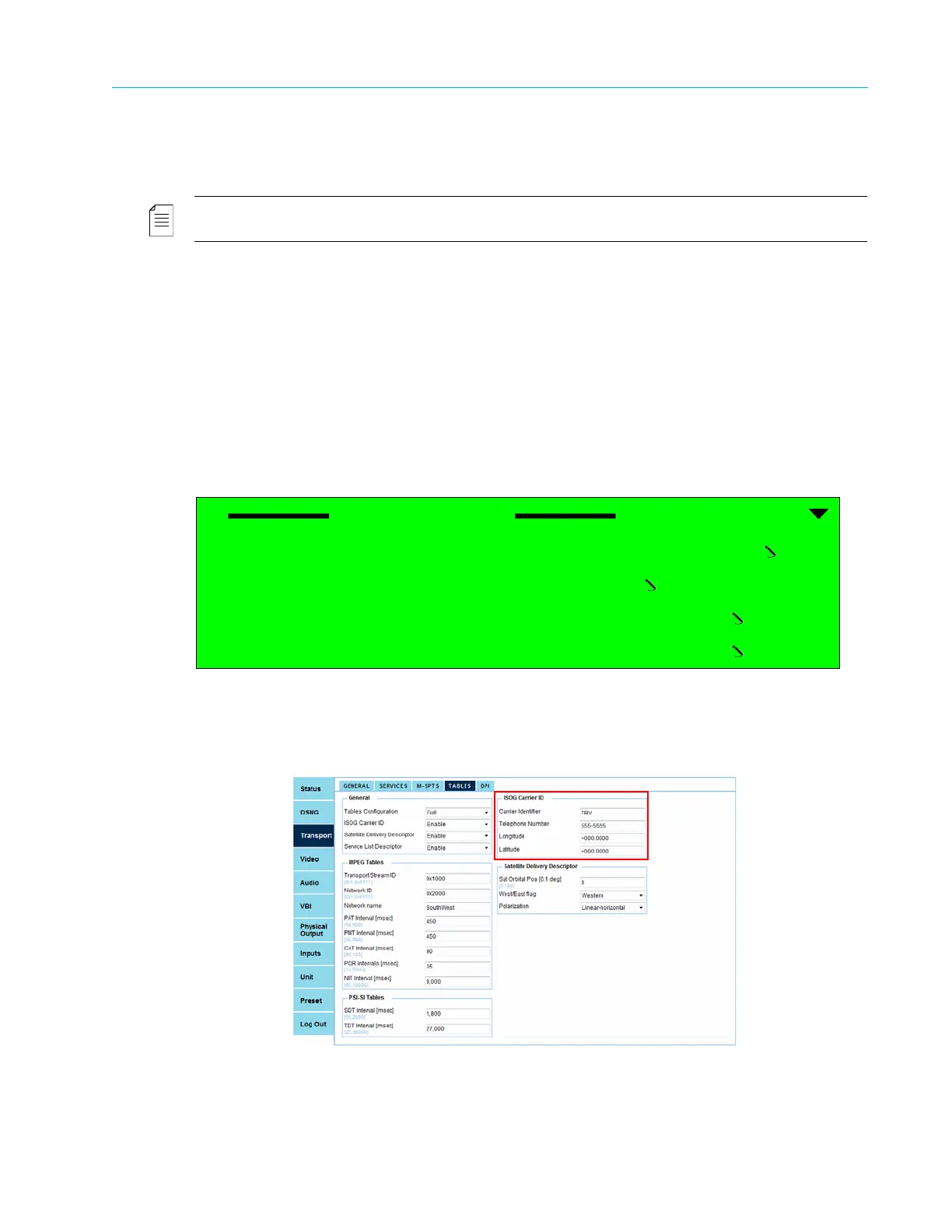
Use the ISOG Carrier ID sub-menu/box to set the Carrier ID parameters.
NOTE: The ISOG Carrier ID menu only displays when the ISOG-WBU Carrier ID option is enabled in the Tables
General menu or General box on the TABLES tab in the web manager (see 4.4.1 General Sub-Menu/Box).
The options provided by the ISOG Carrier ID menu/box are:
■ Carrier Identifier option, which sets an identifier for the carrier (free text string).
■ Telephone number option, which sets the carrier telephone number.
■ Longitude option, which enters the carrier longitude geographical location.
■ Latitude option, which enters the carrier latitude geographical location.
Front Panel
To access the ISOG Carrier ID menu on the front panel:
❖ Navigate Root > Configuration > Transport Stream > Tables > Carrier ID.
Web Manager
To access the ISOG Carrier ID box in the Web Manager:
❖ Select Transport > Tables.
ISOG Carrier ID
1 Carrier Identifier
ALPHA
2 Telephone Number
+1 (55) 555-5555
3 Longitude
+000.000
4 Latitude
+000.000



 To Next Page