Chapter 2 Initial Configuration and Basic Opera-
tion
© 2013 Harmonic Inc. Harmonic All rights reserved. 29 Ellipse 3000 Release 3.0, Rev. B
Ellipse Set-Up Procedures
2.2.1 H.264 Ultra Low Latency Mode Set-up Procedure
The receiving IRD should be set to Ultra Low latency mode. If the IRD receives IP stream from the
Ellipse, the IRD de-jitter buffer should be set to minimum.
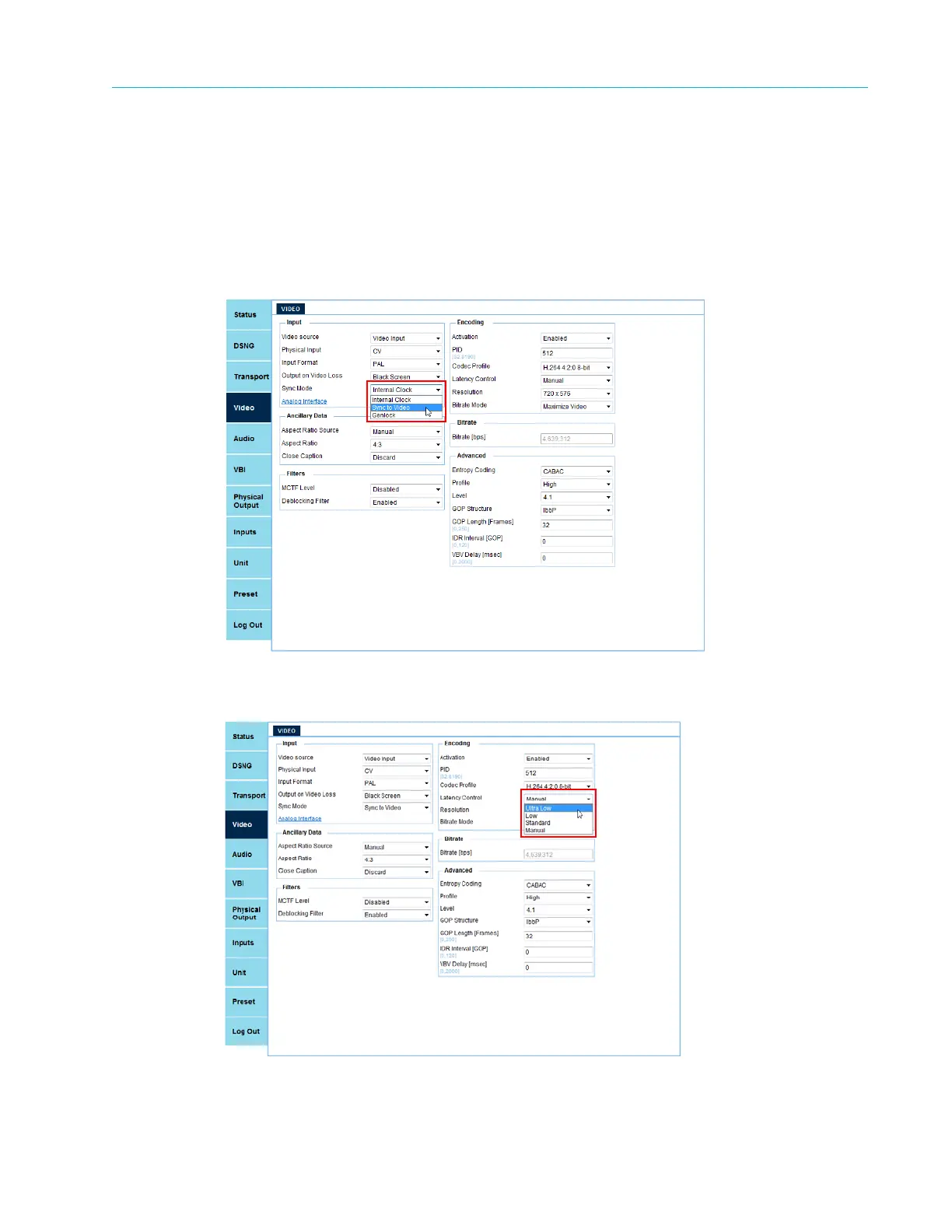
To set-up the Ellipse to receive and process an ultra low latency H.264 transport stream:
1. Select Unit > Video in the web manager.
2. Select Sync to Video in the Sync Mode pull-down menu.
3. Select an H.264 profile under Codec Profile.
4. Select Ultra Low in the Latency Control pull-down menu.
5. Press F1 on the front panel to save the new service (refer to 2.1.1.4 Web Manager Save
Procedure for configuration save instructions).



 To Next Page