10. Canine DEA 1 Blood Typing
Step 11:
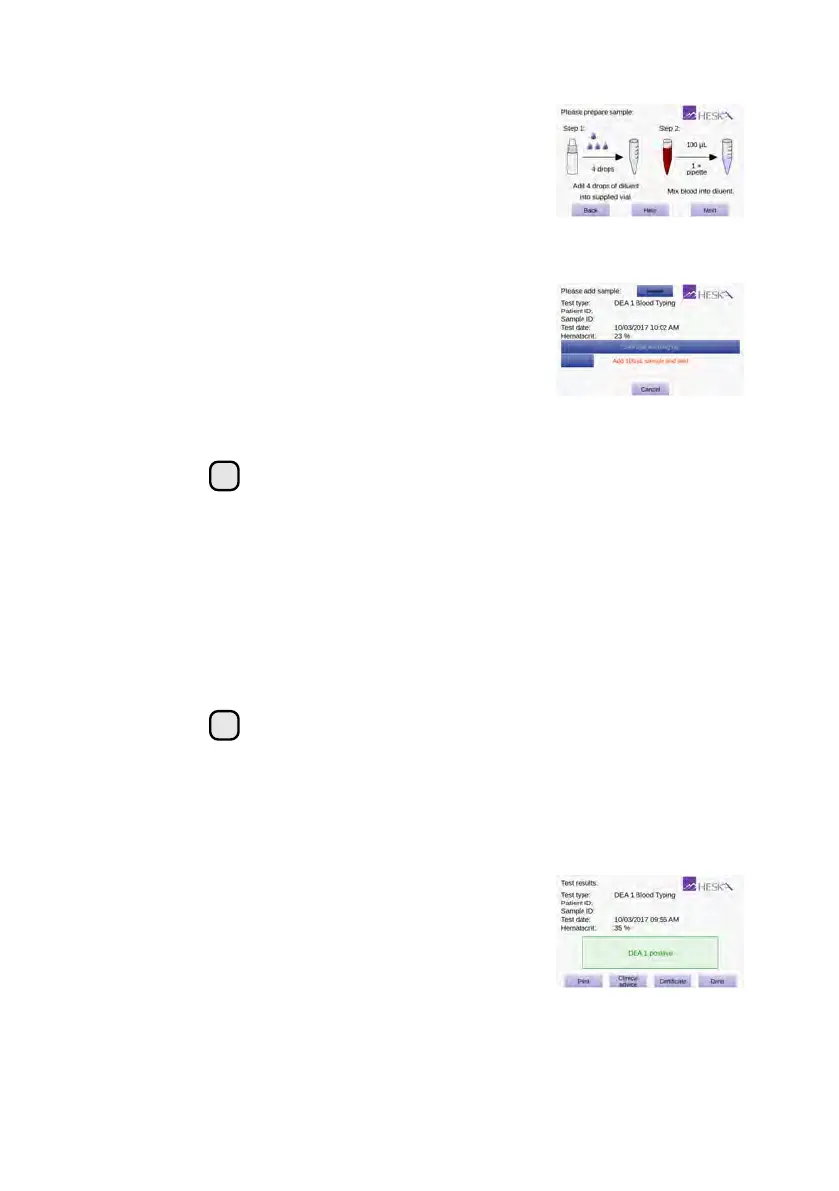
Dilute the sample following the on-screen in-
structions. First, dispense the number of drops
of diluent stated on the screen into one of the
supplied sample tubes. Then mix
100 µL
of
blood into the diluent using the fixed volume
pipette and supplied pipette tip. Ensure proper
mixing by aspirating a couple of times using
the pipette.
Step 12:
Touch
Next
to continue. The
Cartridge Warm-
ing Up screen opens.
It takes approximately 90 seconds for the An-
alyzer to warm up the test cartridge to
99 °F
or
37
◦
C
depending on the environment’s tem-
perature. Lower and higher temperatures may
change the warm up time.
!
Do not add the sample while the cartridge is warming up. Wait until
a prompt appears on the screen instructing you to add the sample.
By default, a message
Add 100 µL sample and wait
flashes on the
screen and a single beeping sound can be heard which signals that
the blood sample can now be added to the cartridge.
Step 13:
Gently invert the test tube back and forth 10 times to obtain a uniform mixture
of blood cells and diluent.
When the message
Add 100 µL sample and wait
appears on the screen,
use the fixed volume pipette and the pipette tip supplied with the cartridge to
add 100 µL of diluted blood to the cartridge’s sample well.
i
Be sure to fill the sample well with at least 100 µL blood.
The measurement starts automatically as soon as the sample is
detected. The test progress is shown on the screen. Measurement
takes approximately 5 minutes. If the Analyzer alerts you that an
insufficient amount of sample was placed into the sample well, repeat
the measurement with a new cartridge. Touch
Cancel
to terminate
the ongoing test.
Step 14:
The test result is displayed on the screen when
the test is finished.
If a printer is connected to the instrument, touch
Print to print the test result.
Touch Done to return to the Home screen.
84



 To Next Page