5.3 Changing the Measurement Period
78
This section describes how to set the method used to start and stop recording.
5.3 Changing the Measurement Period
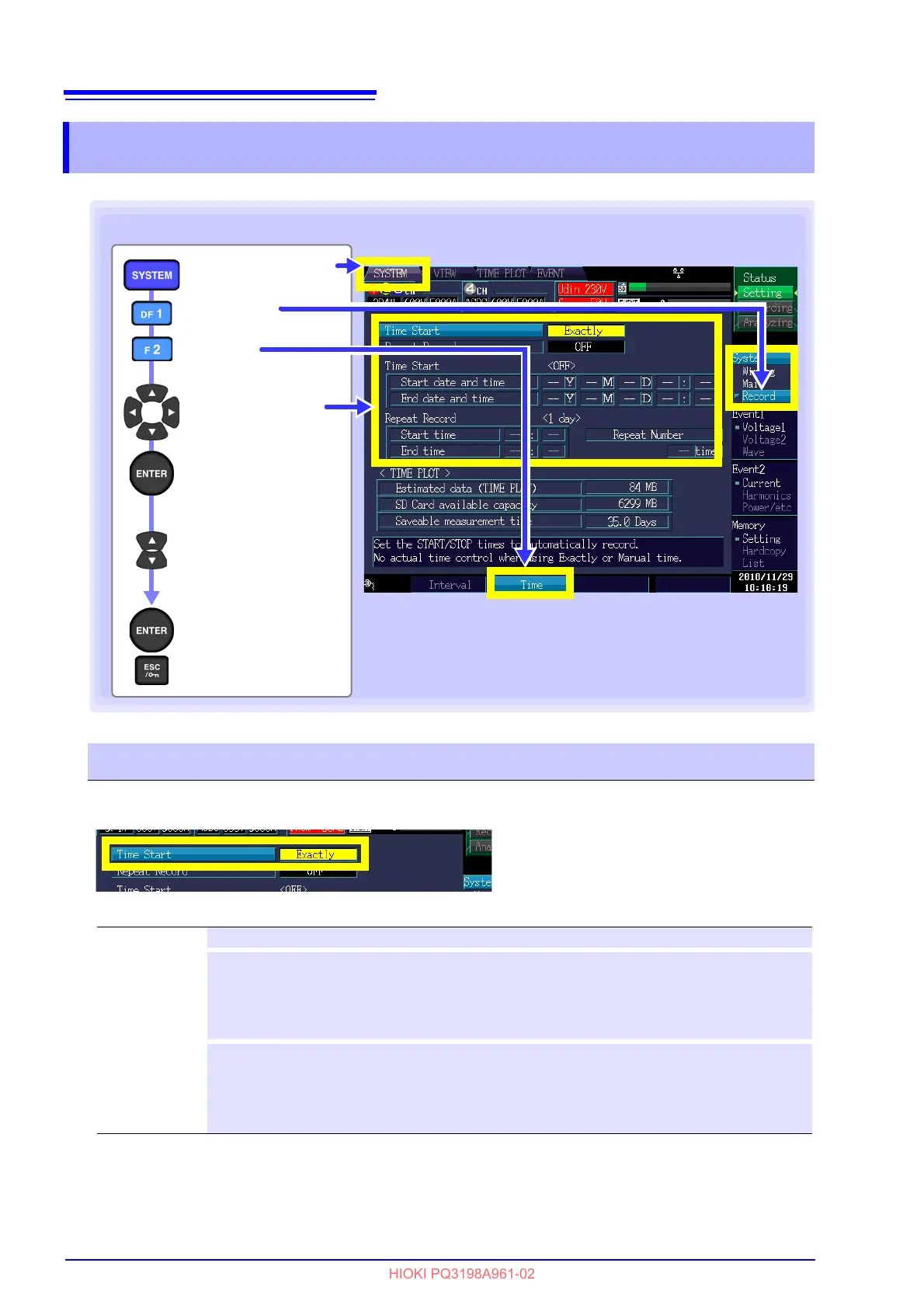
Display a
pull-down menu
to select a setting
Select a value
to change
Select the setting/
change the value
Accept setting
Cancel
[Record]
[SYSTEM] screen
Select a setting
Key operation during configuration
[Time]
Time Start
Setting Contents:( ∗ : Default setting)
Manual Starts and stops recording when the START/STOP key is pressed.
Time
Starts/stops recording at the set time and date.
If the start time and date has already passed when the START/STOP key is pressed, an
[Exactly] start will result, and the start time and date will automatically be changed to the present
time. If the stop time and date has also passed, the stop time and date will be repeated and auto-
matically changed to the longest recording setting interval.
Exactly∗
Starts recording at the next [TIME PLOT Interval] after the START/STOP key is pressed.
If the ST
ART/STOP key is pressed at the time “10:41:22” with the time plot interval set to 10 min,
the instrument will enter in the standby state. The recording will start at “10:50:00.”
If the set recording interval is of 30 s or less, recording will start from the next zero second.
Stop operation is the same as with the [Manual] se
tting.



 To Next Page