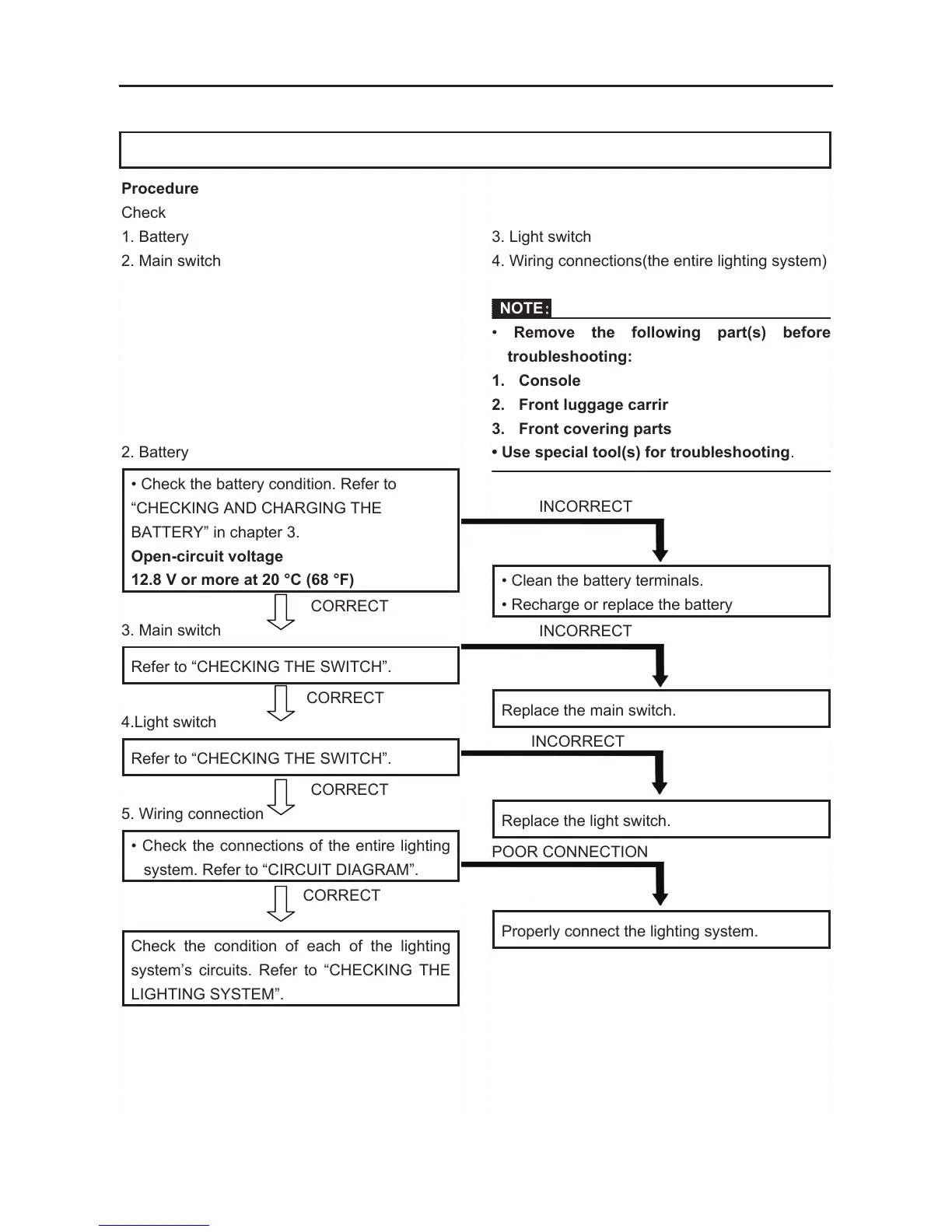
Procedure
Check
1. Battery
2. Main switch
2. Battery
• Check the battery condition. Refer to
“CHECKING AND CHARGING THE
BATTERY” in chapter 3.
Open-circuit voltage
12.8 V or more at 20 °C (68 °F)
CORRECT
3. Main switch
Refer to “CHECKING THE SWITCH”.
CORRECT
4.Light switch
Refer to “CHECKING THE SWITCH”.
CORRECT
5. Wiring connection
• Check the connections of the entire lighting
system. Refer to “CIRCUIT DIAGRAM”.
CORRECT
Check the condition of each of the lighting
system’s circuits. Refer to “CHECKING THE
LIGHTING SYSTEM”.
3. Light switch
4. Wiring connections(the entire lighting system)
NOTE:
• Remove the following part(s) before
troubleshooting:
1. Console
2. Front luggage carrir
3. Front covering parts
• Use special tool(s) for troubleshooting.
INCORRECT
• Clean the battery terminals.
• Recharge or replace the battery
INCORRECT
Replace the main switch.
INCORRECT
Replace the light switch.
POOR CONNECTION
Properly connect the lighting system.
TROUBLESHOOTING
IF THE HEADLIGHT AND/OR TAILLIGHT FAIL TO COME ON:
ELECTRICAL COMPONENTS
- 251 -
CHECKING THE LIGHTING SYSTEM
1. If the headlights fail to come on:
(1). Bulb and bulb socket
• Check the bulb and bulb socket for
continuity.
CONTINUITY
(2). Voltage
• Connect the pocket tester (DC 20 V) to the
headlight couplers.
Tester (+) lead
Green terminal ①
or Yellow terminal ②
Tester (–) lead
Black terminal ③
□
A
When the light switch is on “ ”.
□
B
When the light switch is on “ ”
• Turn the main switch to “ON”.
• Turn the light switch to “ ” or “ ”.
• Check the voltage (12 V) of the “Green” and
“Yellow” leads on the bulb socket
connector.
MEETS SPECIFICATION
This circuit is not faulty.
NO CONTINUITY
Replace the bulb and/or bulb socket.
A
B
OUT OF SPECIFICATION
The wiring circuit from the main switch to the
bulb socket connector is faulty, repair it.


 To Next Page