MX8000 Installation and Operation Guide
8–34
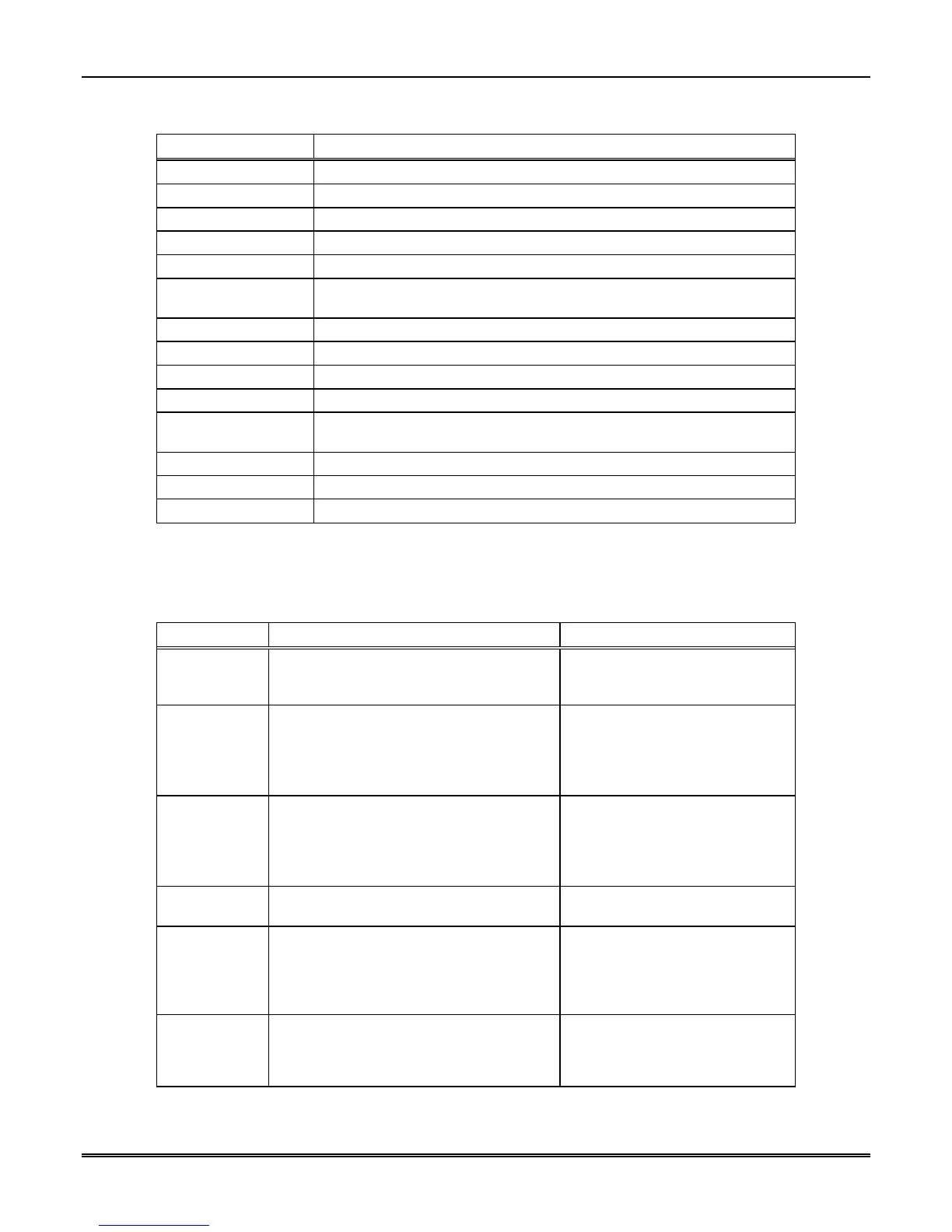
Table 8–41: Report Record Components and Description
Character Description
<"|[">
Start of record indicator.
<R>
Report record identifier.
<"|IA1">
Unit ID = A, followed by receiver ID = 1.
<"|LB">
Line Card #, B = 11. Acceptable values are 0-9, A (= 10), B (=11), C (=12).
<"|A123456">
Account Number.
<"|V55600">
Panel (see Table 8–43) and revision number. In this example the panel =
SX-V and the revision is 5600.
<"|D0514">
Date of the report in mmdd format. mm = Month, dd = Day
<"|T1019">
Time of report in hhmm format. hh = Hour, mm = Minutes
<"N0005">
Reference number. See Section 4.6.3 0001-9999
<"|Z1">
Zone number. One to four alphanumeric characters are acceptable values.
<"|CA">
Condition code indicating the nature of the reported message.
See Table 8–28.
<"|]">
End of information fields indicator.
<Cksum/Ctrl>
Checksum/control field. See Section 8.10.7.
<$0D>
End of record indicator.
8.10.3.1 Information Field Identifiers
The following characters signify which data is contained in an information field:
Table 8–42: Information Field Identifiers
Field Identifier Description Acceptable Values
I System identifier. A unit ID (always an A)
and the receiver ID digit. See 5.4.4.2 to set
receiver ID.
"A" followed by 0-9.
O Communication Lock (Comm-Lock) usage. 0 = Not Supported (4)
1 = Phone lock
2 = Central Station Lock
3 = No lock used
M Audio (Listen-in) usage. 0 = Not Used (4)
1 = Instant mode
2 = Dial out mode
3 = One ring mode
L Line Card number. See Table 8–38 for acceptable
values.
A Account number. Three to six alphanumeric
characters. If the account is more
than 6 characters the account will
be truncated to the last six
characters.
P Protection level of panel. Two bytes, the first indicates the
previous protection level and the
second indicates the current
protection level.



 To Next Page