MX8000 Installation and Operation Guide
4–10
Date: 01/01/01
<Minute 0 to 59>
Date: 01/01/01
<Change AM/PM>
Time: 12:00AM
<Month 1 to 12>
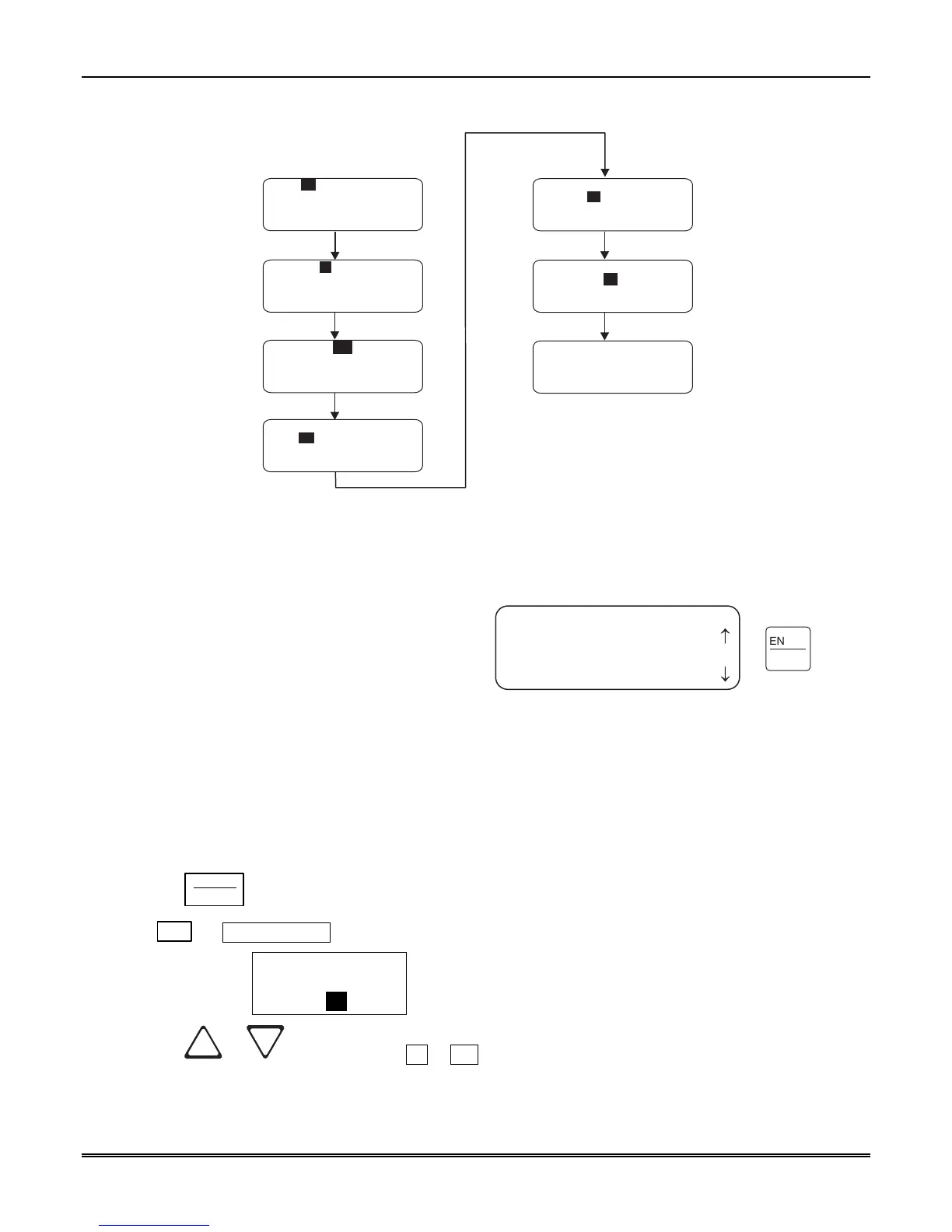
Set Time and Date
1. Press the Menu
button.
2. Press the 4 button.
3. Set the Hour (1 to 12).
The field to be
changed flashes.
Press the Enter or
> button to advance.
4. Set the Minutes. The
field to be changed
flashes.
Press the Enter or
> button to advance.
5. Set time to AM or PM.
The field to be
changed flashes.
Press the Enter or
> button to advance.
6. Set the Month.
The field to be
changed flashes.
Press the Enter or
> button to advance.
7. Set the Day.
The field to be
changed flashes.
Press the Enter or
> button to advance.
8. Set the Year (0 to 99).
The field to be
changed flashes.
Press the Enter or
> button to advance.
Press Enter button at
the correct time to
synchronize with.
Date: 01/01/01
<Hour 1 to 12> <=Exit>
Time: 12:00AM
Date: 01/01/01
Press ENTER at exact
time <<= to Cancel>
9.
Time: 12:00AM
Time: 12:00AM
Time: 12:00AM
Date: 01/01/01
Time: 12:00AM
<Year 00 to 99>
Date: 01/01/01
Time: 12:00AM
<Day 1 to 31>
Date: 01/01/01
Figure 4–10: Setting Time and Date Program Sequence
4.6.7 System Restart
System restart allows the operator or
installer to restart the receiver. An installer
has the option to set the receiver back to
factory default settings, while an operator
can only restart the receiver.
Note: The time and date set in the receiver
will be saved. However, all of the call history
will be lost.
Follow These Steps to restart the receiver:
<Installer Menu>
5=System Restart
6 Printer Menu
7 Program Menu
¯
ENTER
MENU
Figure 4–11: System Restart Display
Note: All messages must be acknowledged before a system restart procedure can be performed. If all messages
are not acknowledged, cycle the receiver’s power to restart the system. If the power is cycled all
unacknowledged messages will be lost.
1. Log on to the receiver (see Section 4.4.4 for log on procedure).
2. Press the
ENTER
MENU
button to view the main menu items.
3. Press
5
for System Restart.
The display reads
Do you wish to
shutdown & restart
system? No
4. Press the or button to toggle No to Yes.



 To Next Page