Section 4 – Operation
4–3
4.2.1 LED Displays
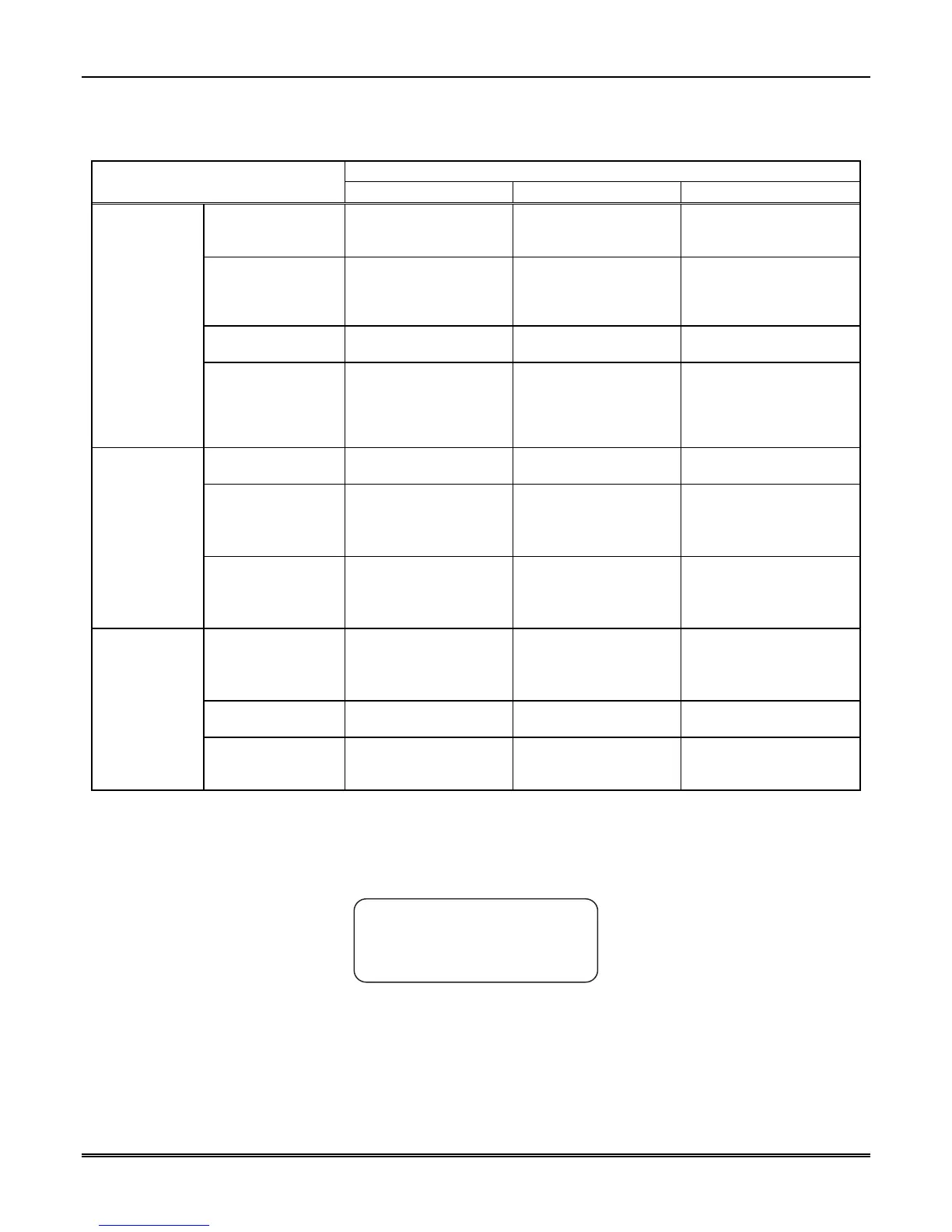
Table 4–2: LED Description
Meaning
LED
On Off Flashing
System Power System power is on. No AC or DC power to
the Receiver
No AC power and the
system is operating on the
backup battery.
System Fault A fault condition exists
that has been
acknowledged but not
cleared.
The system is operating
normally.
A fault condition exists that
has not been
acknowledged.
Operator Logged In An operator is logged on. No operator is logged
on.
Touchpad
LEDs
Call Pending The acknowledge key
was pressed at least
once, but not all the
events in a call were
acknowledged.
No calls pending or all
calls have been
acknowledged.
Calls pending.
Off The line card is
operating normally.
Red Slow Flash – Uninitialized.
Fast Flash – Trouble
(Specifics available on
VFD).
Line Port LED
(MX8000-LC3
and
MX8000-LRR)
Green Off Hook Ring Detection – Flash
follows ring.
Listen-in – 1 sec. on, 1 sec
off.
Red (Fault) N/A The line card is
operating normally.
Slow Flash – Uninitialized.
Fast Flash – Trouble
(Specifics available on
VFD).
Green (Active) Off Hook No activity. Ring Detection – Flash
follows ring.
Line Port LEDs
(MX8000-LC1)
Yellow (Listen-in) Comes on when
operator acknowledges
the listen-in call.
No listen-in occurring. N/A
4.2.2 VFD Status Display
The status display is a 4-line 20 character (each line) backlit VFD that shows the various alarm and function
messages. It functions in all modes of operation (normal and programming mode). As the MX8000
acknowledges calls and messages, it updates the calls on the VFD and silences the alert tone.
MX8000 Receiver
Ademco
Man: Active
01/01/01 08:32:44
Figure 4–3: VFD Display
4.2.2.1 VFD Abbreviations
Many of the words used on the VFD are abbreviated to accommodate 20 characters per line. Table 4–3
compares the event that is reported to how it is output to the VFD and printer.



 To Next Page