MX8000 Installation and Operation Guide
5–12
4. Press
until the display flashes on the bright field.
5. Press the
or button until the display flashes on the desired setting.
6. Press
ENTER
MENU
.
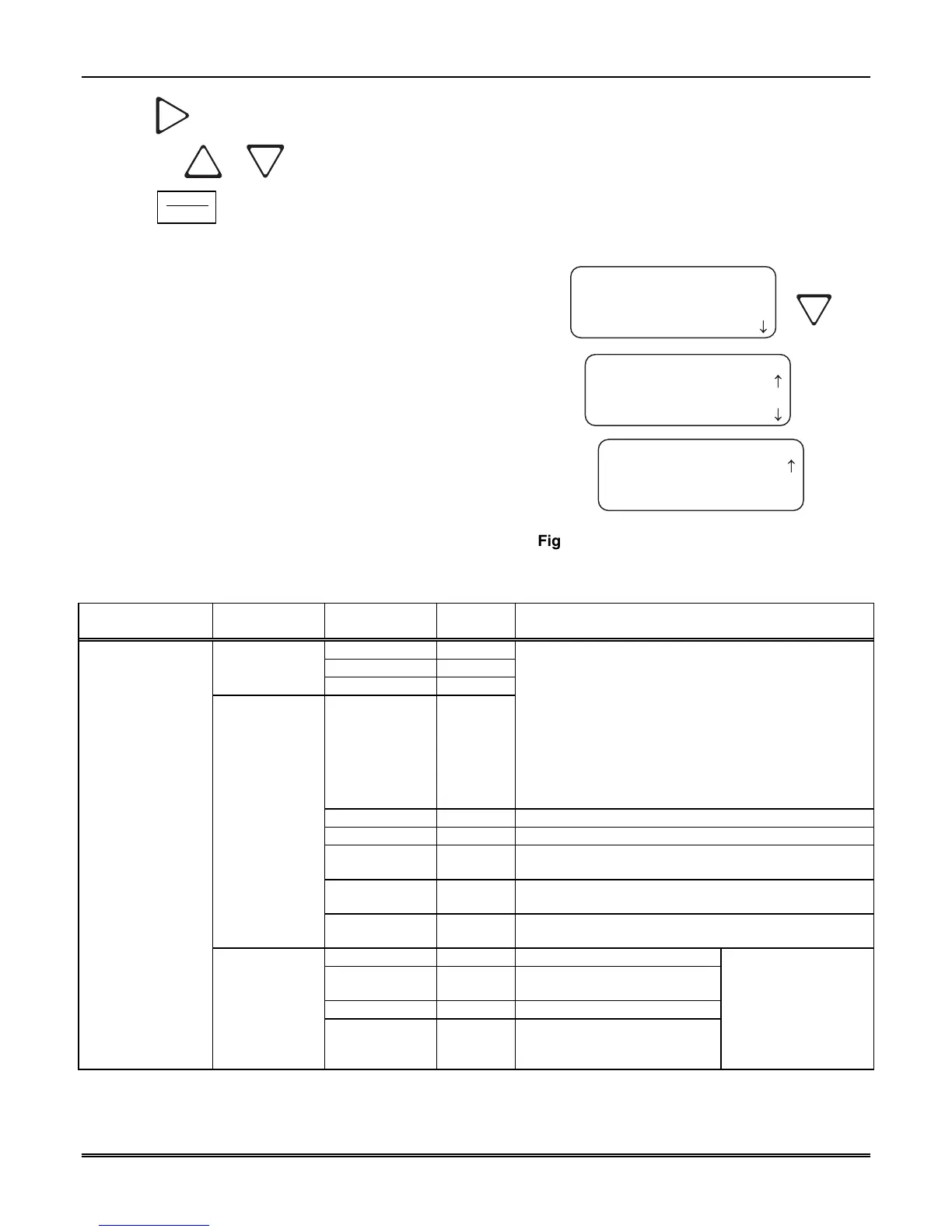
5.4.3 Communications
In the communication option the installer can configure the
communication ports, automation configuration, annunciator
configurations, and the auxiliary relay configurations.
Table 5–5 lists the available choices and gives a description of
those choices.
<Communications>
1=Port Functions
2 Com Port1: Unused
3 Com Port2: Unused
<Communications>
4=Par Port: Unused
5 Automation Cfg
6 Annunciator Cfg
<Communications>
7=Aux Relay Cfg
< Exit Menu
¯
¯
Figure 5–6: Communications Options Menu
Table 5–5: Communications Options and Description
Communications
Menu
Choices Options Default Comments
Unused
✔
Automation
Com1
Printer
Unused
✔
Rules for Port Functions:
1. Functions in Brackets [ ] will not appear unless
“Automation” is selected for Com1 function.
2. Functions in { } will not appear unless “Printer” is
selected in Com1 or Par.
3. A function may be selected only once in the 3 ports
(only one printer, only one Diag, and so on).
4. All ports may be configured “Unused”.
5. Only Com Port 1 can be set as the primary
automation port.
Diagnostics
Would output raw Hex-ASCII code.
Printer
English output to a printer.
[Auto Bkp]
Would act as a backup automation port if a fault
occurred with the primary automation port.
[Auto Bkp Prn]
Would act as a backup print output port if a fault
occurred with the automation port.
Com2
[Printer Bkp]
Would act as a backup printer port if a fault occurred
with the primary printer port.
Unused
✔
Diagnostics
Would output raw Hex-ASCII
code.
Printer
English output to a printer.
Communications
Port Functions
Par
[Auto Bkp Prn]
Would act as a backup print
output port if a fault occurred
with the automation port.
Note:
The receiver
printer port is enabled
at the factory. You will
receive a trouble
condition when a
printer is not attached.



 To Next Page