Item Description Default Value Value Range
BCB trips if
UPS stops
power supply
Species whether the BCB
trips when the UPS stops
supplying power and the
output power is o.
Enable Disable,
Enable
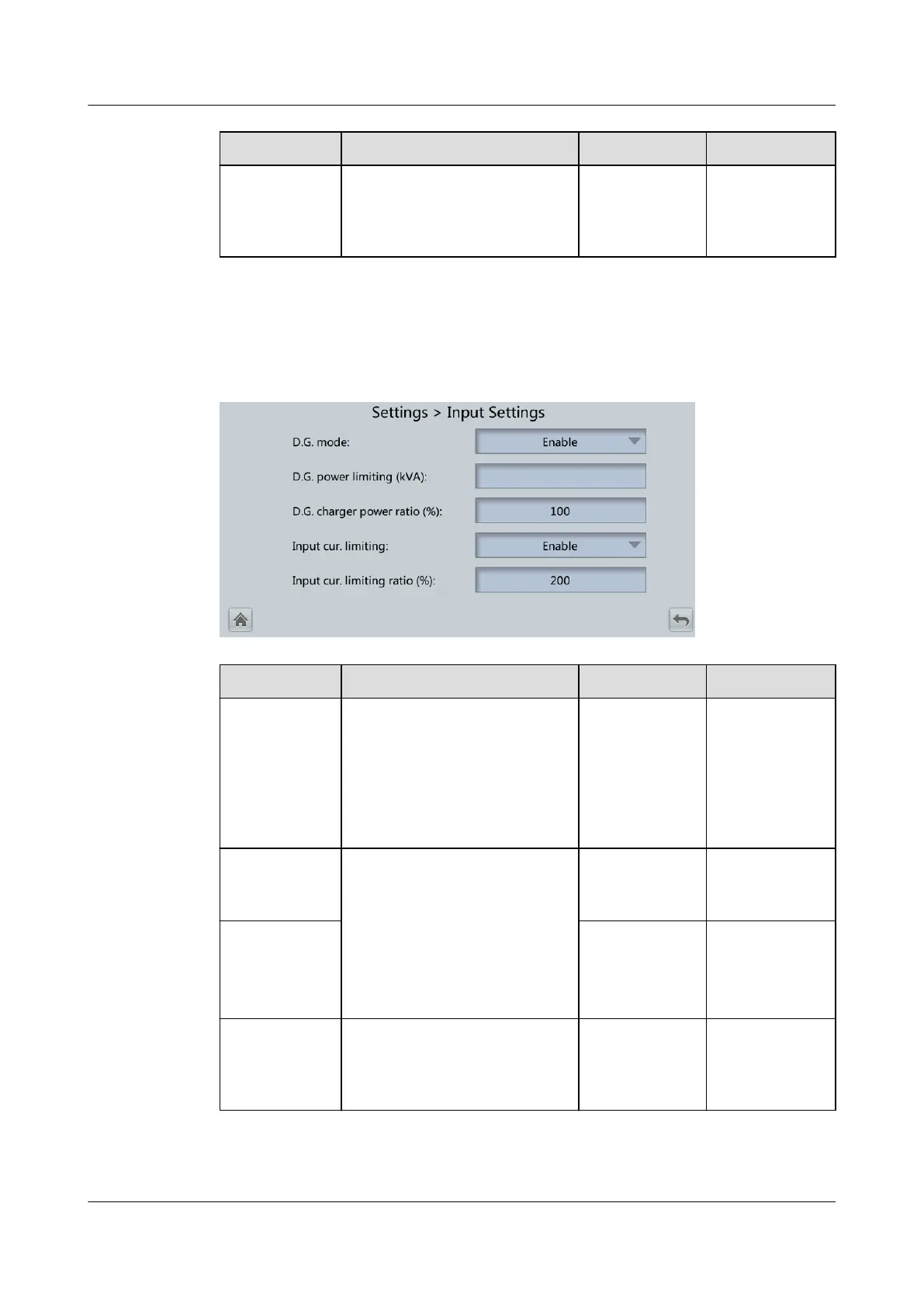
4.2.4.3 Input Settings
Figure 4-28 Input Settings
Item Description Default Value Value Range
D.G. mode Set this parameter to Enable
when a DG connects to the
input power distribution
cabinet (PDC). The UPS
enters the DG mode when a
DG is detected over dry
contacts.
Disable Disable,
Enable
D.G. power
limiting (kVA)
The two parameters enable
the UPS to control the valid
input current and input
current limit values,
preventing load impact and
facilitating cooperation
between the UPS and the
DG.
Depends on
the actual
model.
0–5000
D.G. charger
power ratio
(%)
100 0–100
Input cur.
limiting
Species whether to enable
or disable input current
limiting for the UPS to
protect the generator.
Disable Disable,
Enable
UPS5000-E-(30 kVA–180 kVA)
User Manual (Integrated UPS) 4 LCD Interface
Issue 02 (2022-12-30) Copyright © Huawei Digital Power Technologies Co., Ltd. 102












 To Next Page