3.2.1 Installing a UPS Cabinet
Secured Installation
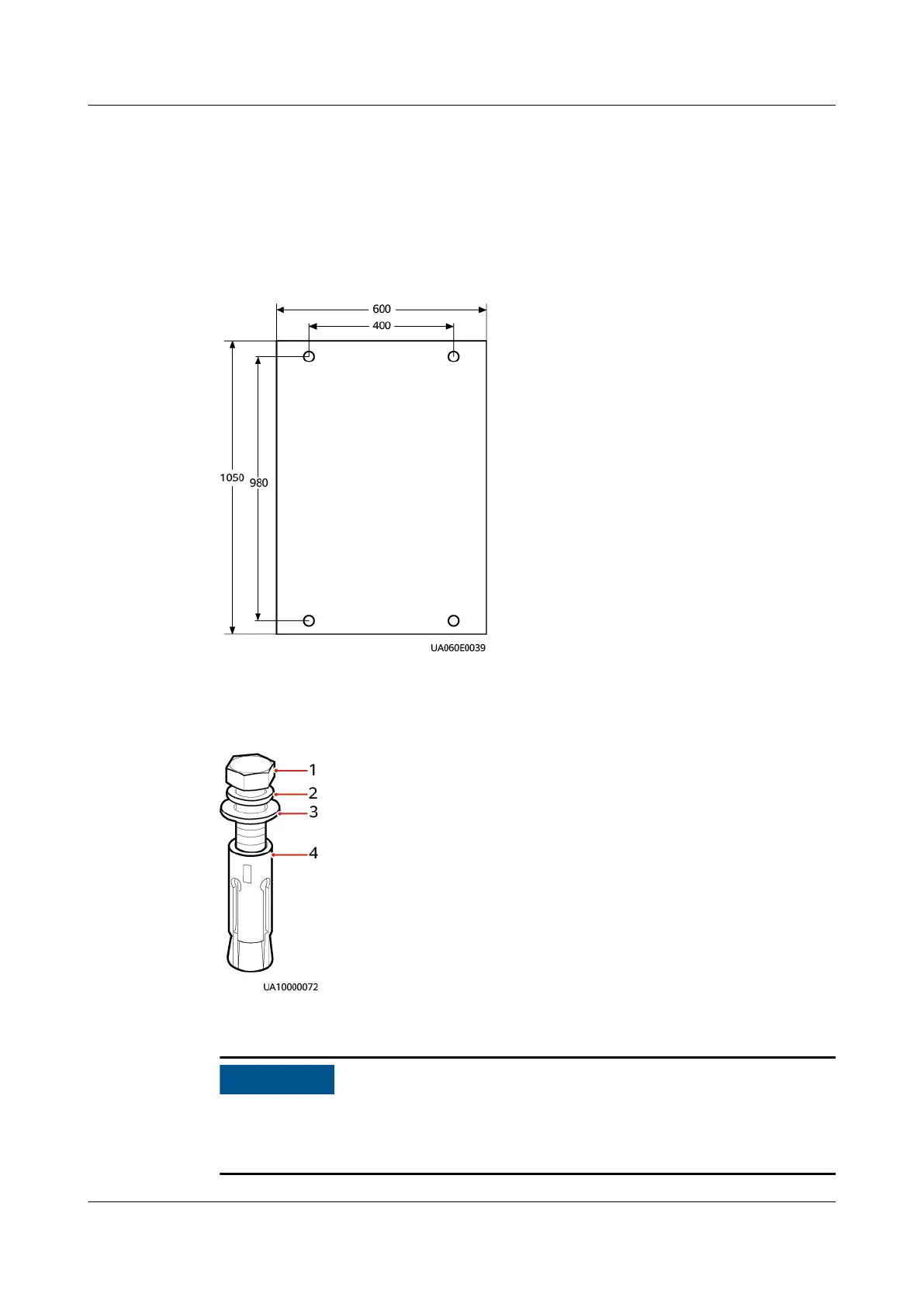
Step 1 Determine the position for installing the cabinet. Mark mounting holes based on
the drawings or
marking-o template.
Figure 3-6 Mounting holes (unit: mm)
Step 2 Use a hammer drill to drill holes for installing expansion bolts and then install
expansion bolts in the holes.
Figure 3-7 Expansion bolt composition
(1) M12 bolt
(2) Spring washer (3) Flat washer (4) Expansion sleeve
Knock the expansion bolt into the hole until the expansion sleeve completely ts
into the hole. The expansion sleeve must be completely buried under the ground
to facilitate subsequent installation.
UPS5000-E-(30 kVA–180 kVA)
User Manual (Integrated UPS) 3 Installation
Issue 02 (2022-12-30) Copyright © Huawei Digital Power Technologies Co., Ltd. 56












 To Next Page