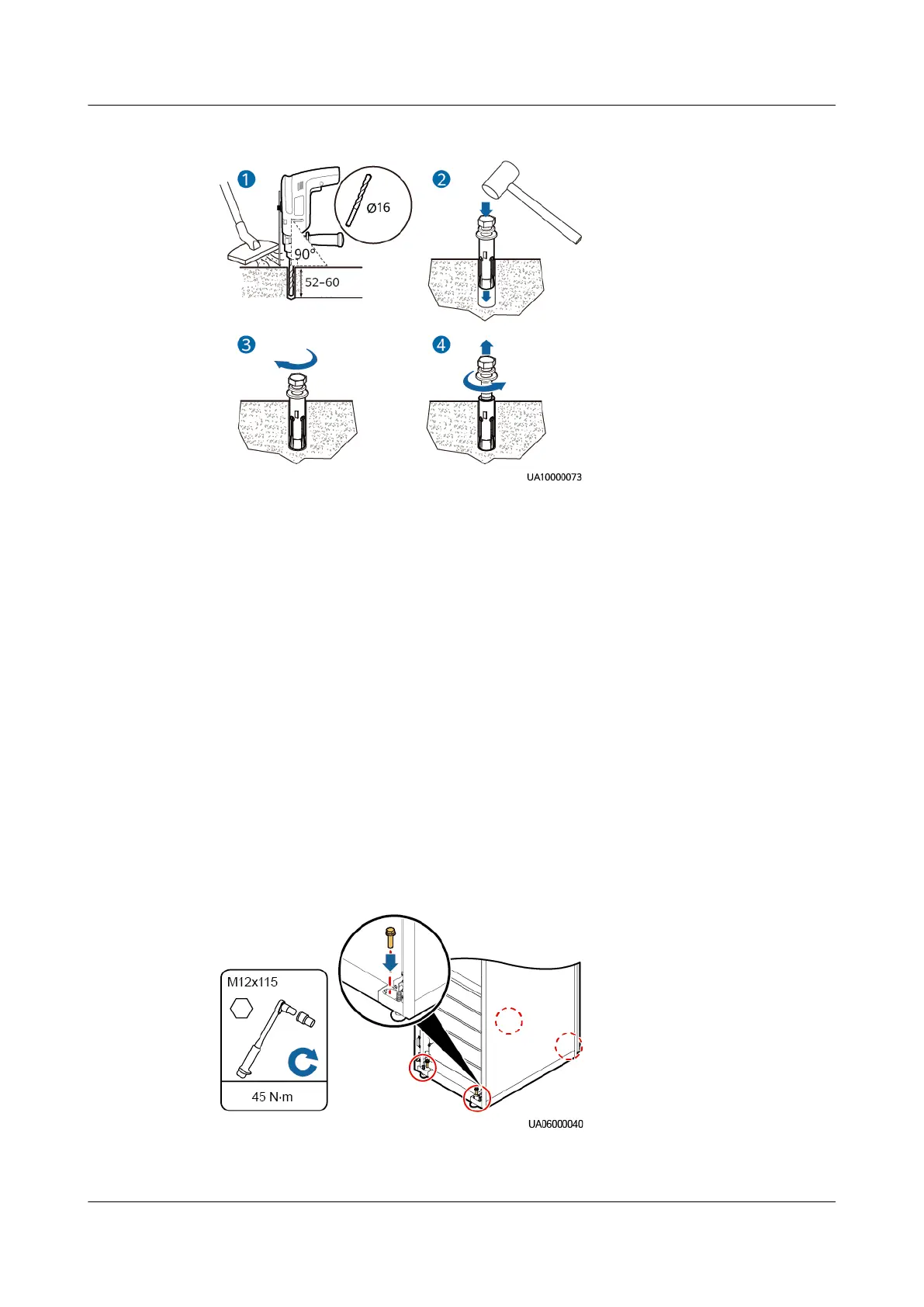
Figure 3-8 Installing an expansion bolt (unit: mm)
1. Drill a hole into the concrete oor using a hammer drill. The hole depth
ranges from 52 mm to 60 mm.
2. Partially tighten the expansion bolts and vertically insert them into the holes.
Knock the expansion bolt using a rubber mallet until the expansion sleeve is
fully inserted into the hole.
3. Partially tighten the expansion bolt.
4. Remove the bolt, spring washer, and
at washer.
Step 3 Move the UPS over its castors to the installation position.
Step 4 If the castors need to hang in the air, perform Step 1–Step 2 in Non-Secured
Installation.
Step 5 Open the front and rear doors of the cabinet.
Step 6 Insert four M12x115 expansion bolts into the expansion bolt holes in the
oor,
and tighten the expansion bolts.
Figure 3-9 Tightening expansion bolts
----End
UPS5000-E-(30 kVA–180 kVA)
User Manual (Integrated UPS) 3 Installation
Issue 02 (2022-12-30) Copyright © Huawei Digital Power Technologies Co., Ltd. 57












 To Next Page