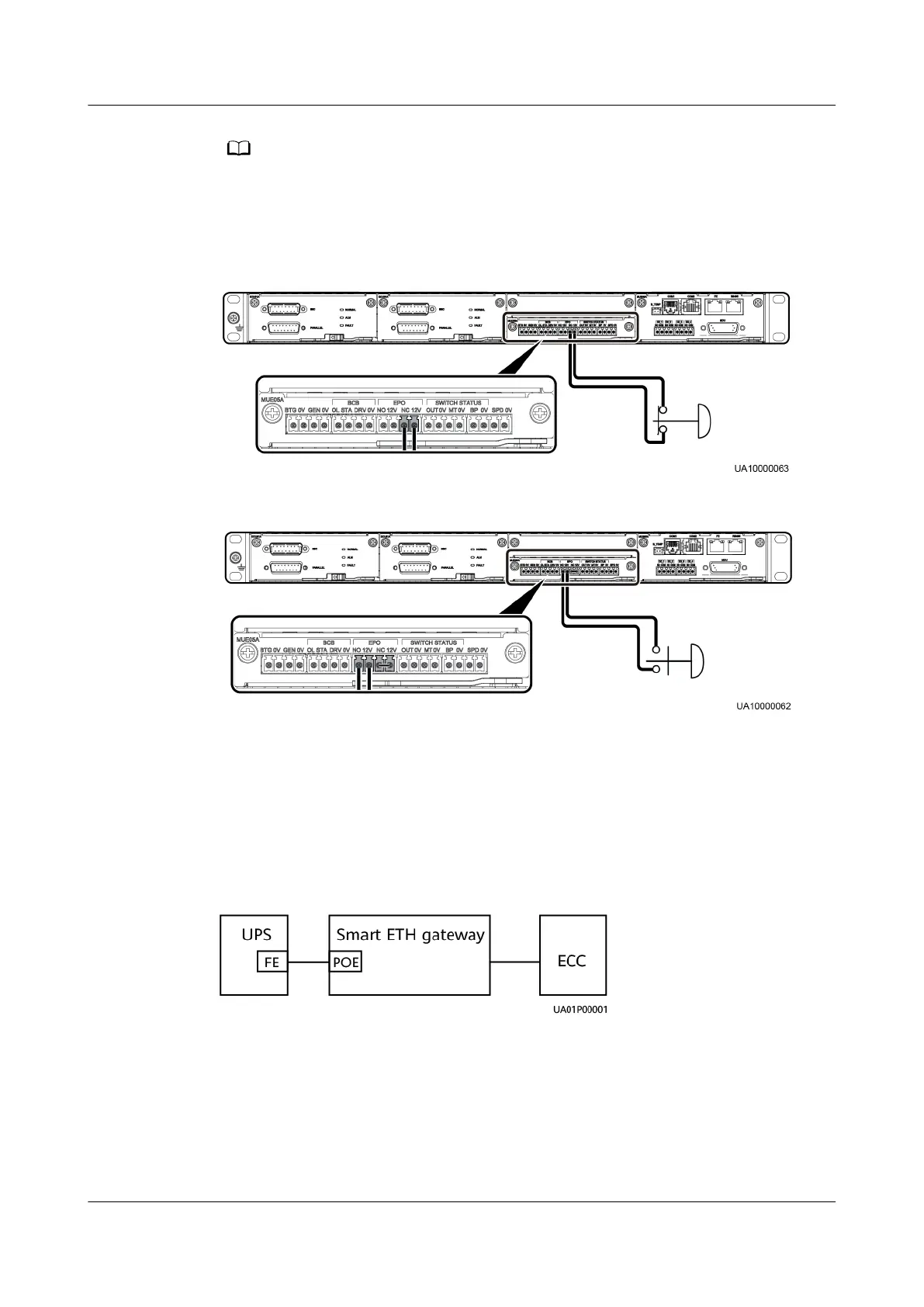
When you use the NC status, remove the jumper between EPO_NC and EPO_12V rst.
When you turn o the EPO switch, EPO is triggered. When you use the NO status, ensure
that the jumper is connected between EPO_NC and EPO_12V. When you turn on the EPO
switch, EPO is triggered.
Figure 3-30 Cable connection for an NC EPO port
Figure 3-31
Cable connection for an NO EPO port
3.2.6.2 Connecting a Communications Cable to a Northbound Device
Procedure
Step 1 Connect one end of the cable to the FE port on the UPS monitoring interface card,
and connect the other end to any PoE port on the smart ETH gateway.
Figure 3-32 Connecting a communications cable
----End
3.2.6.3 Connecting SmartLi Communications Cables
Prerequisites
The battery type is lithium battery.
UPS5000-E-(30 kVA–180 kVA)
User Manual (Integrated UPS) 3 Installation
Issue 02 (2022-12-30) Copyright © Huawei Digital Power Technologies Co., Ltd. 73












 To Next Page