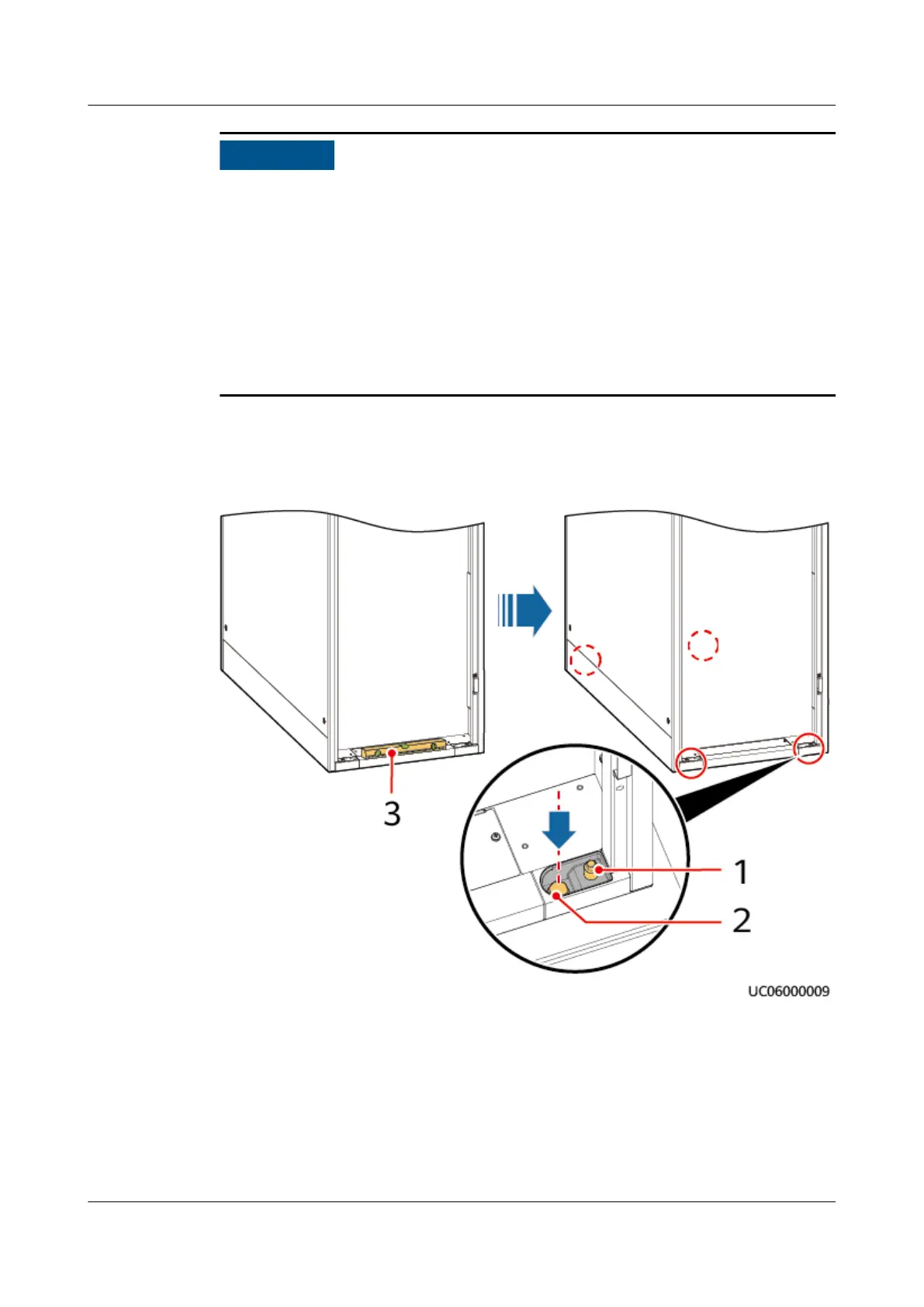
● Wrench an anchor bolt clockwise to elevate the cabinet, or wrench it
counterclockwise to lower the cabinet. The anchor bolts can be wrenched
within a range of 0–8 mm.
● To prevent cabinet tilting, adjust the four anchor bolts instead of one anchor
bolt.
● Use a measuring tape for measurement when leveling the cabinet to ensure
that the height between the cabinet top and the
oor is 2000 mm (tolerance
+3 mm).
● Do not remove anchor bolts. Otherwise, you need to rework them for use.
Step 3 Insert four M12 bolt assemblies into the mounting holes on the UPS and support,
and tighten the bolts.
Figure 3-11 Leveling and tightening bolts
(1) Anchor bolt
(2) Fixing bolt (3) Level
----End
3.2.2 Installing a Tail Frame
UPS5000-E-(30 kVA–180 kVA)
User Manual (Integrated UPS) 3 Installation
Issue 02 (2022-12-30) Copyright © Huawei Digital Power Technologies Co., Ltd. 59












 To Next Page