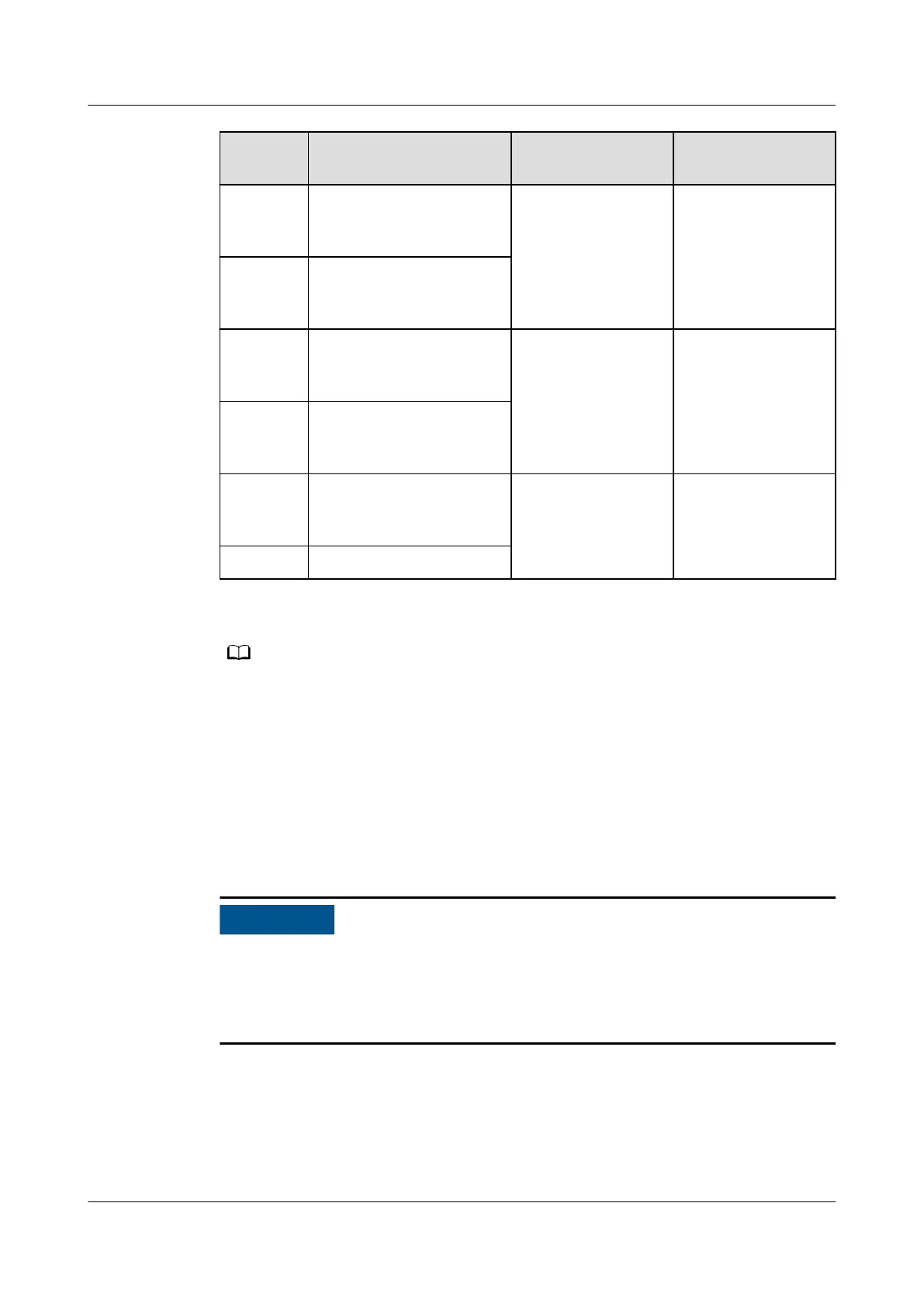
Silk
Screen
Description Status Initial Status
SWITCH
STATUS_
MT
Port for monitoring the
maintenance circuit
breaker
● Disconnected:
circuit breaker
ON
● Connected:
circuit breaker
OFF
Disconnected
SWITCH
STATUS_
0V
Port for signal ground
SWITCH
STATUS_
BP
Port for monitoring the
bypass input circuit
breaker
● Connected:
circuit breaker
ON
● Disconnected:
circuit breaker
OFF
Connected
SWITCH
STATUS_
0V
Port for signal ground
SPD Port for monitoring the
input AC surge
protective device (SPD)
● Connected: SPD
enabled
● Disconnected:
SPD disabled
Connected
0V Port for signal ground
● A port on the dry contact interface card takes eect only after it is set on the
monitoring system. Disable the unused dry contact signals .
● Set the EPO port to NO or NC as required.
● When multiple UPSs are paralleled, all dry contact signals to be used need to connect to
each UPS.
● Signal cables must be double-insulated twisted cables. If the cable length is within 25–
50 m, the cross-sectional area must be 0.5–1.5 mm
2
.
2.3.4.4 Monitoring Interface Card
● Only once being set will dry contact signals take eect. Disable unused dry
contact signals on the monitoring system.
● In a parallel system, ensure that used dry contacts properly connect to each
UPS.
The monitoring interface card provides external ports as well as monitoring and
control functions for the MDU. The ports include the ambient temperature and
humidity sensor port, FE port, battery temperature monitoring port, and network
management port. The MDU monitors the UPS, allows users to set parameters,
delivers commands, reports system information, and displays key UPS information
and parameters on the LCD.
UPS5000-E-(30 kVA–180 kVA)
User Manual (Integrated UPS) 2 Product Overview
Issue 02 (2022-12-30) Copyright © Huawei Digital Power Technologies Co., Ltd. 39












 To Next Page