Procedure
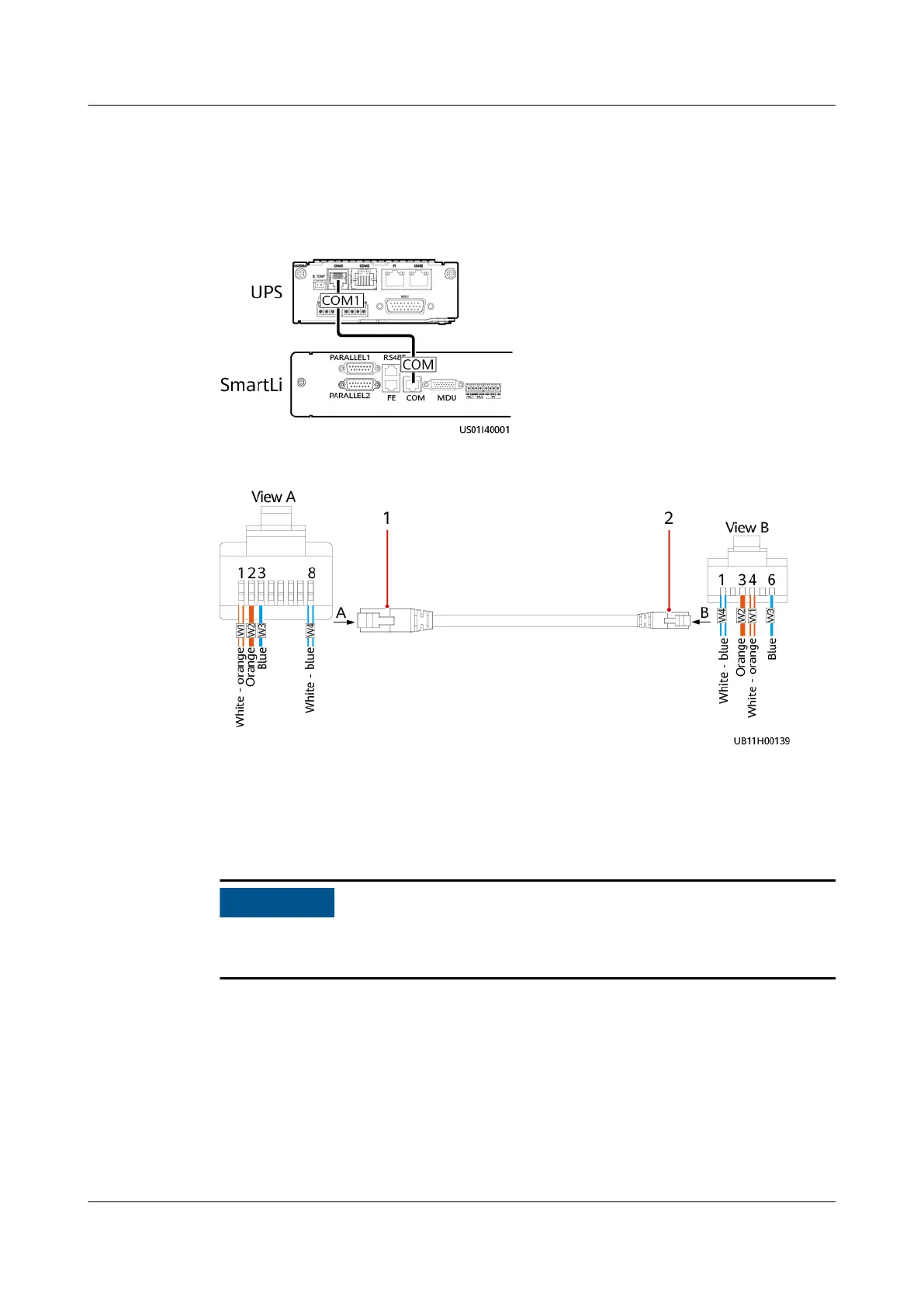
Step 1 Connect one end of the cable to the COM1 port on the UPS monitoring interface
card, and the other end to the COM port on the SmartLi monitoring interface unit.
Figure 3-33 Connecting a communications cable
Figure 3-34 Communications cable between the SmartLi and the integrated UPS
(1) Connecting the 8-pin connector to
the SmartLi
(2) Connecting the 6-pin connector to
the UPS
W1 and W2, and W3 and W4 respectively use a group of twisted-pair cables, and
other redundant core wires are cut
o.
----End
3.3 (Optional) Combining Cabinets
Procedure
Step 1 Open the front and rear doors of the UPS. Adjust the UPS height by turning the
anchor bolts using a wrench. Use a level to check the levelness.
UPS5000-E-(30 kVA–180 kVA)
User Manual (Integrated UPS) 3 Installation
Issue 02 (2022-12-30) Copyright © Huawei Digital Power Technologies Co., Ltd. 74












 To Next Page