● To avoid frequent transfers between ECO mode and normal mode, do not set
ECO mode when the bypass input is unstable or is sensitive to load changes.
● ECO mode is not recommended when the load is less than 10%.
● Before setting ECO mode, ensure that the bypass is working properly.
Procedure
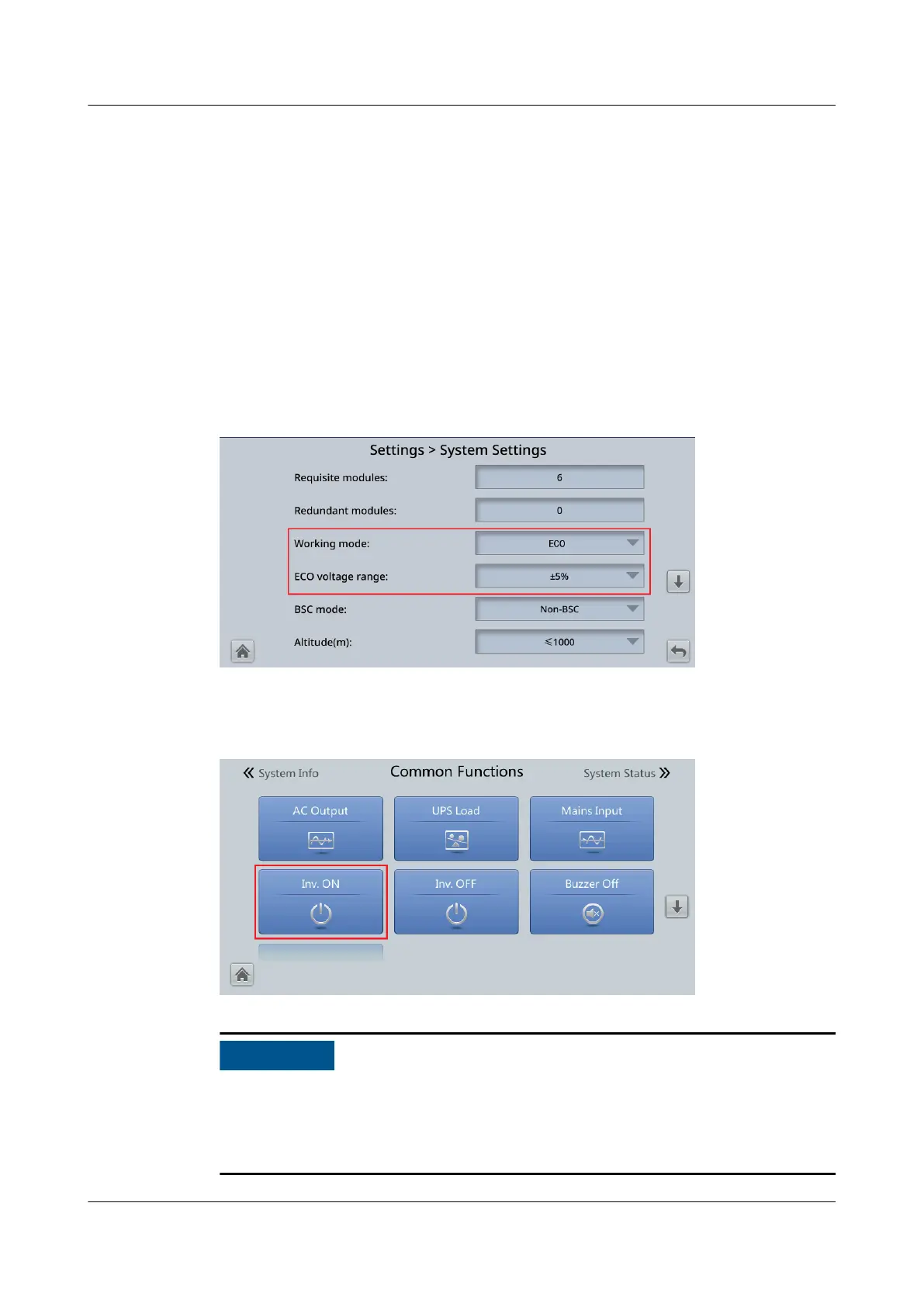
Step 1 On the LCD, choose System Info > Settings > System Settings and set Working
mode to ECO. The information indicating that the UPS works in ECO mode is
displayed on the LCD.
Step 2 Set the ECO voltage range.
Figure 5-4 ECO parameters
Step 3 (Optional) If you set ECO mode in bypass mode, manually start the UPS inverter.
Figure 5-5 Manually starting the inverter
After startup, the UPS still supplies power through the bypass, and the inverter is
standby. When the bypass is abnormal, the UPS transfers to inverter mode
immediately. If the inverter is not started, the UPS cannot transfer to inverter
mode immediately when the bypass is abnormal, and the system may power
o.
UPS5000-E-(30 kVA–180 kVA)
User Manual (Integrated UPS) 5 Operations
Issue 02 (2022-12-30) Copyright © Huawei Digital Power Technologies Co., Ltd. 133












 To Next Page