Automatic Shallow Discharge Test
Step 1 On the home screen of the LCD, choose System Info > Settings > Battery
Settings and set Sched. shallow dis. test to Enable.
Step 2 Set Sched. shallow dis. test time and Sched. shallow dis. test interval as
required. After setting is complete, the system will perform automatic shallow
discharge tests based on the settings.
----End
Manual Shallow Discharge Test
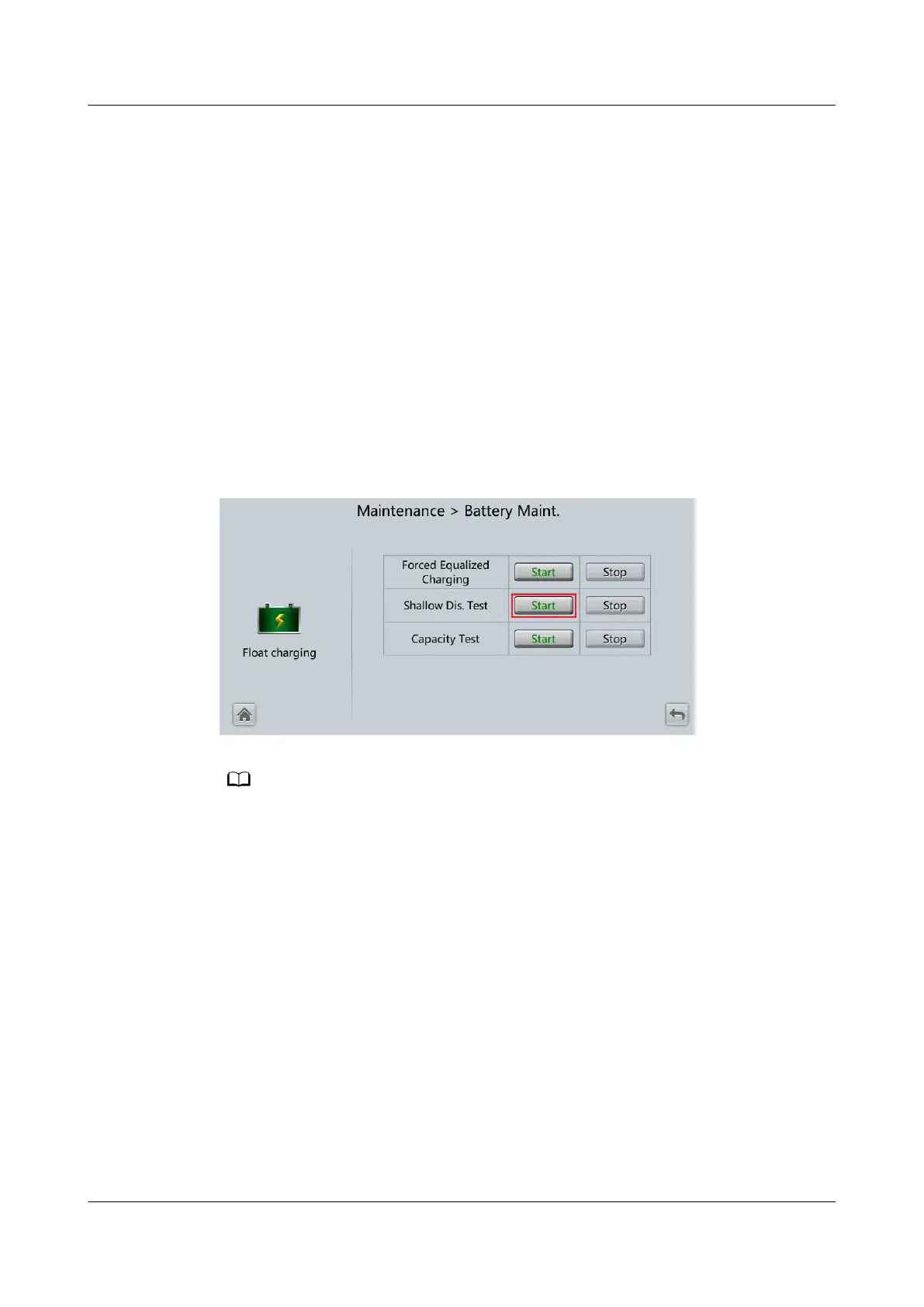
Step 1 On the home screen of the LCD, choose System Info > Maintenance > Battery
Maint.
Step 2 Tap Start on the right of Shallow Dis. Test to start a shallow discharge test.
Figure 5-9 Starting a shallow discharge test
When the battery test is completed normally, the test data is used as common test data.
Record the data obtained from the latest ve tests.
The shallow discharge test automatically stops in any of the following cases:
● The battery discharge capacity reaches the
specied value (10%–50%, 20% by default).
● The discharge voltage reaches the warning threshold (calculated in real time).
● The load rate uctuation exceeds 10%.
● A fault alarm is generated.
----End
UPS5000-E-(30 kVA–180 kVA)
User Manual (Integrated UPS) 5 Operations
Issue 02 (2022-12-30) Copyright © Huawei Digital Power Technologies Co., Ltd. 136












 To Next Page