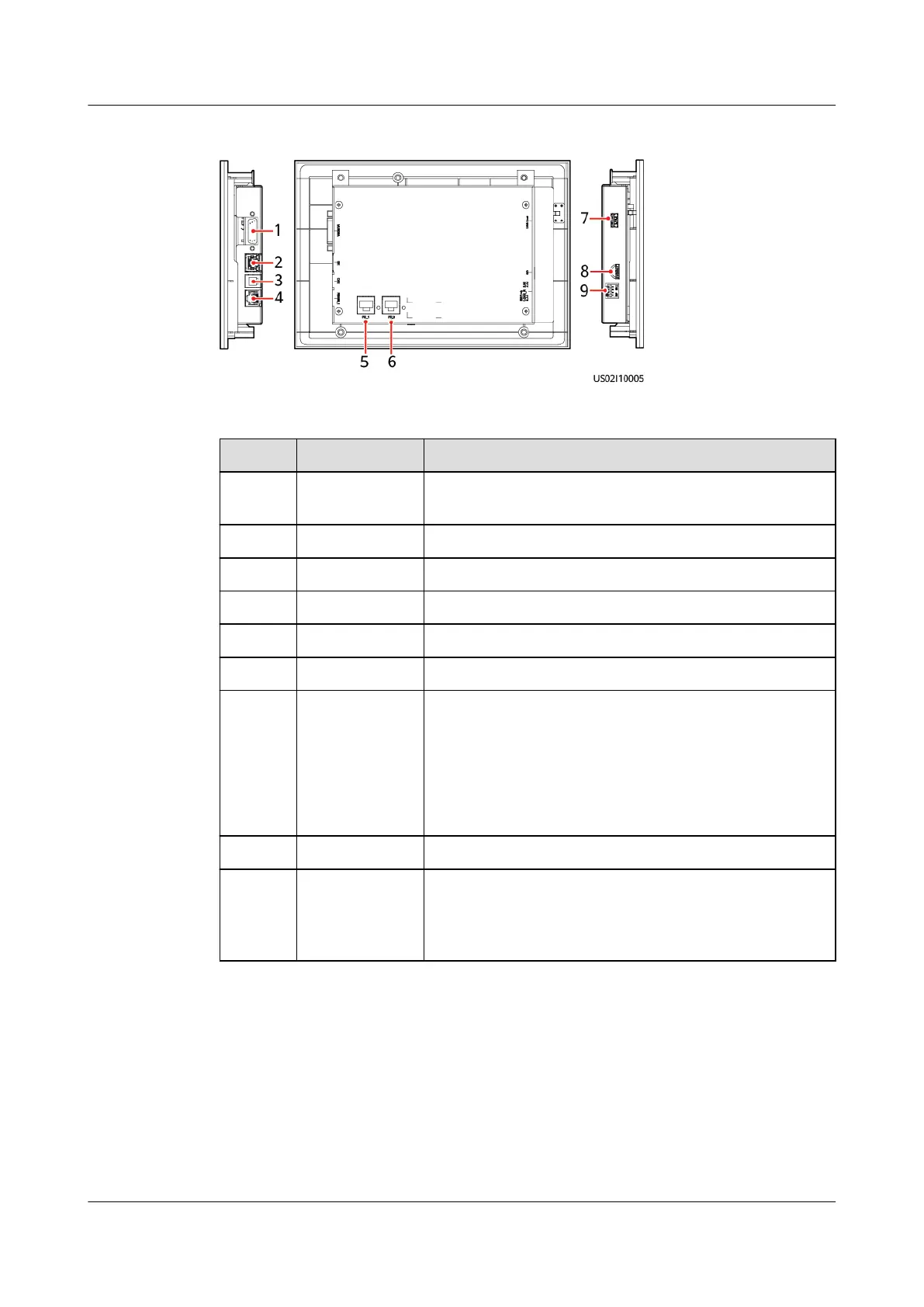
Figure 2-21 MDU ports
Table 2-12 MDU port description
No. Port Name Description
1 MUS05A
(DB26)
Connects to the MDU and monitoring interface card.
2 GE Connects to a Huawei northbound device.
3 CAN Reserved
4 RS485_1 Reserved
5 FE_1 Reserved
6 FE_2 Reserved
7 USB Host Insert a USB ash drive to import and export
conguration les, export run logs, and upgrade
software.
NOTE
The USB port is protected by a security mechanism. Users
can export and import data and upgrade software only
after being authenticated.
8 SD Reserved
9 DIP switch Implements specic functions by using the DIP
switch and specic buttons; controls the CAN
communication build-out resistor in a parallel
system.
Functions
The MDU allows you to control UPS operations, view the running status and
alarms, and set parameters.
Specications
Dimensions (H x W x D): 175 mm x 264 mm x 40 mm
UPS5000-E-(30 kVA–180 kVA)
User Manual (Integrated UPS) 2 Product Overview
Issue 02 (2022-12-30) Copyright © Huawei Digital Power Technologies Co., Ltd. 45












 To Next Page