158 - Inepro Back Office Suite
Configuration
When the CSV wizard to import data tables from a Comma Separated Values files is started, the choice between 'Easy' and
'Enhanced' is shown.
Unless very specific wishes on how the data is stored (kind of type and the format) are required and/or instructions are
given to choose 'enhanced' by our support team, 'Easy' should always be chosen. Click .
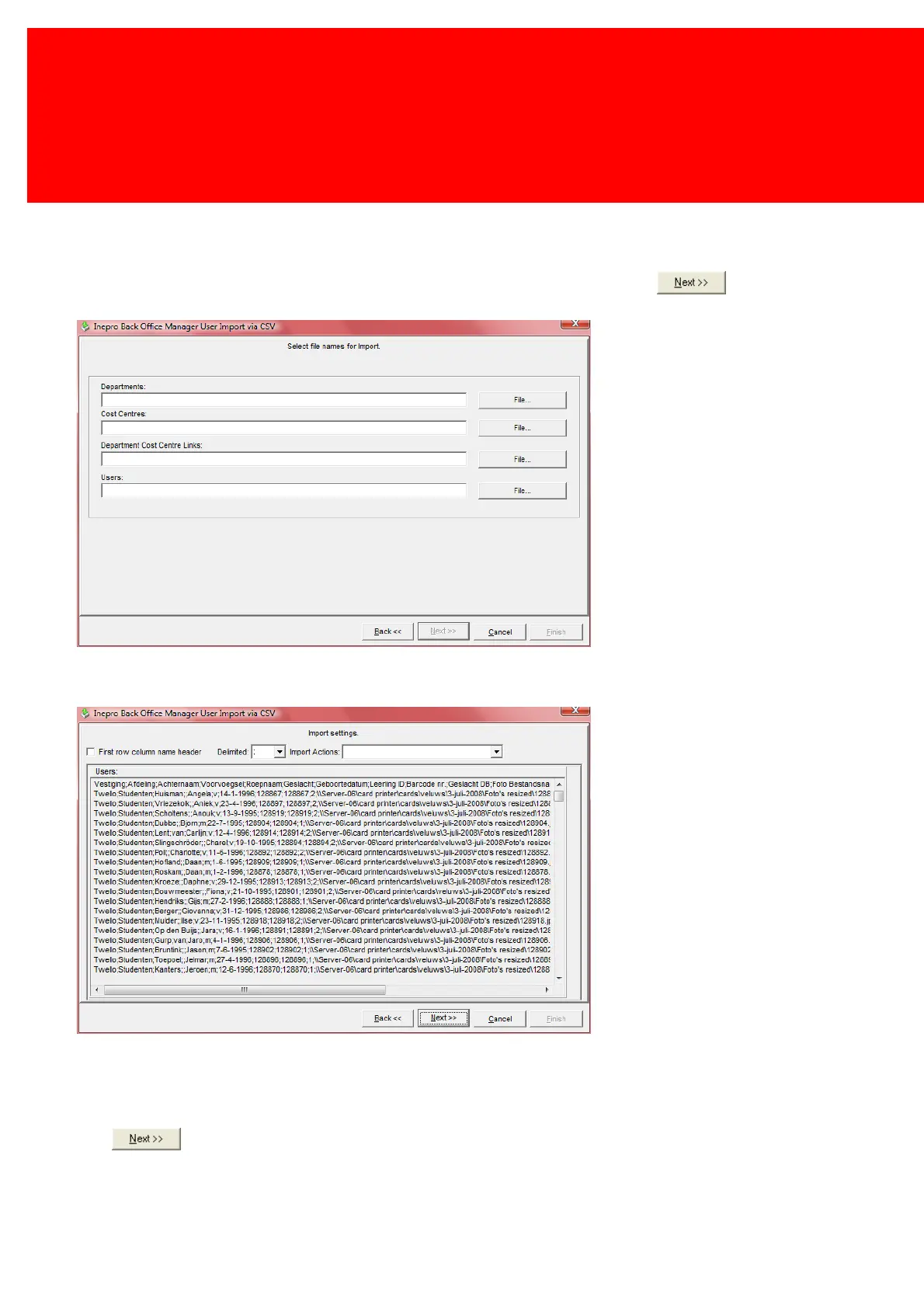
Connect the *.csv files to the tables in the Inepro database by clicking the "File" button next to the table that needs to be
filled and selecting a *.csv file.
This is the Import Settings screen where the properties of the *.csv files will be set.
Check the 'First row column name header' if the first line in the *.csv file hold the field names or headers of the data.
Set the character used as delimiter in the Delimited field. This is the character at the end of a value in the *.csv file. It is
usually a ';' or a ','.
In the 'Import Actions' field the action of the imported information can be chosen, 'Insert', 'Update' or 'Delete'.
Click .


 To Next Page