8.2.6 Drive program selection after component replacement
The drive program is saved in the remote and in the power module. If one of these two components
is replaced, the system must be told which of the components has not been replaced so that it
knows which contains the current controller profile.
Note
The system allows normal usage of the mobility aid after component replacement only if the
profile is selected afterwards.
8.2.6.1 Profile selection with remote REM A or REM B
• Insert the plug into the remote or into the power module respectively.
• Switch the remote on.
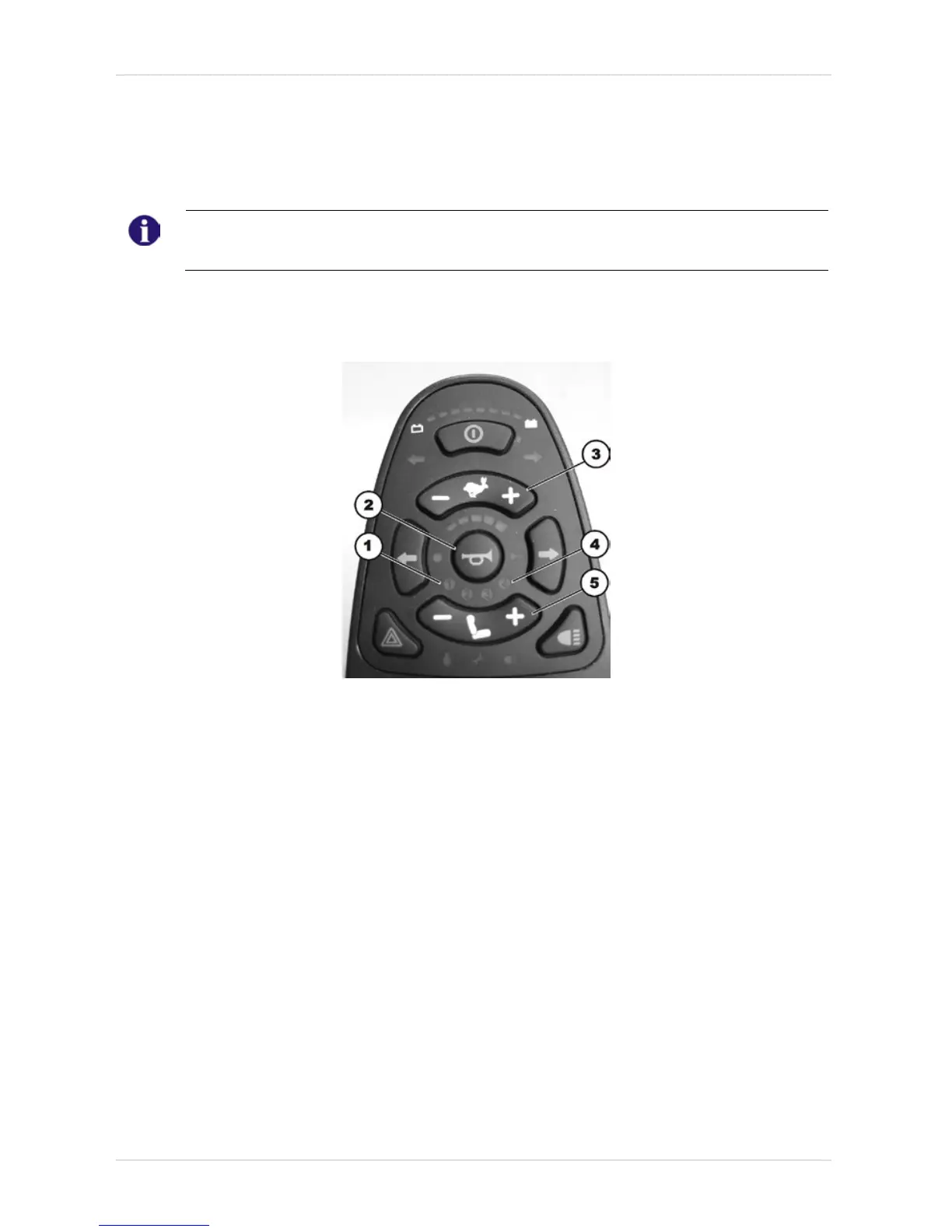
• LEDs (1) and (4) blink.
• Use the bottom rocker switch (5) to select where the required controller profile is saved.
LED 1 = power module
LED 4 = remote
Only LED (1) or (4) blinks now depending on the selection.
• Press the "Horn“ (2) and "+“ (3) buttons on the speed selection and hold them down for 3
seconds to confirm the selection.
The system will switch itself off and restart automatically. In the process, the selected profile is
saved in the remote and in the power module.






 To Next Page