iPECS-MG
Hardware Description and Installation Manual Issue 1.1
87
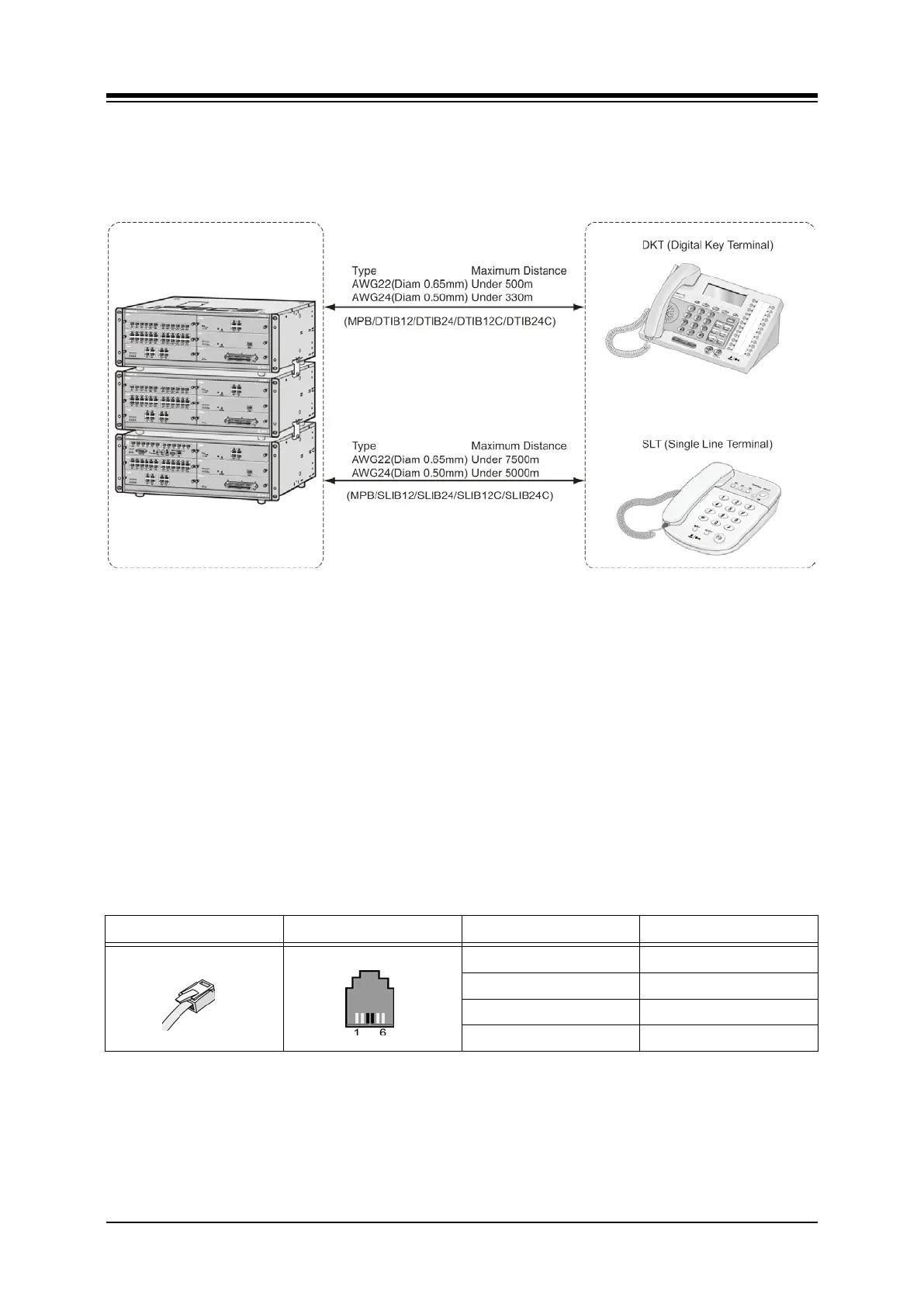
6.1.1 Terminal Cabling Distance
Figure 6.1.1-1 Terminal Cabling Distance
6.1.2 Terminal Connections
6.1.2.1 DKT Wiring
The Digital Key Telephone and digital DSS Console are terminated to the 1st pair of the RJ11
located in the bottom of the DKT or Console. The wall outlet for the DKT or Console should be
connected back to an appropriate DTIB or MPB DSIU DKT port.
Referring to the pin-out chart below and Figure 6.1.1-1,
Wire the wall outlet 1st pair to the DTIB or DSIU termination point using UTP cable.
Note separate wiring is required for the LDP-7048 DSS Console.
Using the line cord provided, connect the DKT or DSS Console to the wall outlet.
Table 6.1.2.1-1 DKT Pin-out Chart
Line Cord CONNECTOR PIN SIGNAL NAME
RJ11 1,2 Not used
3 Ring
4 Tip
5,6 Not used



 To Next Page