LIP-9071 iPKTS User Guide
2
2 Installation
2.1 Overview
LIP-9071 phone is shipped with LIP-9071 phone, handset, pedestal, 6-ft Cat 5 cable terminated in RJ-45
connectors and the Quick Guide. An optional AC/DC adapter is available for use when the network connection
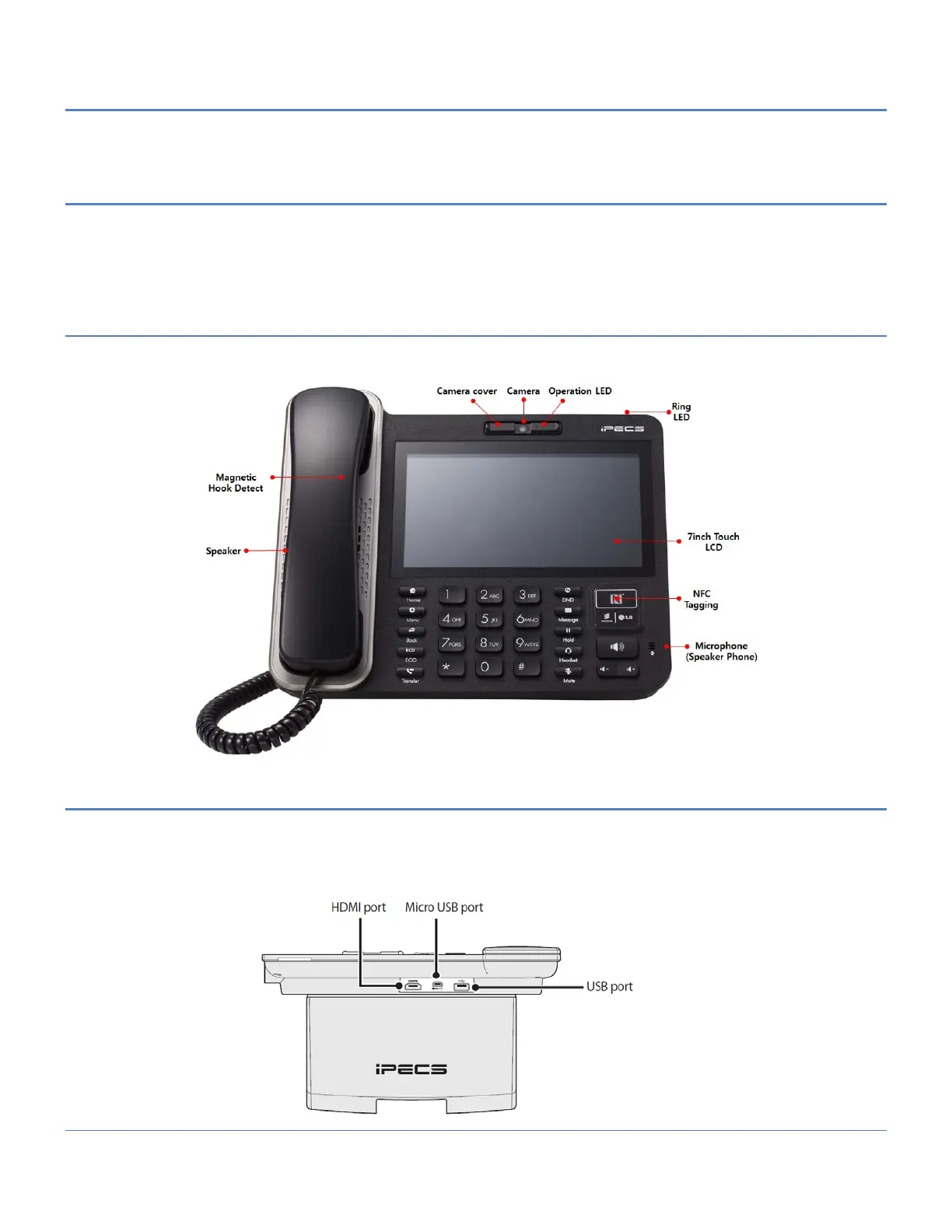
does not support IEEE 802.3af up to class 4 PoE (Power over Ethernet). The figures below present line drawings
of the front and top of LIP-9071 phone identifying major elements of the user interface and external connections.
2.2 Front view
LIP-9071 has hardware button interface with touch interface as well. The front camera provides slide cover to hide
camera lens for security purpose.
2.3 Top view
LIP-9071 has external device interface for USB, Micro USB and HDMI display. USB devices can be connected via
the USB port. For example, connect a USB flash drive to save pictures or MP3 files. And Connect display device to
the HDMI port using standard HDMI cable.
* The main purpose of micro USB is for debugging by installation engineer.



 To Next Page