Chapter 7 SETUP MODE
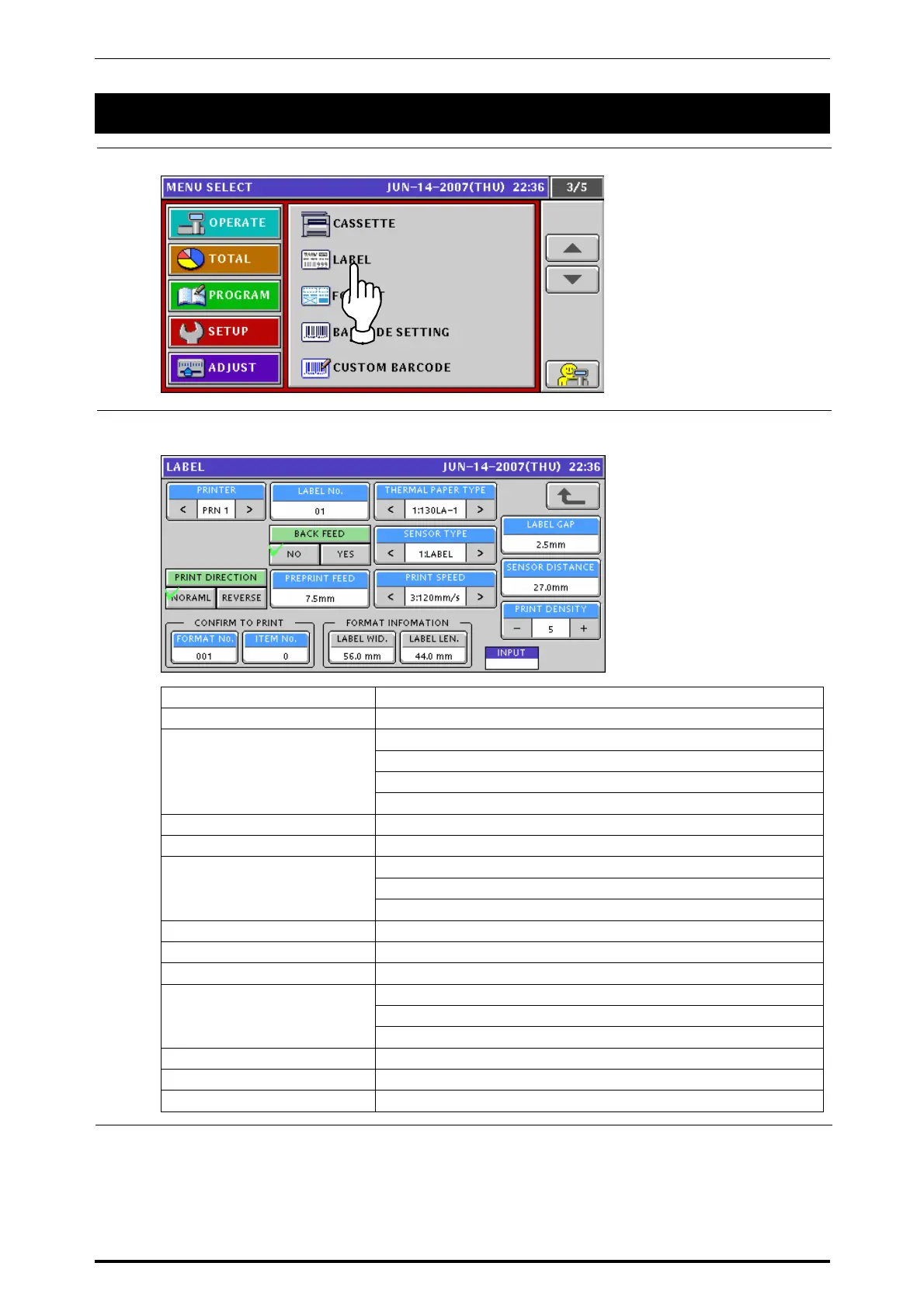
7.3 LABEL SETTING
1.
Press the “LABEL” field on the setup menu screen.
2.
The label setup screen appears.
Press to select a desired field for each item.
PRINTER Select a desired printer.
LABEL NO. Enter a numeric value and press this field.
Select one of the following types:
0: Receipt
1: 130LA-A
THERMAL PAPER TYPE
3: 150LA-1
LABEL GAP Enter a numeric value and press this field.
BACK FEED Press to select either “NO” or “YES”.
Select one of the following types:
0: No use
SENSOR TYPE
1: Label
SENSOR DISTANCE Enter a numeric value and press this field.
PRINT DIRECTION Press to select either “NORMAL” or “REVERSE”.
PREPRINT FEED Enter a numeric value and press this field.
Select one of the following print speeds:
1: 80mm/sec
PRINT SPEED
2: 100mm/sec
PRINT DENSITY Select a desired print density level (0 – 9).
FORMAT NO. Enter a numeric value and press this field.
ITEM NO. Enter a numeric value and press this field.
7-10 UNI-7 Service Manual



 To Next Page