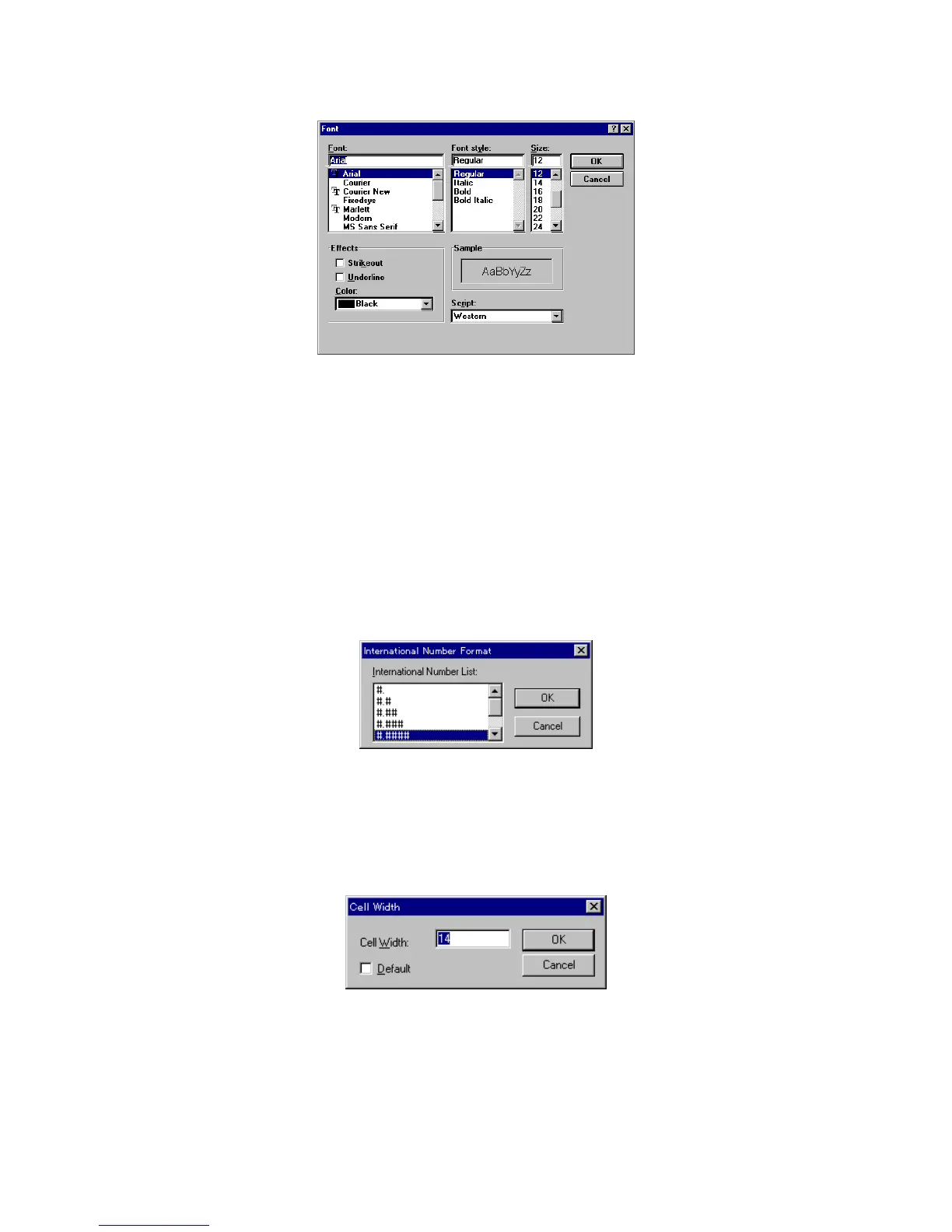
F igure 4.27 [F ont] dialog box
[F ont] list S elect a font from this list.
[F ont S tyle] list S elect a font style from this list.
[S ize] list S et a font size.
[E ffects] S et special character styles such as strike-through or underlined.
[C olor] list S et a font color.
[S am ple] D isplays a sam ple of the set font.
4.5.2 [F orm at...]
S elect a colum n. C lick [V iew ] - [F orm at...] to set the num ber of decim al places to appear on the [D ata S heet].
T his can be set individually for each colum n. This function is active only w hen the [D ata S heet] w indow is
active.
F igure 4.28 [International N um ber F orm at] dialog box
4.5.3 [C ell W idth...]
C lick [V iew ] - [C ell W idth...] to set the cell w idth for each colum n of the [D ata S heet]. T his function is active
only w hen the [D ata S heet] w indow is active.
F igure 4.29 [C ell W idth] setting dialog box
[C ell W idth] Text box for inputting cell w idth. Input range is 4 to 32 characters.
[D efault] T he standard cell w idth is 12 characters.
4.5.4 [S cale...]
C lick [V iew ] - [S cale...] to set the scale of the vertical and horizontal axes of the calibration curve. S elect the



 To Next Page