OPERATOR'S STATION
1-27
IMPORTANT: Each time the oil is changed and/or oil
filter is replaced, reset the displayed monitor time by
pressing monitor display mode selector (1) for more
than 2 seconds.
Beware not to press monitor display mode selector
(1) when the display is indicating the time to change
or replace. The display will not be able to indicate the
correct time.
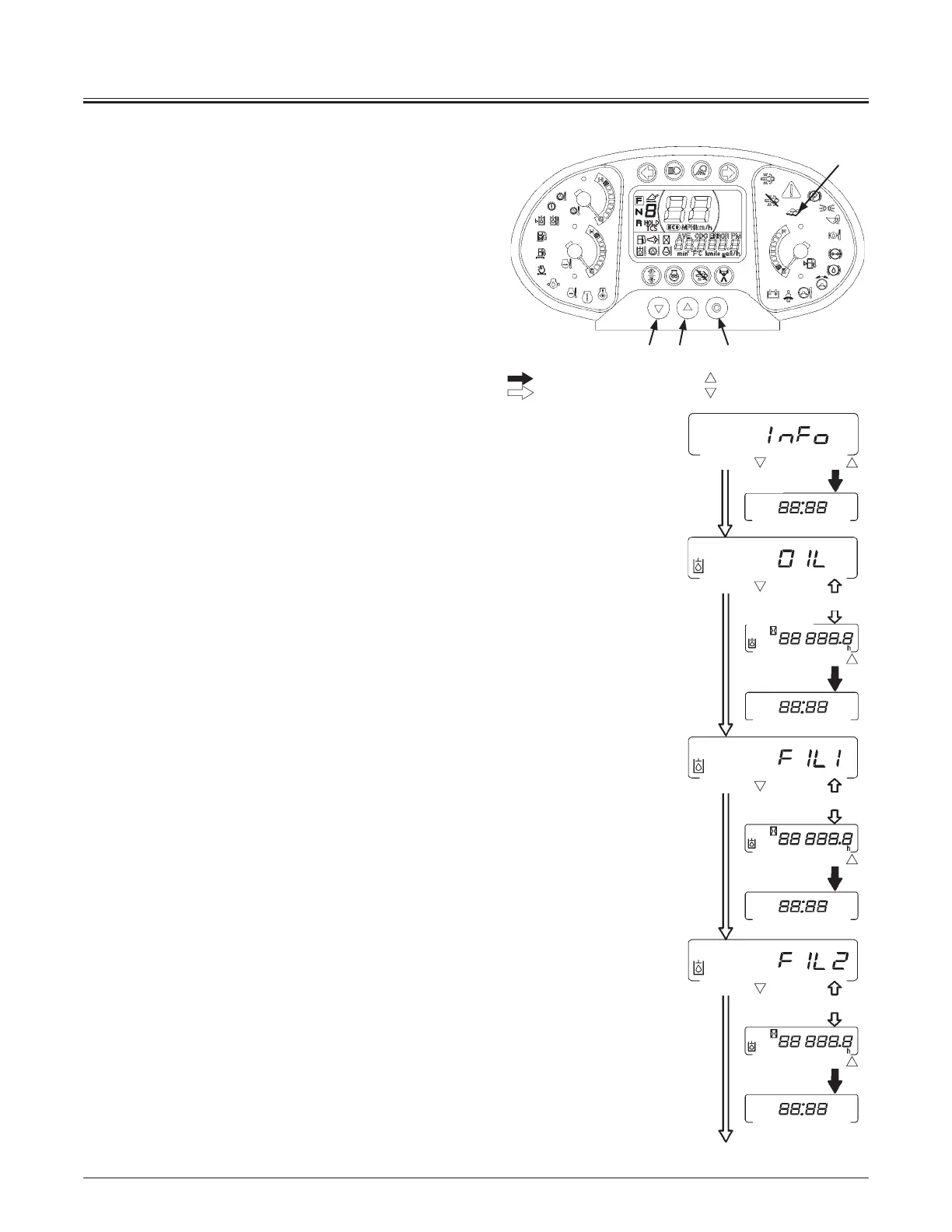
y INFO
When screen A is indicated, press monitor display selector (2)
once at a time to return to the clock display screen B. Then,
when monitor display selector (3) is pressed, the screen is
shifted to the hydraulic hour meter display C.
y Hydraulic Oil Hour Meter
Screen C and time screen D indicating the remaining hours up
to hydraulic oil change are alternately displayed
When the remaining hour reading becomes 0 hour,
maintenance indicator (4) will light.
While displaying screen D, when monitor display selector (2) is
pressed, the screen is returned to time screen B. When monitor
display selector (3) is pressed, screen E of “Hydraulic oil filter 1
hour meter” is displayed.
Refer to page 1-30 for the resetting of oil change and filter
replacement intervals.
y Hydraulic Oil Filter 1 Hour Meter
Screen E and time screen F indicating the remaining hours
up to hydraulic tank oil filter replacement are alternately
displayed
When the remaining hour reading becomes 0 hour,
maintenance indicator (4) will light.
While displaying screen F, when monitor display selector (2) is
pressed, the screen is returned to time screen B. When monitor
display selector (3) is pressed, screen G of “Hydraulic oil filter 2
hour meter” is displayed.
Refer to page 1-30 for the resetting of oil change and filter
replacement intervals.
y Hydraulic Oil Filter 2 Hour Meter
Screen G and time screen H indicating the remaining hours up
to pilot oil filter replacement are alternately displayed
When the remaining hour reading becomes 0 hour,
maintenance indicator (4) will light.
While displaying screen H, when monitor display selector (2) is
pressed, the screen is returned to time screen B. When monitor
display selector (3) is pressed, screen I of “Transmission oil hour
meter” is displayed.
Refer to page 1-30 for the resetting of oil change and filter
replacement intervals.
INFO
Hydraulic Oil
Hour Meter
Hydraulic Oil Filter 1
Hour Meter
Clock
Clock
Remaining hours
before replacement
is displayed.
Remaining hours
before replacement
is displayed.
Clock
Remaining hours
before replacement
is displayed.
Clock
Hydraulic Oil Filter 2
Hour Meter
Alternate display
Alternate display
Alternate display
C
A
D
B
B
E
F
B
B
G
H
MNDB-01-008
32 1
4
Press button
Press button
Press button
Press button
Press button
Press button
Press button
Press button
: When monitor display selector ( )(2) is pressed once:
: When monitor display selector ( )(3) is pressed once:
MNDB-01-040



 To Next Page