OPERATOR'S STATION
1-26
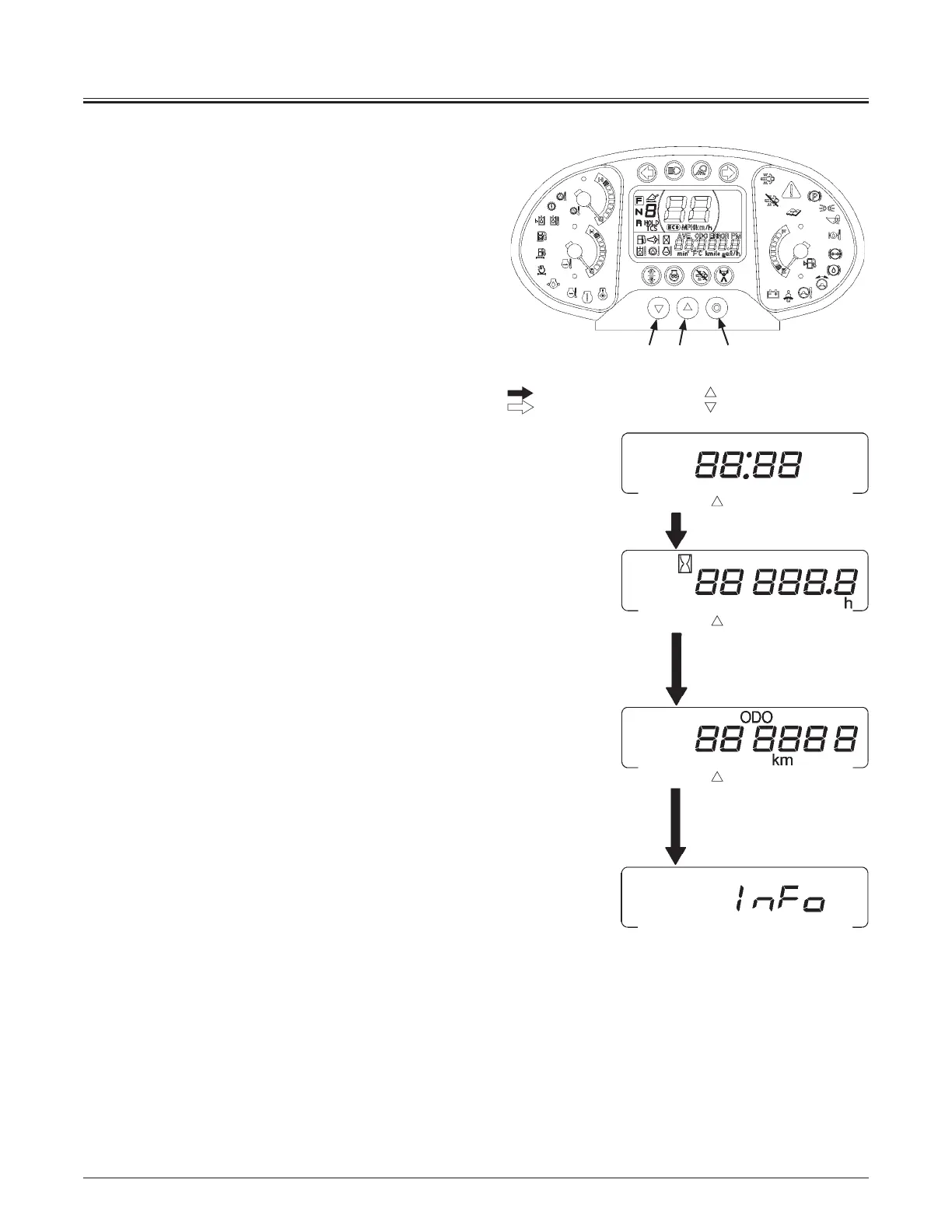
Shifting Item to be Indicated on Machine Information
Display
Press monitor display selector (2) to shift the display item
one a time in order from the clock display on the machine
information display.
y Clock (24H)
Indicates the present time. When this display is indicated, press
monitor display selector (2) one a time to display the Hour
Meter.
y Hour Meter
Indicates the total machine operating hours up to present. In
case the operating hour exceeds 99999.9h, the meter restarts
counting the hour from 0 hour. When this display is indicated,
press monitor display selector (2) once at a time to display the
odometer.
y Odometer
Indicates the total machine traveling distance up to present.
When this display is indicated, press monitor display selector
(2) once at a time to display the INFO.
Clock (24H)
Hour Meter
Odometer
INFO
MNDB-01-008
32 1
Press button
Press button
Press button
: When monitor display selector ( )(2) is pressed once:
: When monitor display selector ( )(3) is pressed once:
MNDB-01-039



 To Next Page