26 PWR-01
Installation and Preparation | Connecting to the Output Terminals
1
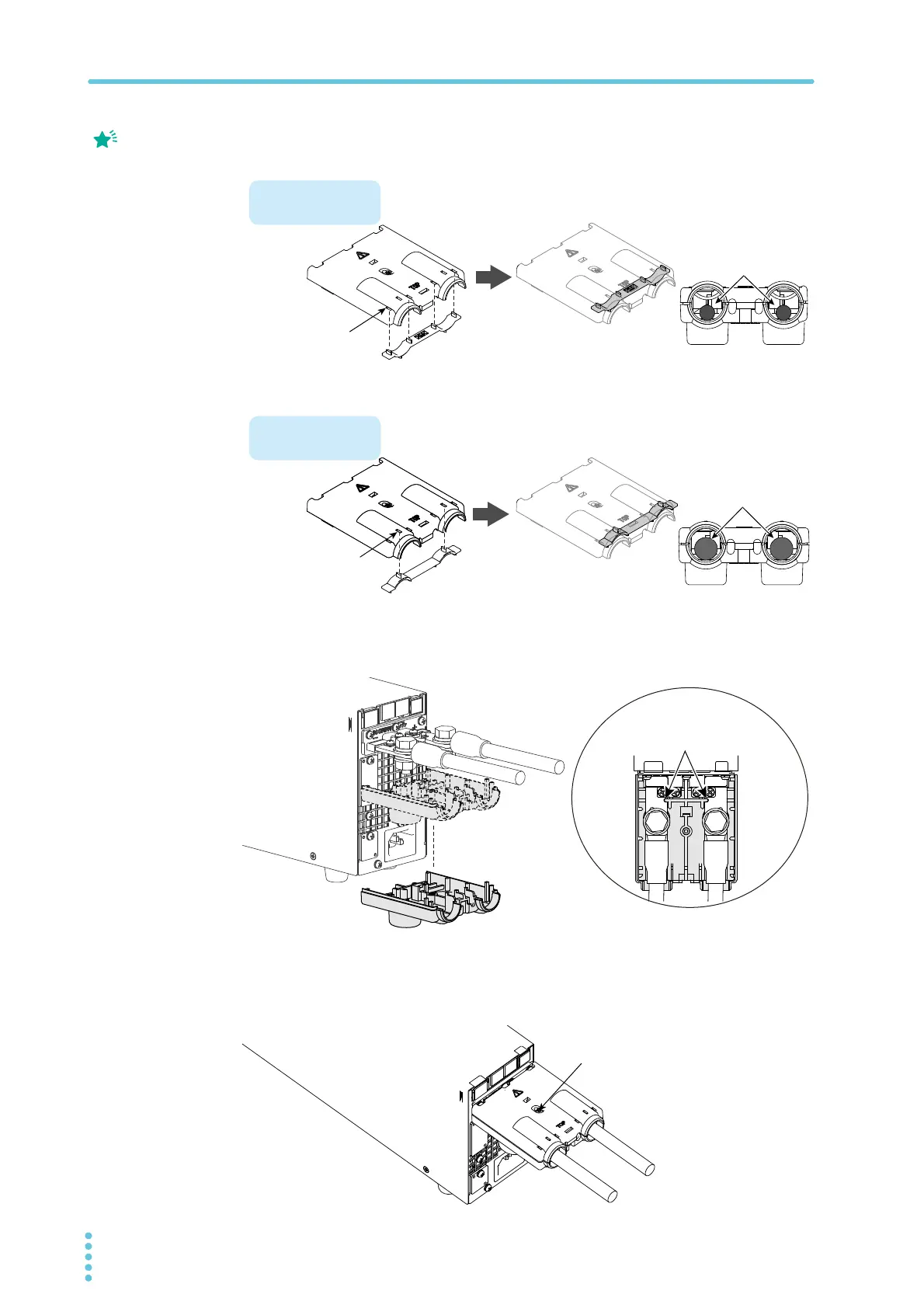
Attach the adapter to the top half of the OUTPUT terminal cover.
Insert the adapter tabs into the cuts in the OUTPUT terminal cover.
2
Align the bottom half of the OUTPUT terminal cover to the rear-panel
output terminals.
3
Place the top half of the OUTPUT terminal cover over the bottom half,
and screw them together.
Make sure that the screws are securely fastened.
The top and bottom
halves of the OUTPUT
terminal cover have
different shapes.
Cable diameter
(including the insulation)
ø8 to ø17
Cable diameter
(including the insulation)
Up to ø7
For thick load cables
Top half of the cover
cable position
Insert the adapter
tabs into the two
Insert the adapter
tabs into four two
cuts in the top half
Align the cover to the cut-out in
the rear-panel output terminal.
400W model example
After you have lined up the top and
bottom halves of the cover, use the
screws to fix the cover in place.
Screw (M3)








 To Next Page