PWR-01 39
Basic Features | Output Operation
Soft start/ stop function
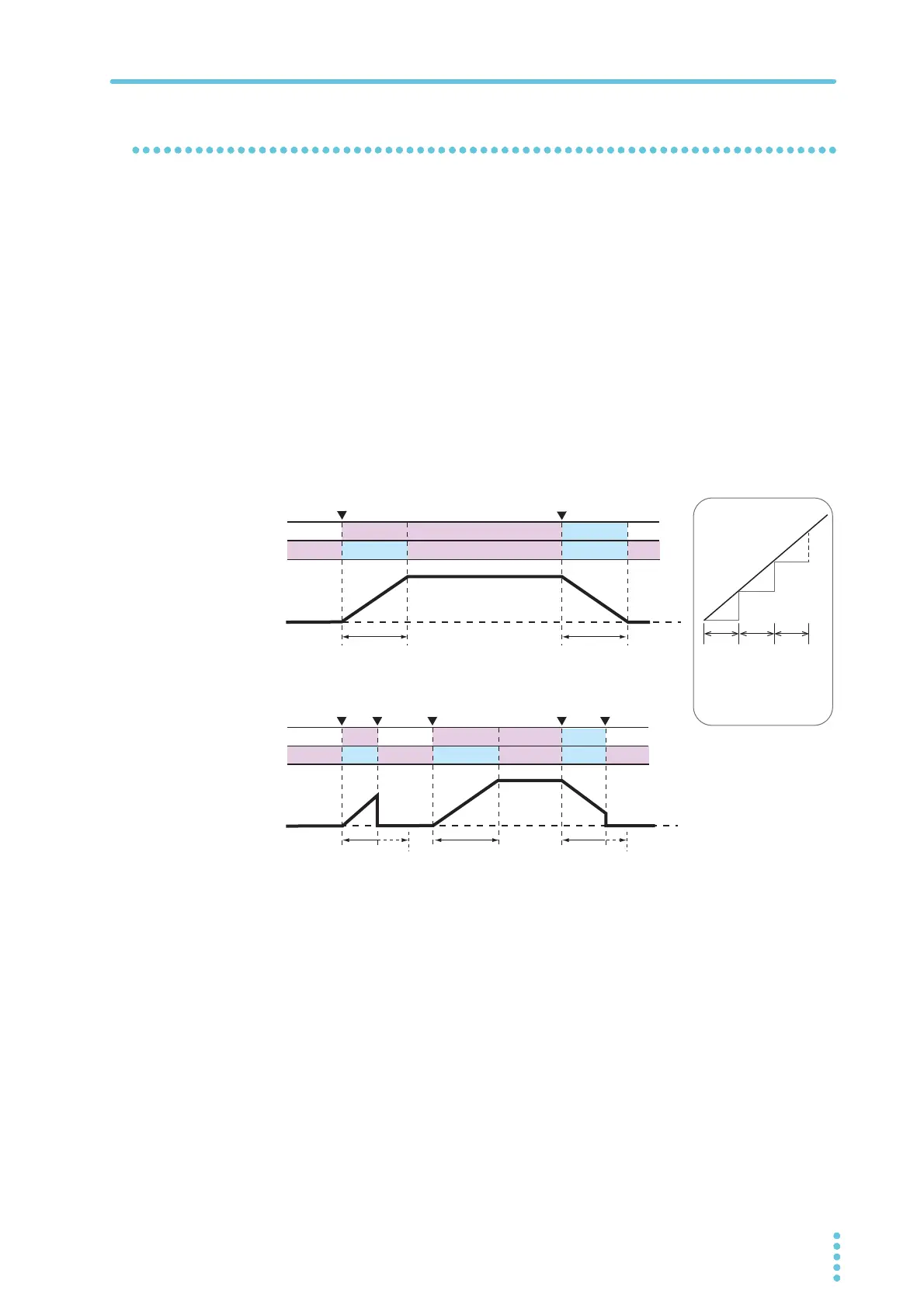
You can set the rise time and fall time of output current.
This is useful when the load cannot follow the sudden rise or fall in the output current or when
you want to avoid the overcurrent protection from being activated.
Set the soft start time (CF04/ CF06) and soft stop time (CF05/ CF07) CONFIG parameters.
The soft start and soft stop times are applied to the operation mode set by the output-on
startup state (CF02: CV/ CC).
When you set the this function, SS lights.
When soft start is in effect, SS blinks, and the OUTPUT LED lights green.
When soft stop is in effect, SS and the OUTPUT LED blink green.
If you press OUTPUT when soft start or soft stop is in effect, the process is canceled, and the
output is turned off. If you press OUTPUT again, soft start resumes.
If the bleeder circuit is set to off, the output current may not fall gradually even if soft stop is
used.
0.1s 0.1s 0.1s
Actually, each
transition takes
place over 0.1 s.
Blinking Off
Lit
LitLit
Lit
Lit
Lit
Blinking
Off
Blinking
Blinking
Off
Lit
Off
Lit
Off
Lit
Blinking Blinking
LitLit
Lit
Blinking
On
Off Off
Soft stop timeSoft start time
Soft start
canceled
Soft stop
canceled
OUTPUT LED
SS LED
OUTPUT LED
SS LED
PWR-01 output
PWR-01 output
źUHSUHVHQWVWKDWWKH287387NH\KDVEHHQSUHVVHG
Soft stop timeSoft start
Soft start time
Forced to off
Off
On








 To Next Page