80 PWR-01
Synchronized Operation
Synchronized operation is a function that synchronizes settings and the resumption of
sequence programs using trigger signals.
Different PWR-01 models (e.g., PWR400W and PWR800W) can be mixed and connected.
Synchronized operation is also possible in parallel operation.
Synchronized operation has the following features. To perform synchronized operation, you
need to configure various settings using commands through remote control. After configura-
tion, synchronized operation can be performed without a PC.
• Synchronization of voltage and current settings (trigger subsystem: TRANsient)
Output variation can be synchronized. This is useful when you want to synchronize to the
operation of external devices. The trigger source needs to be set to hardware trigger wait
state (TRIG:TRAN:SOURTRIGIN).
• Synchronization of sequence program steps (trigger subsystem: PROGram)
The resumption of paused steps in a sequence program can be synchronized. On each
model, the trigger input of specific steps needs to be set to on (PROG:STEP<n>:TRIGIN
ON).
Set the trigger signal polarity using CONFIG settings (CF83: trigger input signal polarity,
CF84: trigger output signal polarity) (p.69). Make the polarities of all trigger signals of con-
nected devices the same. The factory default setting is positive trigger.
Synchronization pulses are signals with 100 μs widths.
The RS232C connector and TRIG IN connector are the same. When performing synchro-
nized operation through remote control, RS232C cannot be used.
For details on the setting, see the “Communication Interface Manual” in the included CD-
ROM.
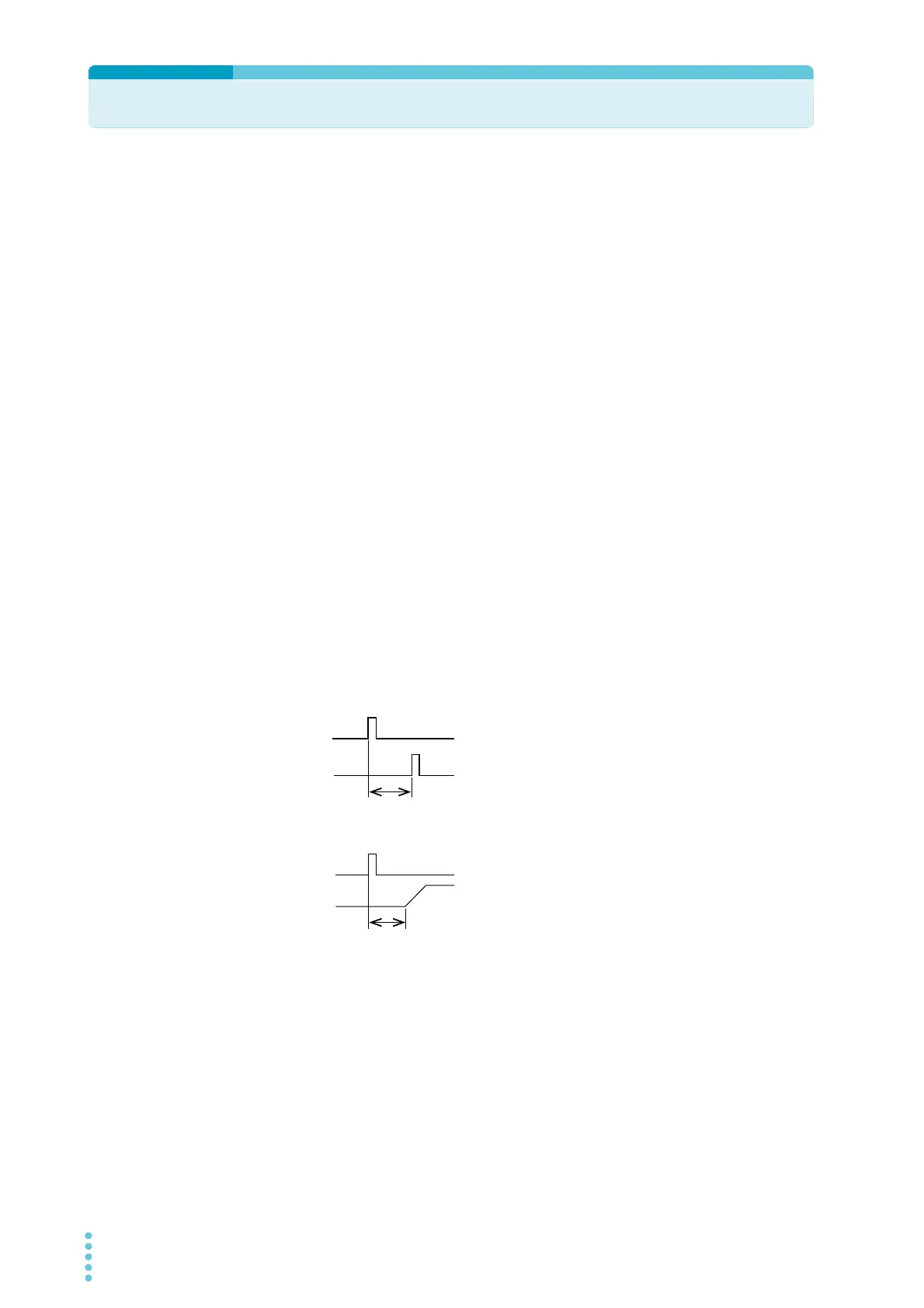
Synchronized operation delay
The delay from when a TRIG IN signal is received to
when a TRIG OUT signal is transmitted is 1 ms (typical
value).
The delay from when a TRIG IN signal is received to
when the voltage/ current is produced is 850 μs (typical
value).
When using a cascade connection as shown in connection example 2 (p.82), carefully con-
sider the number of connected units and the delay.
1 ms (typical value)
TRIG IN
TRIG OUT
TRIG IN
Output voltage
or current
ȝVW\SLFDOYDOXH








 To Next Page