4 Operation
Special equipment
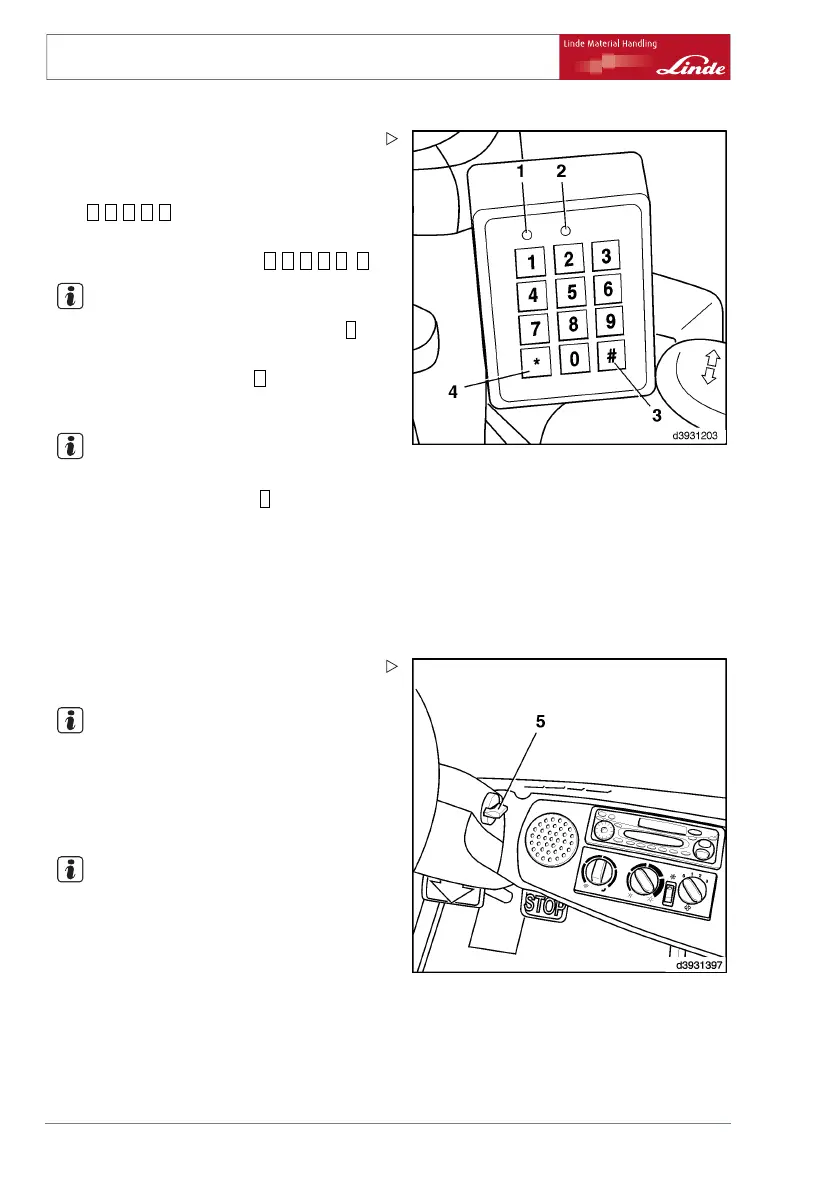
¾ Press any key to start input device.
The green LED (2) flashes.
¾ Enter personal PIN number (facto
ry setting
=
0 0 0 0 0
) and status code.
Therefore, for a properly set-up truck, the PIN
number should be as follows:
0 0 0 0 0 0
.
NOTE
If the PIN was input incorrectly,
press the
*
button (4) and enter the correct P
IN number.
¾ Confirm the input with the
#
button (3).
The green LED (2) lights up continuously.
NOTE
If the red LED (1) lights up, an inco
rrect PIN
number was input. Press the
*
button
(4) and
enter it again. If more than three i
ncorrect in-
puts are made (factory setting), t
he red LED
(1) lights up and the green LED (2) f
lashes.
The input of a valid PIN is blocke
d for 10 minu-
tes. The blocking time can be int
errupted by
inputting a special PIN number.
Please con-
tact your fleet manager.
¾ Turn the rotary knob (5) in a clockwise direc-
tion against the stop and start the vehicle.
NOTE
If the vehicle does not start properly the first
time, the start procedure can be repeated (5)
until the rotary button is returned to the zero
position and the PIN number is discarded after
expiry of the delay time.
NOTE
If the green (2) and red (1) LED
both light up
continuously, the data must b
e read out. Ple-
ase inform your fleet manager
at once.
Switch the vehicle off and log off:
¾ Turn the rotary button (5) anticlockwise as
far as it will go.
The engine is turned off.
78 Operating Instructions – 393 807 1001 EN – 08/2008



 To Next Page