Operation 4
Special equipment
NOTE
After a delay time (factory setting = 10 se-
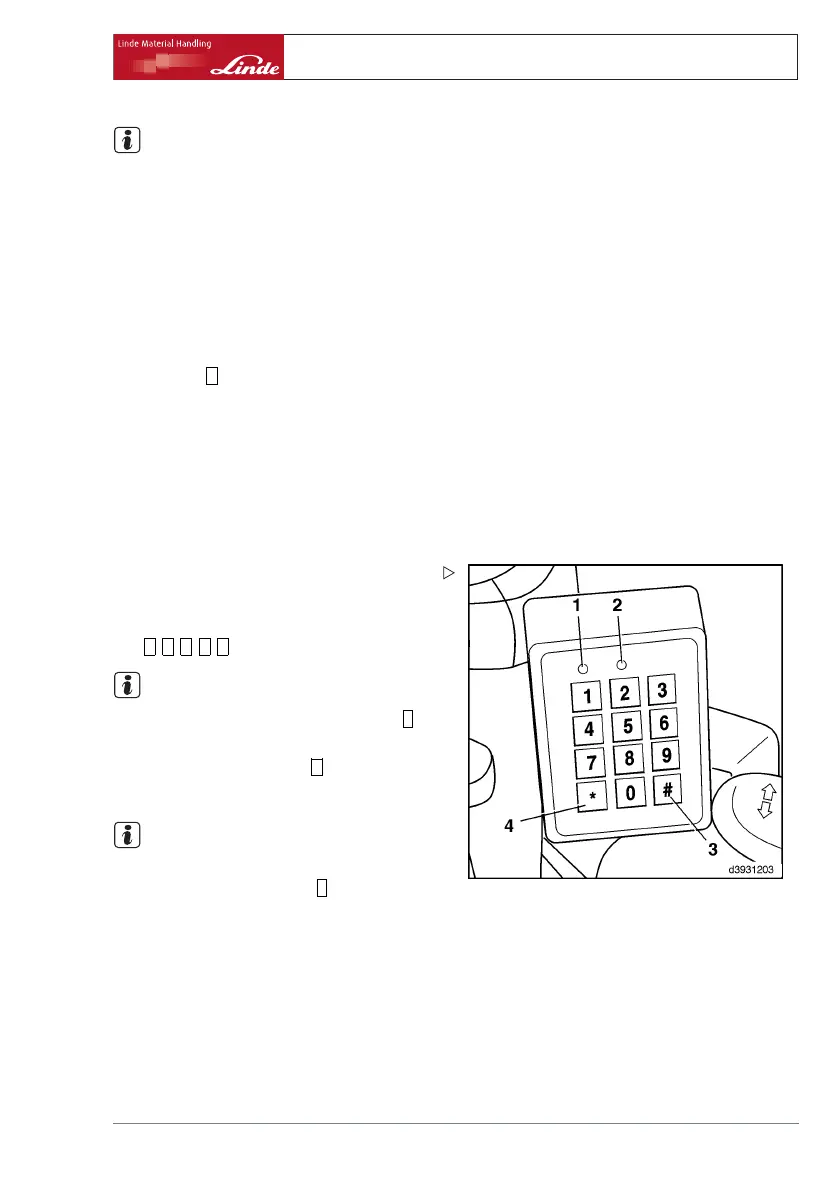
conds) the red LED (1) lights up briefly, and
the green (2) and red (1) LEDs then flash for
approx. 3 seconds. During this period the ve-
hicle can be started at any time. The LEDs
then go out, and the PIN number is discarded.
The delay time can be set to between 10 se-
conds and 10 minutes using the diagnostic
device. Please contact your authorised dea-
ler.
Pressing the
#
button (3) after s
witching off
the engine terminates the dela
y time immedi-
ately and the PIN number is de
leted.
Forklift Data Acquisition - S
pecial setting
(PIN number)
Log on and start vehicle:
¾ Apply the parking brake.
¾ Press any key to start input d
evice.
The green LED (2) flashes.
¾ Enter personal PIN number (factory setting
=
0 0 0 0 0
).
NOTE
If the PIN was input incorrect
ly, press the
*
button (4) and enter the corre
ct PIN number.
¾ Confirm the input with the
#
button (3).
The green LED (2) lights up continuously.
NOTE
If the red LED (1) lights up, an in
correct PIN
number was input. Press the
*
bu
tton (4) and
enter it again. If more than th
ree incorrect in-
puts are made (factory settin
g), the red LED
(1) lights up and the green LED
(2) flashes.
The input of a valid PIN is bloc
ked for 10 minu-
tes. The blocking time can be i
nterrupted by
inputting a special PIN numbe
r. Please con-
tact your fleet manager.
Operating Instructions – 393 807 1001 EN – 08/2008 79



 To Next Page