ProtoMat S Installation
© 2011 LPKF AG HB V0.9/Mrz-11 41
5
Pos: 16 /ED_Technisc he_Dokumentation/2_Be dienungsanleitun g/Maschine/RP_Fräsb ohrplotter/Pr otoMat_S_Serie/Pr otoMat_S_Serie_II G/Kapitel_5_Inst allation_Inbetriebn ahme/5_1_Aufste llungsbedingungen @ 0\ mod_1254749141057_205 8.docx @ 3635 @ 12
5 Installation
In this chapter installation and start up procedure of the circuit board plotter is
described in detail.
5.1 Assembly conditions
ATTENTION
Risk of injury!
An instable underground that crashes may harm operators due
to vibrations and machine powers that may occur during
processing of a work piece.
The machine must be placed on a solid surface.
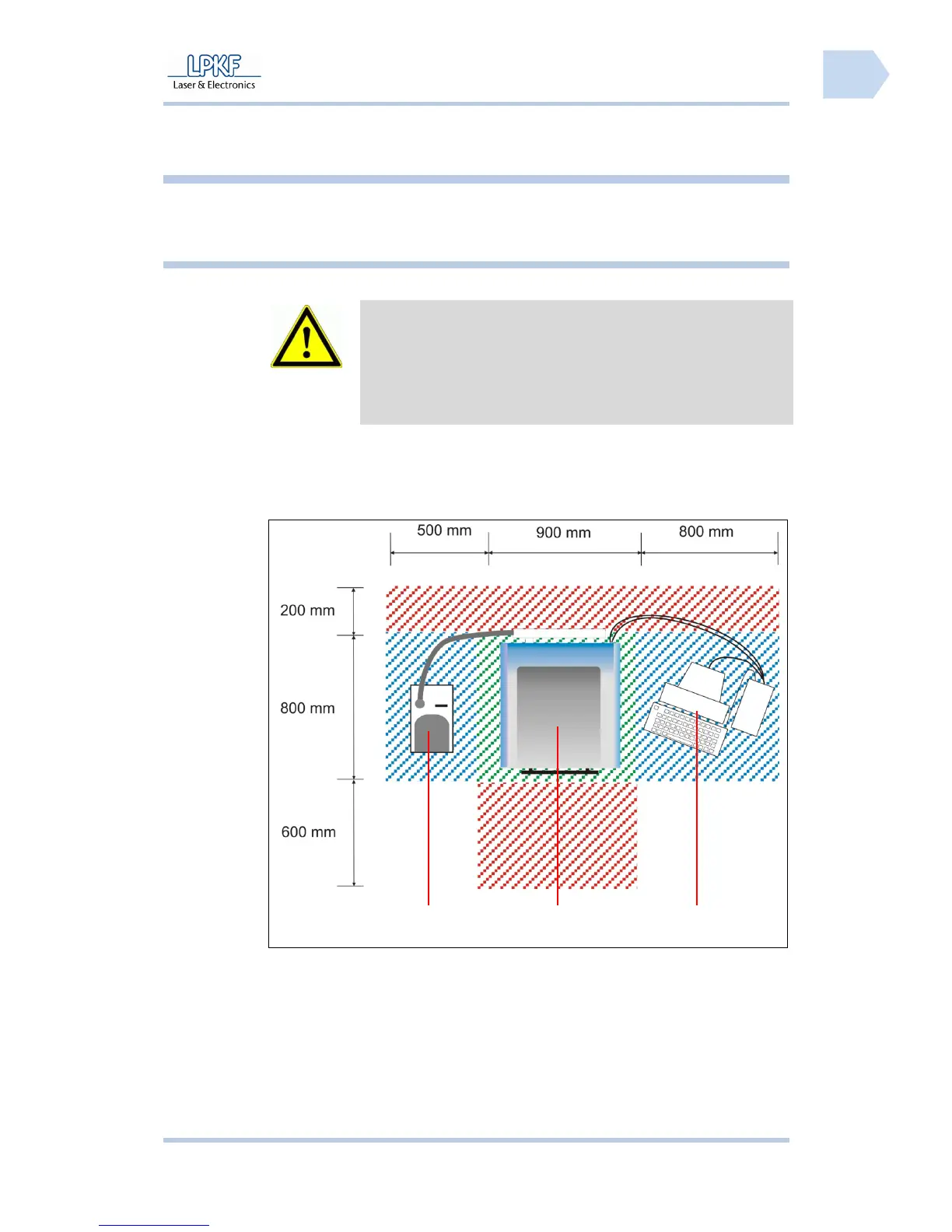
The circuit board plotter has to be installed on a solid work desk with a size of at
least 800 x 900 mm.
Fig. 12: Required
space
/1/ Dust extraction /3/ PC
/2/ Circuit board plotter
The areas marked in red are safety zones that must not be blocked with
objects.
Pos: 17 /ED_Technisc he_Dokumentation/2_Be dienungsanleitun g/Maschine/RP_Fräsb ohrplotter/Pr otoMat_S_Serie/Pr otoMat_S_Serie_II G/Kapitel_5_Inst allation_Inbetriebn ahme/5_2_Gerät_au spacken @ 0\mod_12547538 07408_2058.doc x @ 3639 @ 2
1
2
3



 To Next Page