68
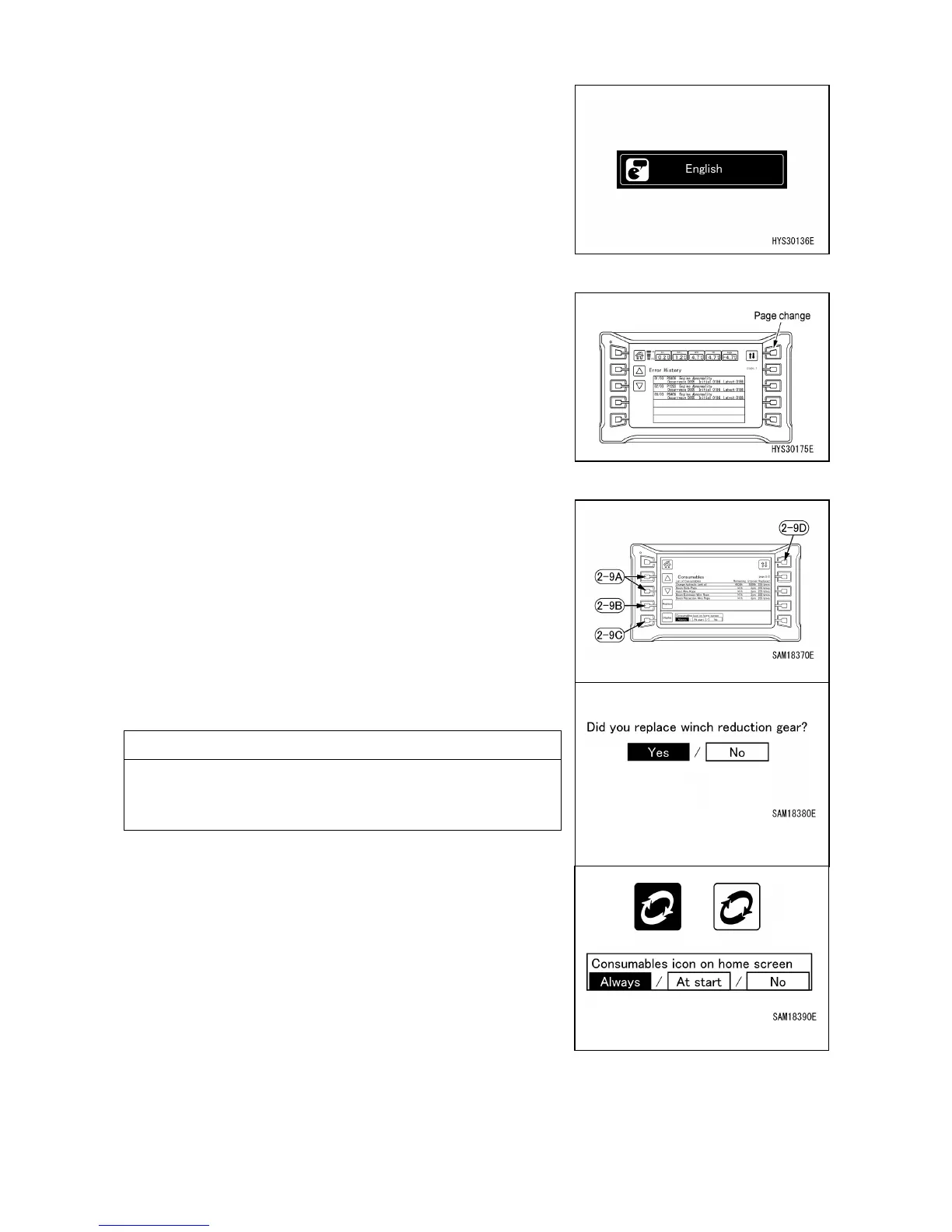
[2-7] LANGUAGE SETTING
When the switch (2-7) is pressed, the language can be
changed if there are alternatives of the display language.
[2-8] ERROR HISTORY DISPLAY
When the switch (2-8) is pressed, the error history can be
viewed.
If a fault occurs now, it is displayed in red characters.
See "OPERATION 2.1.2 ‘’WARNING DISPLAY’’ for details.
[2-9] CONSUMABLES DISPLAY
When the switch (2-9) is pressed, the list of consumables
can be viewed.
After replacing a consumable item, use ▲ or ▼ of the
adjustment switch (2-9A) to select the replaced item. You
can also use the page selector switch (2-9D) to select the
required page.
Once you’ve selected a consumable item, hold down the
replacement switch (2-9B) and update the replacement
time. Once updated, the number of replacements is
incremented by 1, while the remaining time is reset.
If the consumables icon display selector (2-9C) is set to
"Always" or "At start", the remaining time of 30 hours or 3
days will appear as yellow text with a white-on-dark icon
on the top screen, while the remaining time of 0 hours or 0
days will appear as red text with a red icon on the top
screen.
Replace these items promptly. Ignoring scheduled
replacements may generate hazards or adversely affect
the machinery.



 To Next Page