Ultra Electronics Card Systems
Rio Pro Maintenance Manual
SECTION 9.2.2 SENSOR TEST MODE
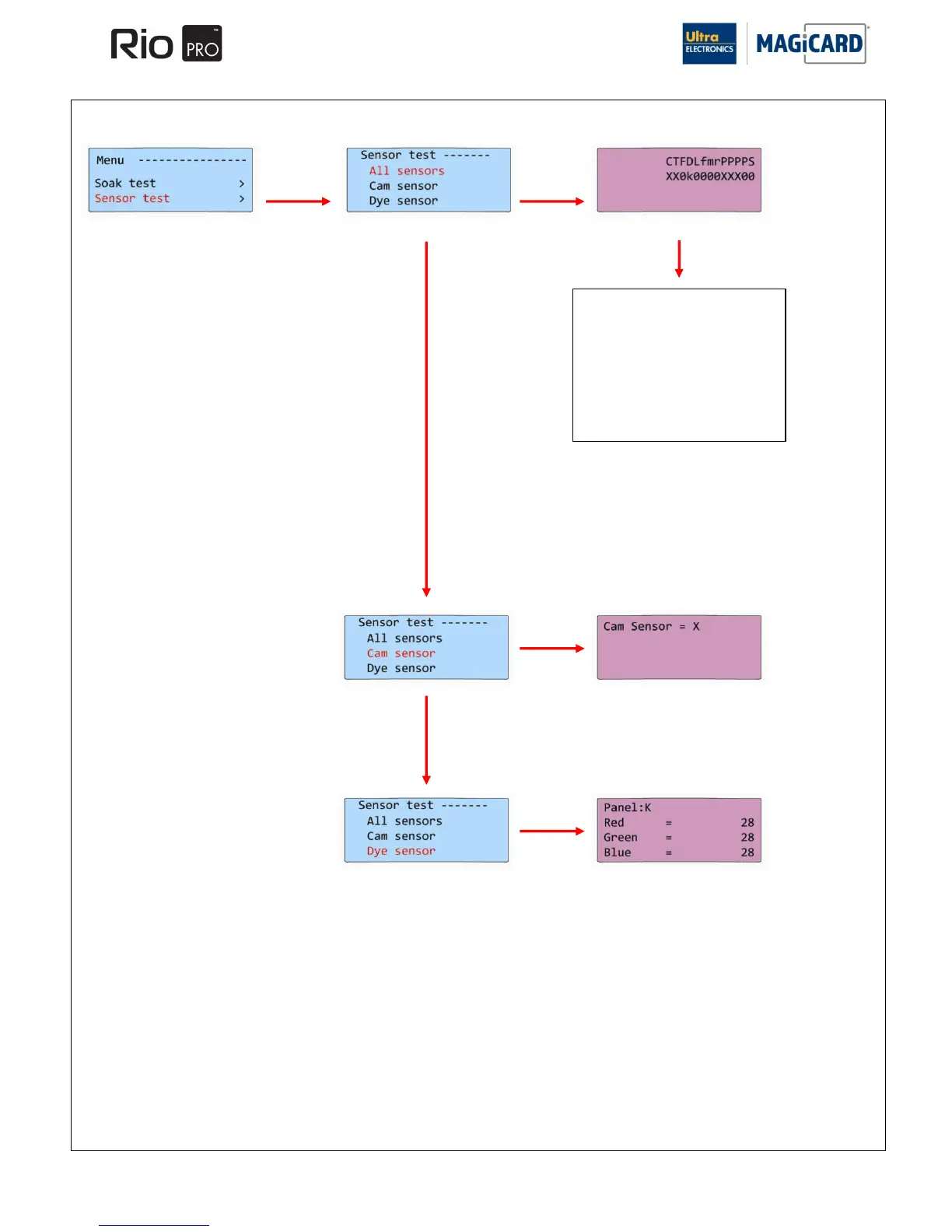
C = Print head Up/Down
T = Tacho Sensor (film movement)
k = Dye Film Sensor
L = Top Cover Sensor
f = Front Card Sensor
m = Middle Card Sensor
r = Rear Card Sensor
P = Left Hand Function Button
p = Right Hand Function Button
s = Chip Contact Position Up/Down
The Sensor Test mode is a useful diagnostic Tool when Sensors in the Printer may be suspect.
During the Cam Sensor test, the
value above will toggle between
X and 0.
The colour of the Printer‟s
Display will change to purple.
The values shown above are
those measured by the Dye-Film
Sensor for each Film Panel.
The colour of the Printer‟s
Display will change to purple.
Each of the above letters represents a
Sensor or Button within the Printer.
The state of each Sensor or Button will
toggle btween X and 0 according to the
current status of the Printer.
The colour of the Printer‟s Display will
change to purple.















 To Next Page