Ultra Electronics Card Systems
Rio Pro Maintenance Manual
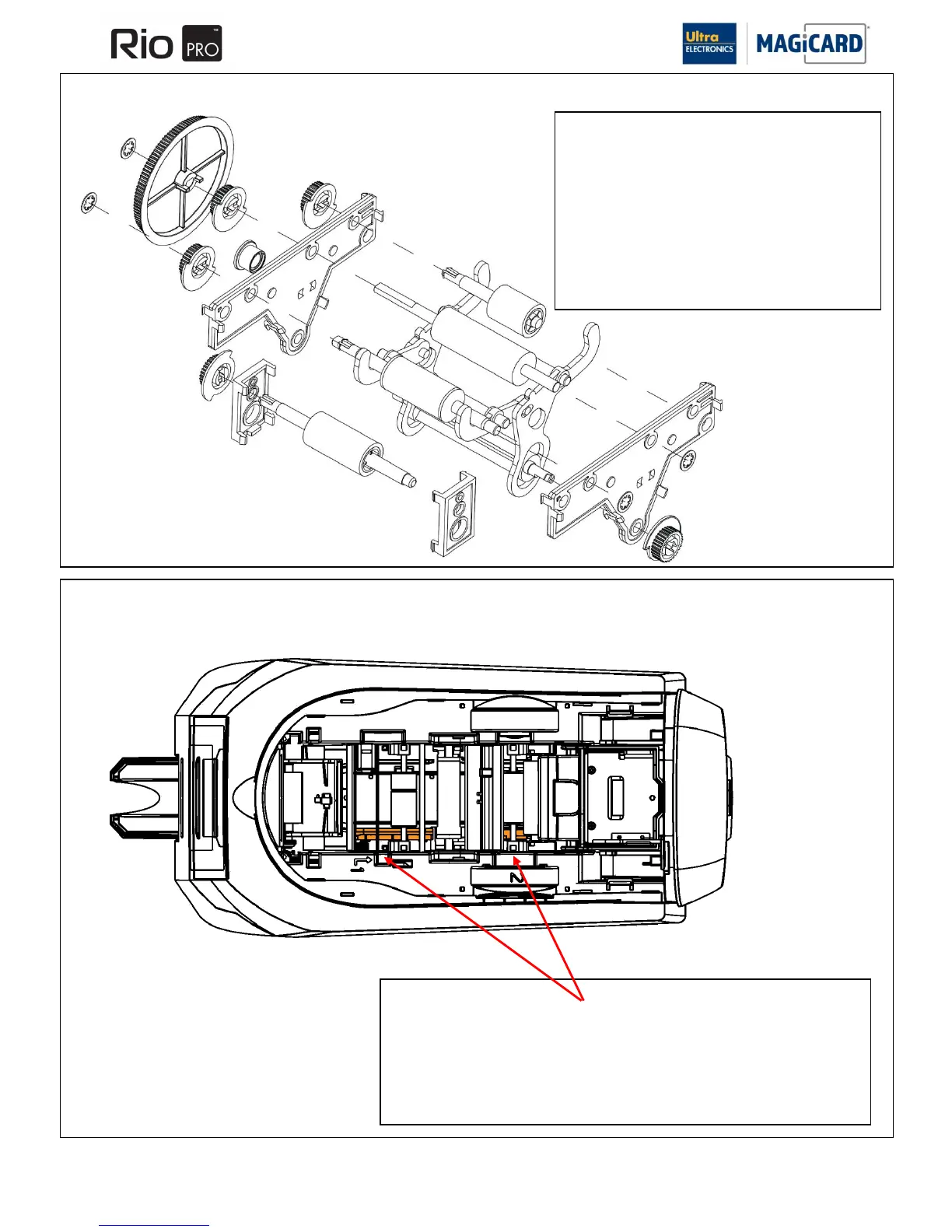
Removal & Refitting of Rollers
1. Once the bearing plates have been removed the
rollers can be removed out the bottom of the Printer.
Roller layout is shown below including the attached
drive Pulleys.
2. Cam linkage can also be removed but ensure both
corresponding parts are kept together to avoid
confusion when refitting.
Refitting is the reverse procedure ensuring the Cam
linkage is correctly orientated.
Removal & Refitting of the Card Guide
1. Remove the two return springs from either end of the Card guide. Parts of the
springs are inside the Card guide plastic assembly
2. The guide will be loose, push it against the internal side wall and lift up out of the
machine.
Refitting is the reverse procedure, located the Card guide and then fit the springs.
section 11.16 Removal and refitting of rollers
SECTION 11.17 REMOVAL & REFITTING OF THE CARD GUIDE & MIDDLE CARD SENSOR















 To Next Page