Touch Screen System and Setup
Version 3.4 TX3 Touch Screen Installation Manual 59 (93)
LT-996 Copyright 2015
3.3.2 22” Touch Screen Controller Boards
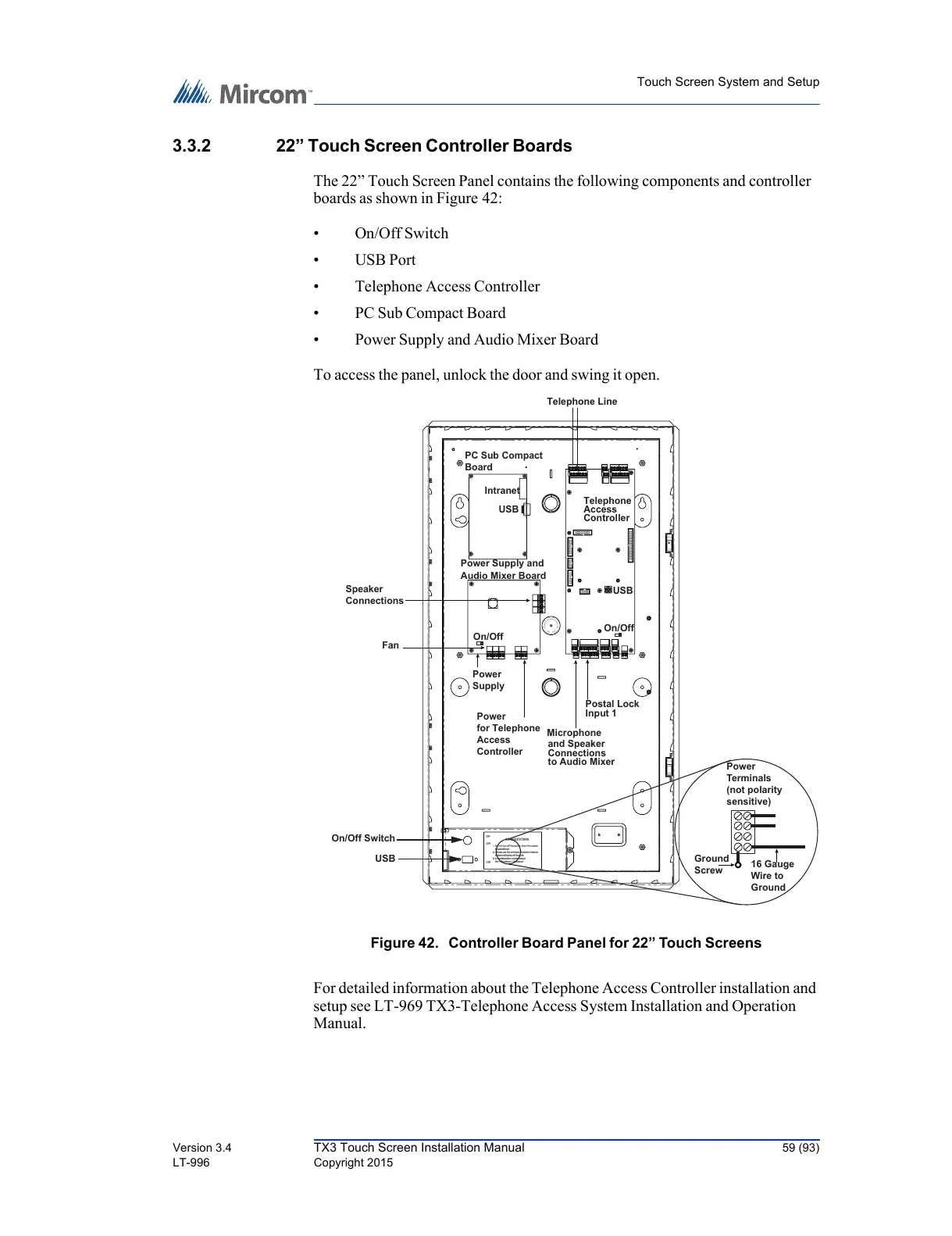
The 22” Touch Screen Panel contains the following components and controller
boards as shown in Figure 42:
•On/Off Switch
•USB Port
• Telephone Access Controller
• PC Sub Compact Board
• Power Supply and Audio Mixer Board
To access the panel, unlock the door and swing it open.
Figure 42. Controller Board Panel for 22” Touch Screens
For detailed information about the Telephone Access Controller installation and
setup see LT-969 TX3-Telephone Access System Installation and Operation
Manual.
Ground
Screw
16 Gauge
Wire to
Ground
Power
Terminals
(not polarity
sensitive)
USB
On/Off Switch
PC Sub Compact
Board
Telephone
Access
Controller
Telephone Line
USB
Intranet
Power Supply and
Audio Mixer Board
Speaker
Connections
Fan
Power
Supply
Power
for Telephone
Access
Controller
Microphone
and Speaker
Connections
to Audio Mixer
Postal Lock
Input 1
On/Off
On/Off
USB



 To Next Page