2
2. Name and function of each point
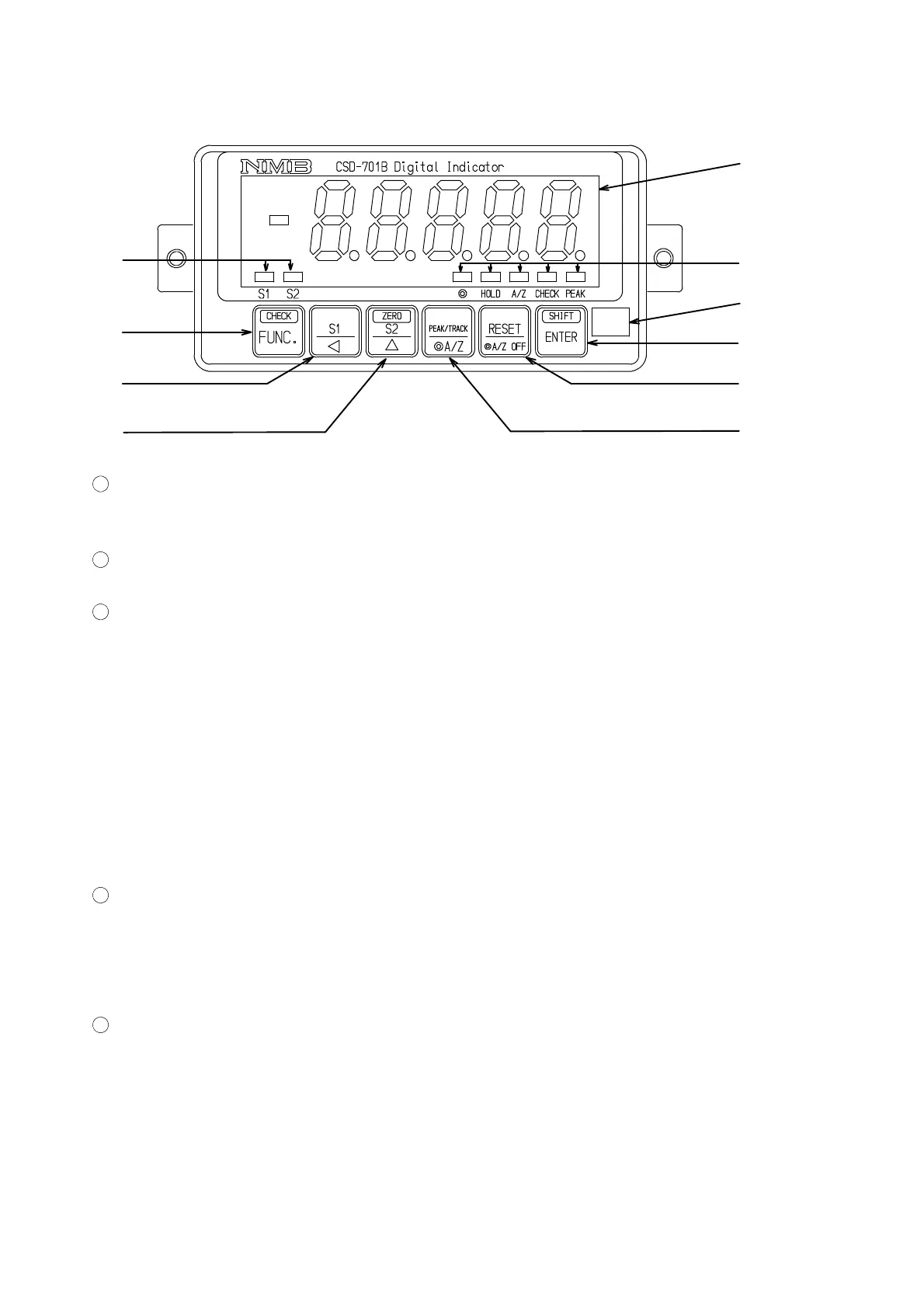
2−1. Front panel
①
③
②
④
⑤
⑩
⑥
⑦
⑧
⑨
1
Load display section
The load data is shown in the Measurement mode, and status or set value is shown in various
kinds of Calibration mode and Setting mode.
2
Judgement display
Compared results by comparator function can be displayed.
3
Status display
◎ Lights up when selecting A/Z or A/Z OFF function in the Function mode.
In the same way, light off when selecting Peak hold function in the Function
mode.
HOLD Lights up when between the HOLD and COM.1 at the external control input is
shorted.
A/Z Lights up at the time of executing Tare weight cancellation(A/Z ON).
Lights off with the tare weight cancellation clear.
(Effective when selecting the A/Z or A/Z OFF function in the function mode.)
CHECK Lights up when the CHECK is ON.
PEAK Lights up when selecting the Peak mode.
4
key
Used when shifting to the Function mode.
Also, by pressing this key and the
key together, it is used when the CHECK value is
turned on and off
5
key
Used when calling the S1 set value changeover mode, or carrying digit at the time of various
kinds of settings.



 To Next Page