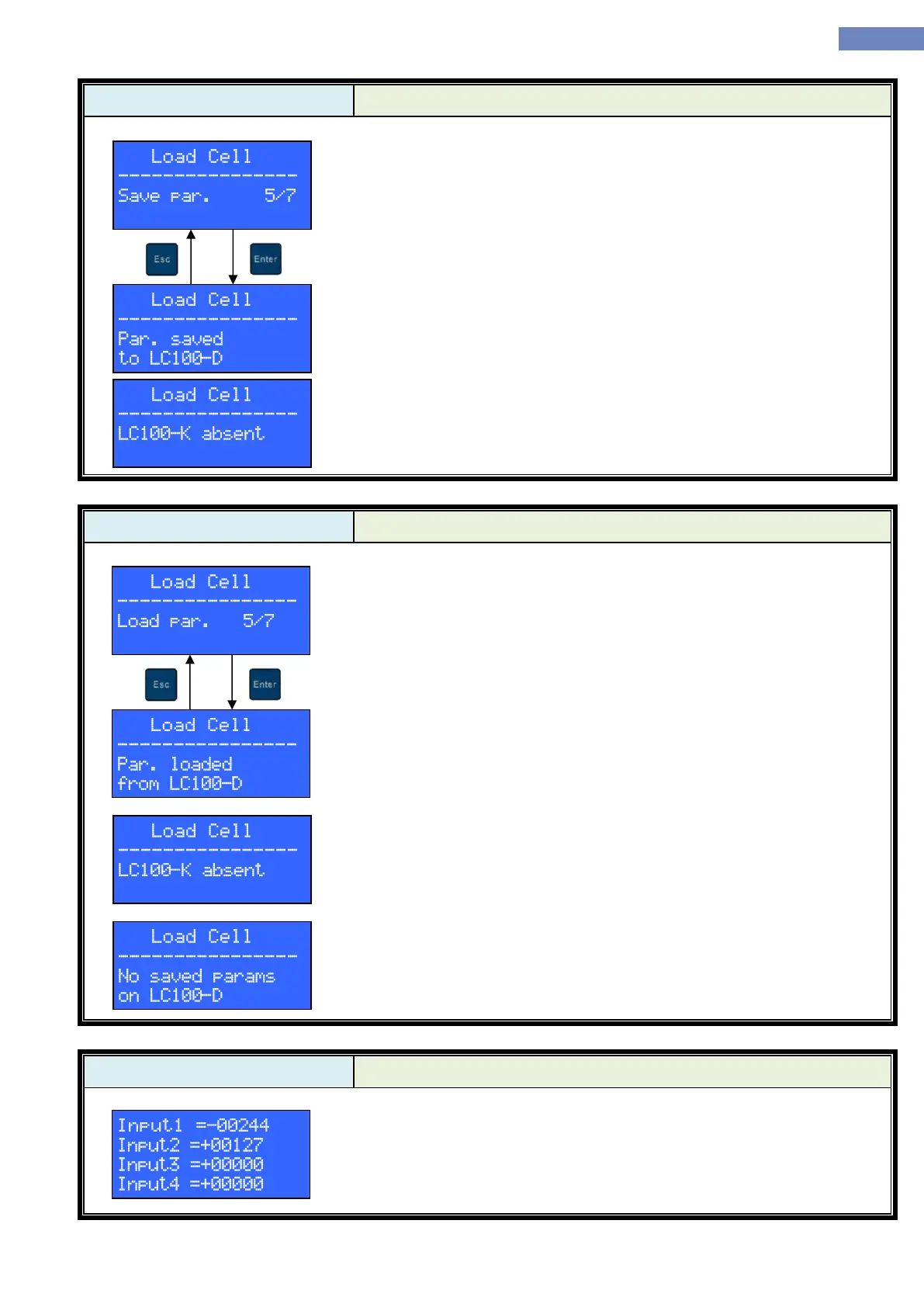
“Save parameters” and “Load parameters” menus can be used to
temporarily store load measurement system parameters on the LC100-D and
restore them at a later time, if LC100-K module has to be replaced (similar to
“Parameter transfer from LC100-C to LC100-D”). There is no need to save
parameters to LC100-D in any other situation.
If parameter saving is successful, “Par. Saved to LC100-D” message is
displayed.
If parameter saving fails (e.g. because of communication error),
“LC100-K absent” message is displayed.
“Save parameters” and “Load parameters” menus can be used to
temporarily store load measurement system parameters on the LC100-D and
restore them at a later time, if LC100-K module has to be replaced (similar to
“Parameter transfer from LC100-C to LC100-D”). There is no need to save
parameters to LC100-D in any other situation.
If parameter loading is successful, “Par. Saved to LC100-D” message
is displayed.
If parameter loading fails (e.g. because of communication error),
“LC100-K absent” message is displayed.
If there are no load measurement system parameters previously saved
on LC100-D, and user tries to load parameters, “No saved params on
LC100-D” message is displayed.
“Sensors” menu shows direct AD conversion results from each of the
four LC100-V analog inputs and is used to troubleshoot sensor problems.


 To Next Page