DVR Server Manual
been assigned for recording before.
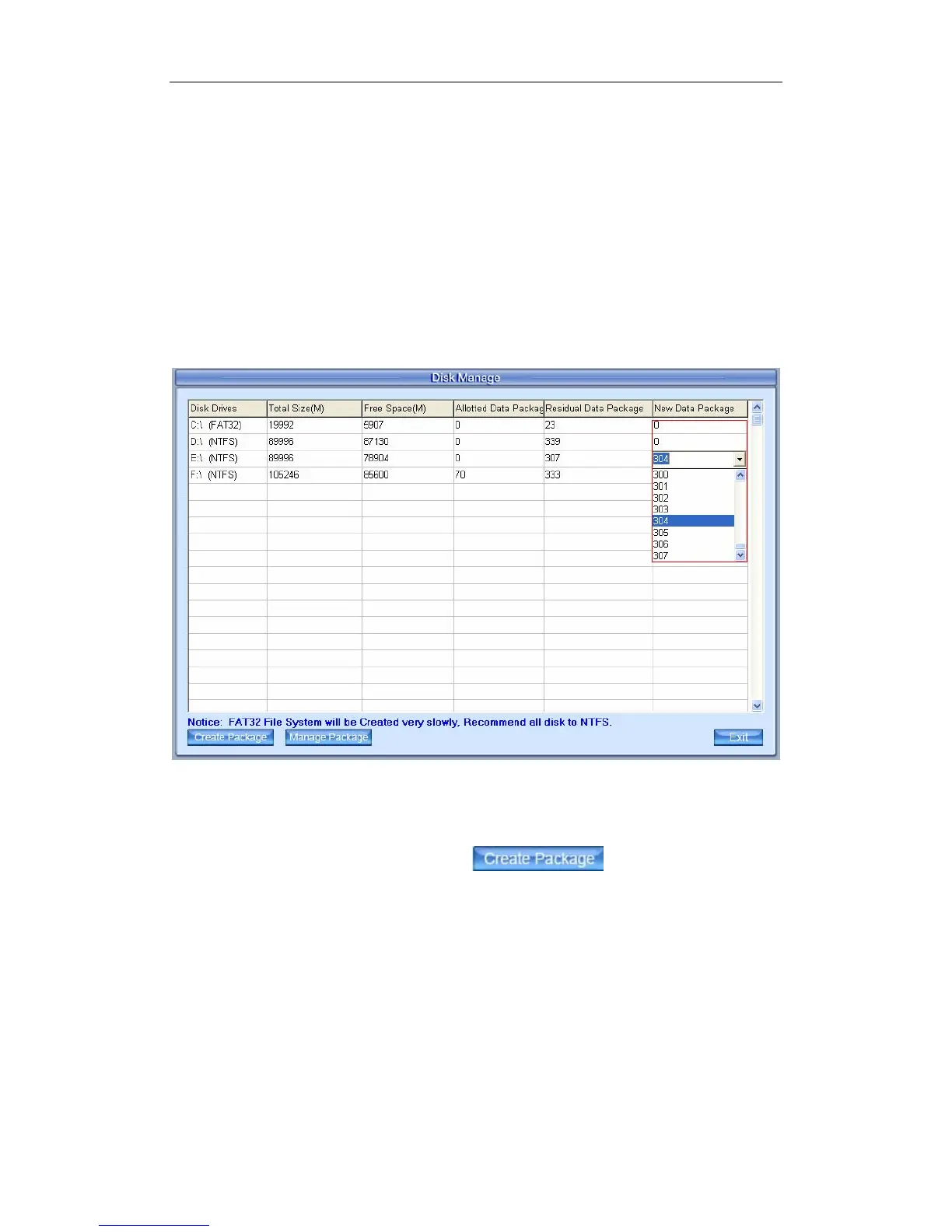
【Residual Data Package】:Display the number of data package that can
be assigned for recording.
【
Residual Data Package
】
=
【
Free Space(M)
】
/256
【New Data Package】:Select the number of the data package that user
want to create for recording.
【
New Data Package
】
≤
【
Residual Data Package
】
1.2.1 Create Package
Select the number of new data package
User can select the number of data package for each disk in the
drop-down list. Then user can press
button to create data
package and index for recording. After that, software could calculate the rest
space automatically.
Note:
Please format the whole disk thoroughly before using it to be recorded.
Each package for recording (Recdata****.mp4) is 256MB, and it is
associated with its index file (RecIndex****.inx). They must work together, or
user can’t playback recording data correctly. Also, user can’t modify them
unless deleting them together manually.
By default, disk C and Disk D are used for system application, so our
17



 To Next Page