DVR Server Manual
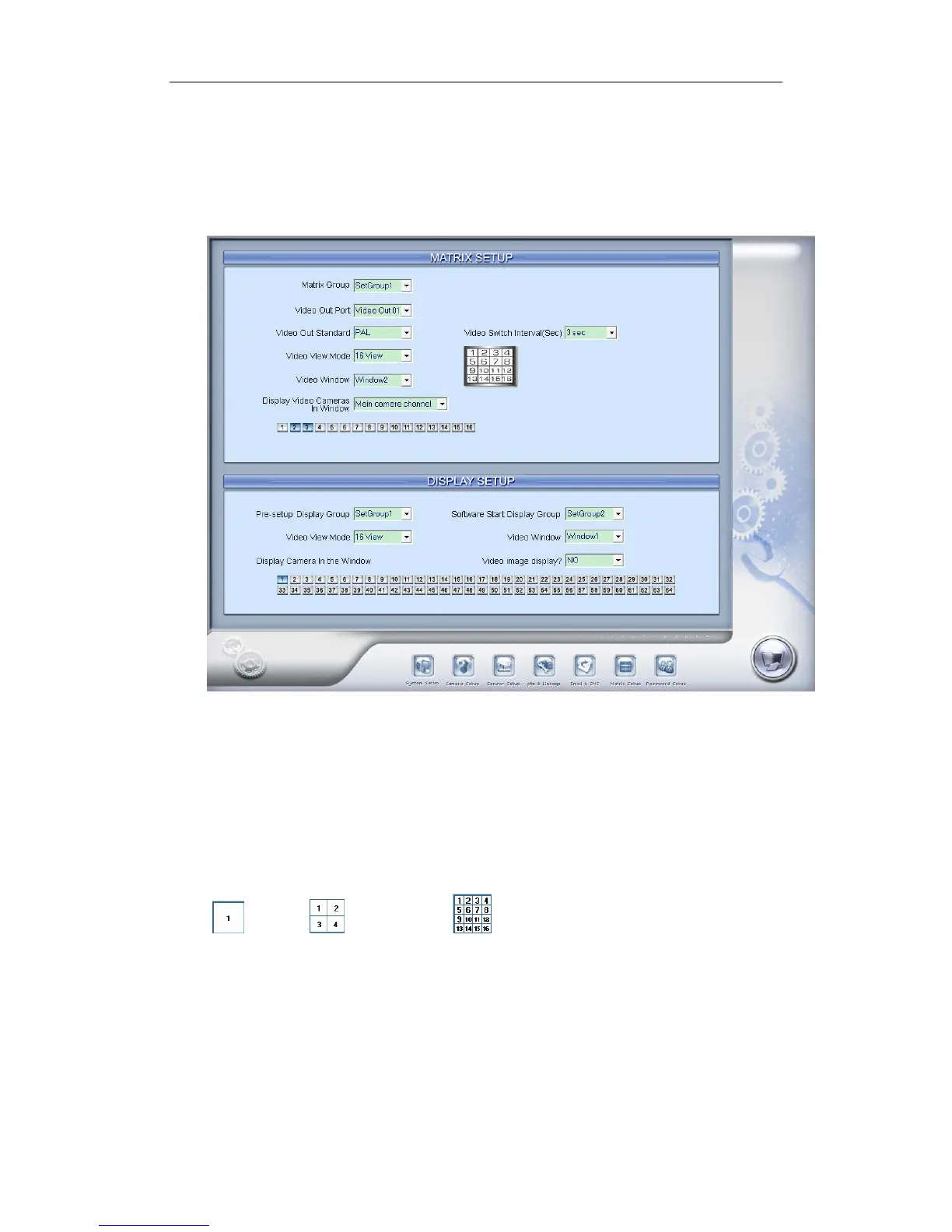
2.6.2 Matrix Setup for DG42xxHF cards
Our new series DG42xxHF cards support to output video from the card
itself to a TV monitor, the setup for this function is samilar to the settings for NV
series Matrix cards.
【Matrix Group】System operator can set groups of video images to be
sent out through the TV output port of DG42xxHF card, each group has
different display modes. Up to 16 groups you can set.
【Video Out Port】Select the output port of DG42xxHF card that you want
to set, only one port is available for each DG42xxHF card.
【Video Out Standard】Set Matrix video out standard, you can select PAL
or NTSC.
【 Video View Mode】 Select video output display mode, there are
1split , 4 splits and 16 splits are supported by DG42xxHF cards,
others are not available.
【Video Window】【Display Video Camera in window】After selecting
video split mode, there will be corresponding display video window, select one
camera or several cameras to show in a window. The Video cameras you can
select are from the same card of the TV output port, others are invisible.
【Video Switch Interval(sec)】Set interval that each window shows
cameras sequencely when there are more than one camera in it.
75



 To Next Page