DVR Server Manual
【If use PPPOE】
If system uses PPPOE to connect with web,
please select it and input the PPPOE login
ID and password.
【PPPOE Login Name】
【PPPOE Login Pass】
【User Pass】Set the password of DVS remotely, after that operation you
should change the Login Pass to corresponding value in Add / Modify server.
Otherwise, you can’t connect the DVS correctly.
【DNS Server IP】If use DNS, input the DNS host IP address.
【Remote manage】
Set the IP address and port of host
server who will receive the message
upload from foreside server
【Remote manage IP】
【Remote manage port】
【Format SD card】When there is a SD card in your IP camera, there will
be a Format button. So that you can format SD card remotely.
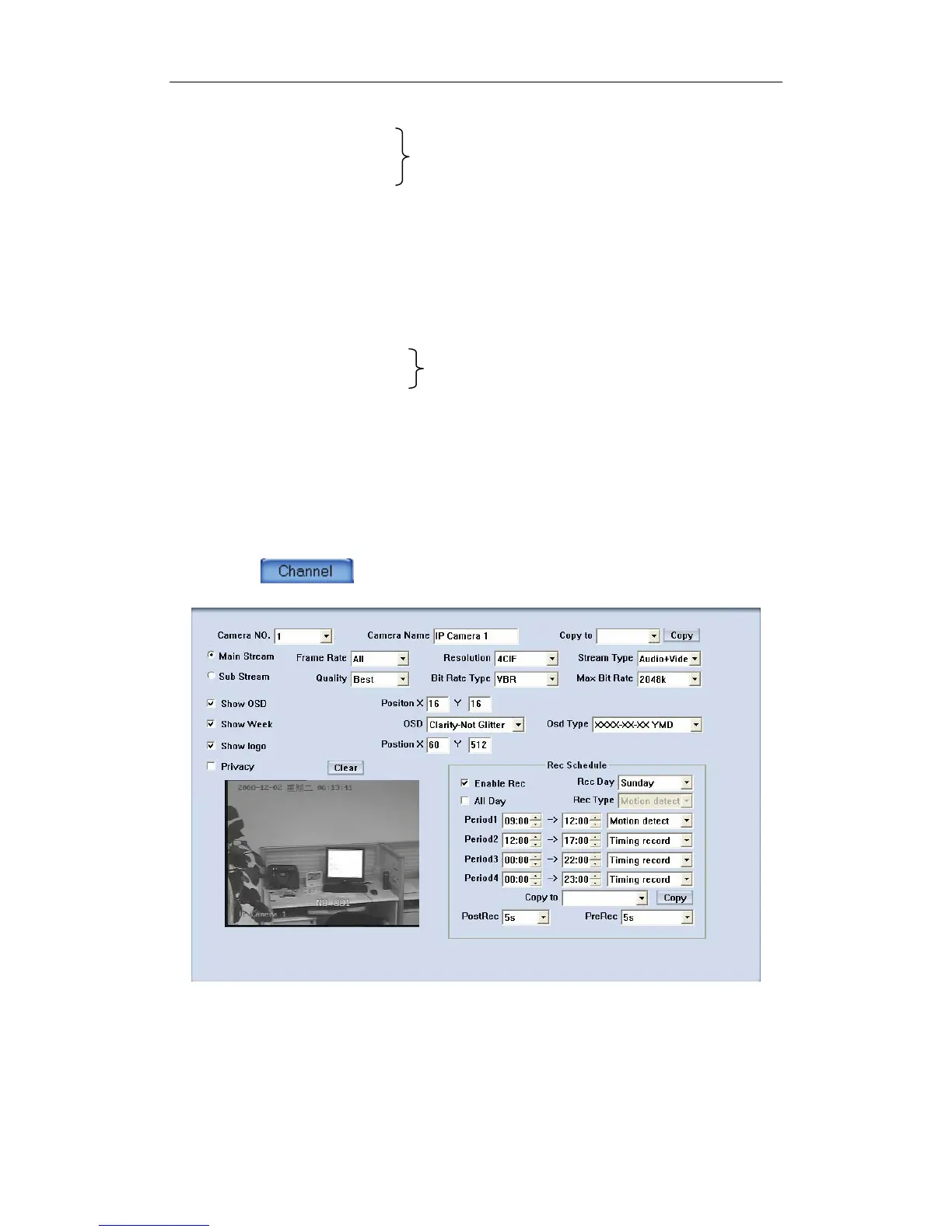
3.3 Channel Setup
Press button to set channel parameters.
This section contains the parameters to designate a name for every
camera connected, to enable or disable show LOGO and OSD, and to set
display type of OSD & LOGO as well as record resolution, record type, record
quality and frame rate, etc.
【Camera NO.】Select the camera to be set from the drop- list.
84



 To Next Page