DVR Server Manual
2.4 PTZ & Linkage Setup
2.4.1 PTZ Protocol Setup
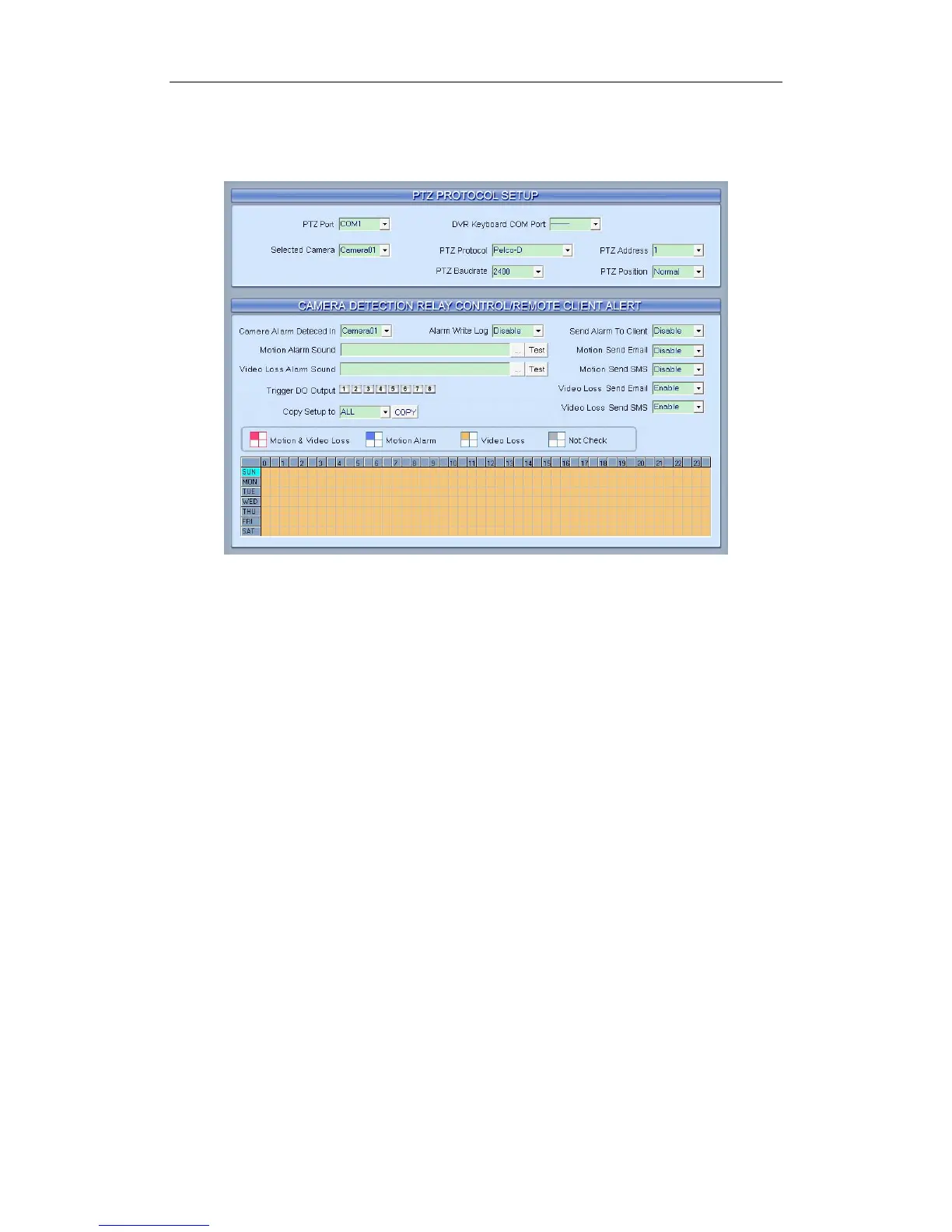
【Selected Camera】Select the camera from the drop-down list to set the
parameters. The cameras just include the cameras of local board cards; IP
Cameras are not included. For IP Camera, you should set it remotely in IP
Camera setup.
【PTZ Port】Select PTZ connecting port, when you do not use PTZ port,
please choose “------”.
【DVR Keyboard COM Port】Select a connecting port for DVR keyboard.
If you have chosen COM1 for DI/DO Port, and you choose COM1 again for
DVR keyboard, then, DI/DO Port will be changed to another port. If you want to
know more details for DVR keyboard, please refer to DVR/NVR Keyboard
Control Manual.
【PTZ Protocol】Select the PTZ protocol for the PTZ camera.
【PTZ Address】Set the camera ID number of the PTZ camera being
controlled.
Note:
The PTZ camera has a dipswitch to set the PTZ address. The PTZ
camera ID number must be matched with the number of this dipswitch.
【PTZ Baud rate】Select PTZ Baud rate for the PTZ camera.
【PTZ Position】Select the installation mode of the PTZ according to its
installation mode.
67



 To Next Page