DVR Server Manual
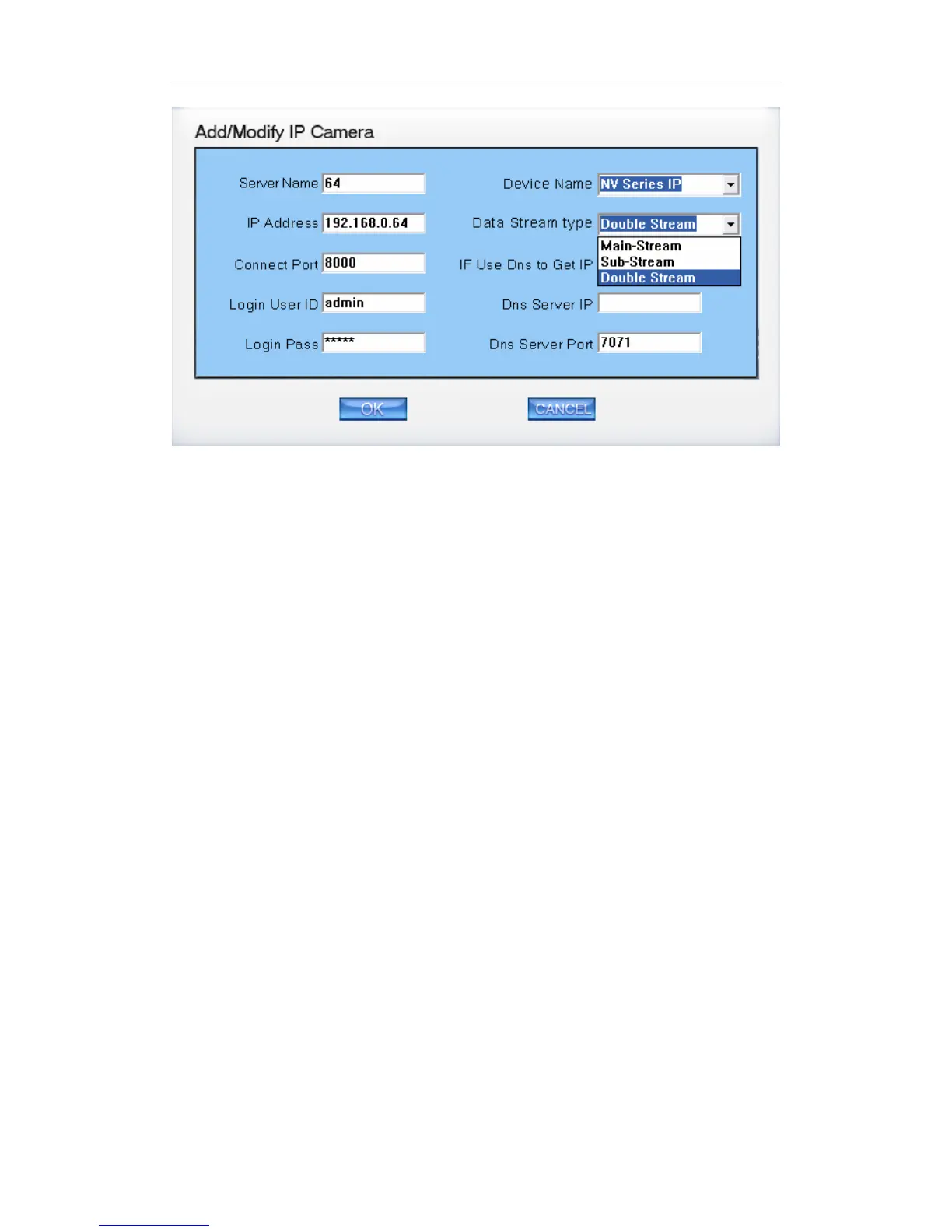
You can add the mega pixel IP camera in the system. If you want to use
the Record sub stream function in the IP device, you should select the data
stream type Double Stream.
【Server Name】Set a name for the new IP camera device.
【IP Address】Input the address of the IP Camera, it is an IP address or IP
alias of an IP camera which is connected through DNS Server.
【Connect Port】Set the port through which connects to IP Camera.
【Login user ID/Login Pass】When the user wants to visit IP Camera and
the server has used the function of rights management, login user ID and
password will be checked. If the user has no right to visit that camera, the
connection will be cut down automatically.
【Device Name】Select the corresponding name for the IP camera. Now
our software supports the following types of IP products: NV Series IP/EMDVR,
DG 42XX/50XX EMDVR, DG 80XX/90XX EMDVR, DG Series IPC, Dahua
Series IP, Sony SNC110/160, ACTi Series IP, Huviron Series IP, Mobotix M12
Series IP, ArecontVision IP, Camtron Series IPC, Axis Series IPC, Vivotek
Series IPC and SanYo Series IPC.
【Data Stream type】Select Main-stream or sub-stream for the device, the
main-stream and sub-stream could be set in the following interface:
38



 To Next Page