4.9 Disabling the Key-Operation of Panel
4-35 ZM2371/ZM2372
4.9 Disabling the Key-Operation of Panel
The key-operation of panel can be disabled.
Disabling/enabling the key-operation through the front panel
_
SHIFT
_
+ [ KEY LOCK ]
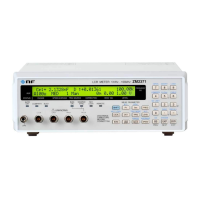
Press the
_
SHIFT
_
+ [KEY LOCK] keys allows alternately switching between disabling
(lock) and enabling (unlock) for key-operation.
However, even if key-operation is disabled, only the following functions are effective:
・Enabling function for the key-operation with the press
_
SHIFT
_
+ [KEY LOCK] keys.
・Restoring function from Remote into Local (panel operation) with the press
_
LOCAL
_
key.
KEY LOCK lamp
The KEY LOCK lamp of front panel lights up while the key-operation is being disabling.
KEY LOCK lamp
_
SHIFT
_
_
LOCAL
_
| [KEY LOCK]
Disabling the key-operation through the Handler interface
For the ZM2372, if /KEY_LOCK signal of handler interface is set to “1” (low level), the
key-operation of panel can be disabled for that period. The /KEY_LOCK signal is disabling
all key-operation. Also in this case, the KEY LOCK lamp lights up.
Locking by the /KEY_LOCK signal cannot be canceled by the panel operation or remote
control interface. Only when the /KEY_LOCK signal is set to “0” (high level), it can be
canceled.


 To Next Page